
If your QuickBooks file has grown into a junk drawer of default accounts, duplicate expense names, and a P&L that somehow still doesn't answer simple owner questions, you're not alone. In Jacksonville, I see the same pattern over and over, a business starts with a basic setup, the bookkeeper keeps posting transactions, and six months later the owner can't tell which services make money, which costs are eating margin, or why tax season always turns into a cleanup project.
Thank you for reading this post, don't forget to subscribe!A chart of accounts setup is where that starts to go right or wrong. It's the master index that classifies every transaction, and standard guidance places it into four core categories, assets, liabilities, income, and expenses, or five categories when equity is broken out separately, with QuickBooks typically using four-digit account numbers as described by NetSuite. That structure isn't bookkeeping decoration. It's the framework behind your reports, your lender conversations, and the financial story your CPA has to defend later.
For healthcare owners dealing with billing complexity, good account structure also matters for operations and collections. If you're working through reimbursement, payer mix, or compliance workflow questions, a useful place to compare notes is managing RCM and compliance strategies, because the reporting questions in those businesses are rarely simple.
Why Your Chart of Accounts Setup Is the First Real Decision You'll Make
A contractor closes month-end with books that technically reconcile. The bank balance ties out, the credit card is posted, and the CPA can file the return. The core problem is more basic, nobody can answer the questions that matter, such as which jobs are profitable, whether retention receivables are piling up, or whether materials are being buried in the wrong bucket.
That is what a weak chart of accounts setup does. It looks orderly on the surface, then fails the moment an owner asks for a report that helps run the business. The COA is the classification engine behind your balance sheet and income statement, so if the structure is off, the reports are off too.
Why the wrong setup causes year-end pain
Most owners treat the COA like housekeeping. It is closer to a decision about how the business will be read later, because it shapes how every future transaction gets interpreted. If payroll, owner draws, job costs, and cash accounts all blur together, your CPA ends up sorting through noise at tax time instead of advising the business.
Practical rule: if an owner cannot read the P&L and make one real decision from it, the COA is doing too much or too little.
That is why I push clients to think about the chart of accounts before the books get busy. A clean starting structure shortens month-end, makes year-end less expensive, and keeps deductions from being missed because they landed in a catch-all account. For contractors and clinics alike, the COA becomes the backbone of reporting discipline, not an afterthought.
The failure is usually quiet. The books still “work,” but they do not help anybody manage the business. If you work with payer mix, reimbursement, or compliance questions, the reporting pressure gets even sharper, and managing RCM and compliance strategies depends on getting the account structure right from the start.
The Core Structure Every Business Should Build On
Start with numbering that leaves room to breathe. A COA that follows a clean number sequence is easier to read, easier to expand, and easier to audit when the business adds a department, a new site, or another loan. I usually reserve blocks for the major categories, then leave gaps inside each block so new accounts can be added without renumbering the whole file.
That structure matters because account numbers do more than make the file look neat. They help owners and bookkeepers sort transactions consistently, and they make it easier to spot whether an account belongs in assets, liabilities, equity, income, or expenses without stuffing everything into a long, flat list. The numbering plan should support the business, not force the business to fit the software.
| Range | Category | Example Accounts |
|---|---|---|
| 1000 to 1999 | Assets | Checking, Savings, Accounts Receivable |
| 2000 to 2999 | Liabilities | Credit Card, Accounts Payable, Loan Payable |
| 3000 to 3999 | Equity | Owner's Equity, Retained Earnings |
| 4000 to 4999 | Income | Service Revenue, Product Revenue |
| 5000 to 8999 | Expenses | Rent, Payroll, Software, Insurance |
A good numbering plan also keeps reporting stable as the business grows. Once a service line, funding source, or expense pattern becomes material, it can be separated without breaking the whole chart. That is the kind of structure a fractional-CFO approach looks for early, before the books get crowded and the owner has to sort out a mess at year-end.
Subaccounts should earn their keep
Subaccounts are useful when they answer a real management question. If utilities need to be tracked by location, or revenue needs to be separated by service line, subaccounts give you that detail without burying the main account. They also help keep the top-level reports readable, which matters more than making the chart feel exhaustive.
Use them sparingly. A parent account should carry the broad category, and the subaccount should add information that someone will use in a monthly review or budget comparison. If the only reason for a subaccount is that it looks organized, it is probably extra clutter.
For owners who want cleaner monthly reviews, I also tie the COA back to key performance indicators in accounting, because the account structure should support the metrics the business watches every month. That keeps the chart tied to decisions instead of turning it into a tidy file that answers nothing.
Designing the COA Around Management Questions, Not Just Tax Forms
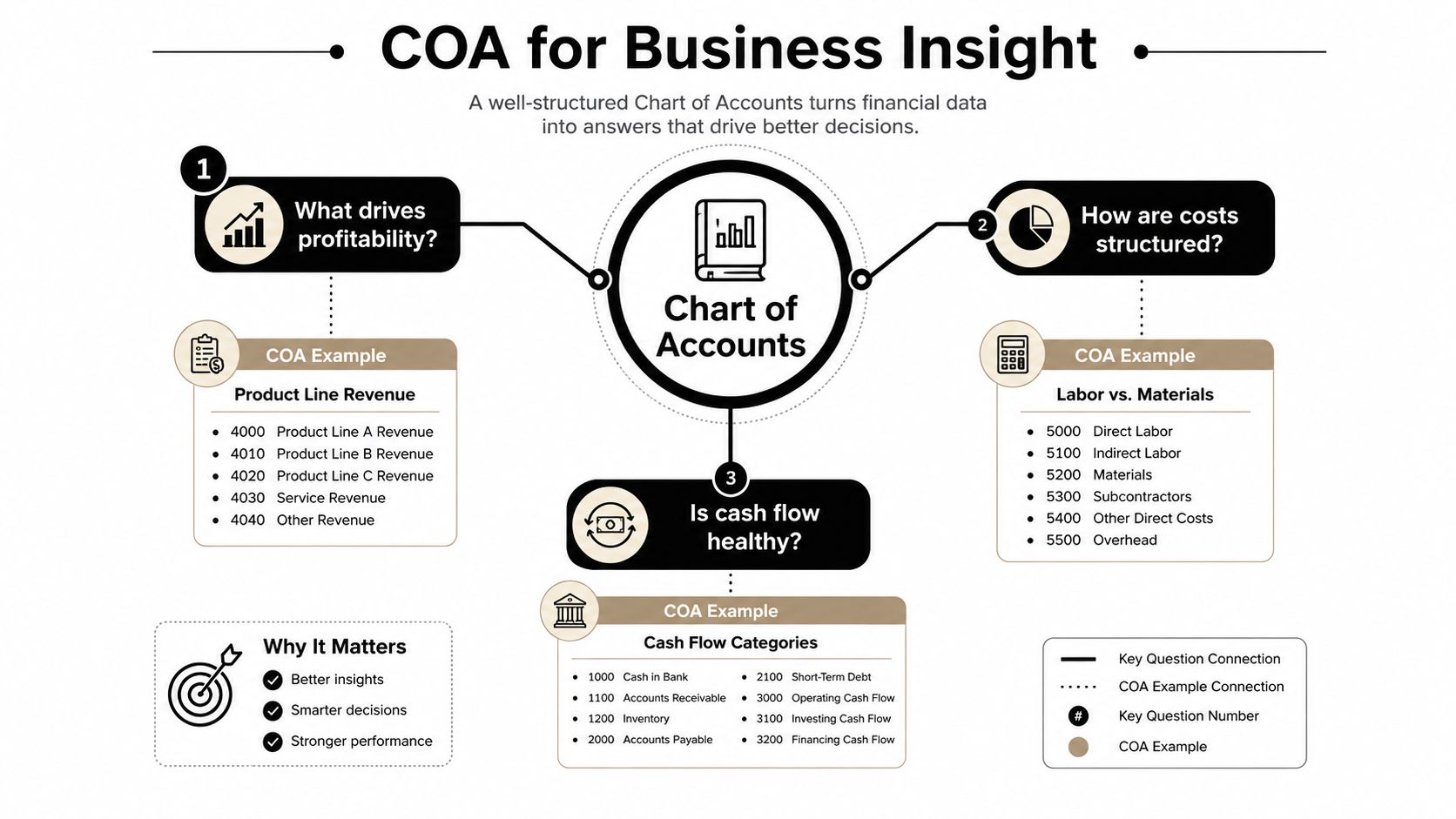
The best chart of accounts is the one that answers the questions owners ask every month. A tax-ready COA can still be useless for management if it groups all revenue together, buries direct costs, and makes it impossible to see which department or service line is carrying the business. That's why I like the fractional-CFO mindset here. It starts with decision-making, not compliance.
A useful COA starts with the reports you want. If you need gross margin by service line, then revenue has to be split in a way that supports that view. If you want to see marketing efficiency, then advertising can't be thrown into a broad “other expenses” bucket. This is the difference between books that file and books that guide.
A simple owner test that works
If you're not sure whether the structure is right, list the five reports you want each month. Then ask whether the current COA can produce them without manual recasts, spreadsheets, or cleanup journal entries. If the answer is no, the structure is wrong, even if the file looks orderly.
That's the practical divide between management reporting and tax reporting. Tax forms want compliance categories. Owners want visibility. A good setup serves both, but it shouldn't pretend those goals are identical.
For businesses trying to measure key performance indicators more cleanly, this accounting KPI resource is a useful companion because it reinforces the idea that reporting starts with the questions management asks.
Build the COA around decisions first, then map it back to tax work later. Doing it in reverse usually gives you a clean return and a confusing dashboard.
Industry-Specific Templates for Healthcare, Construction, and Nonprofits
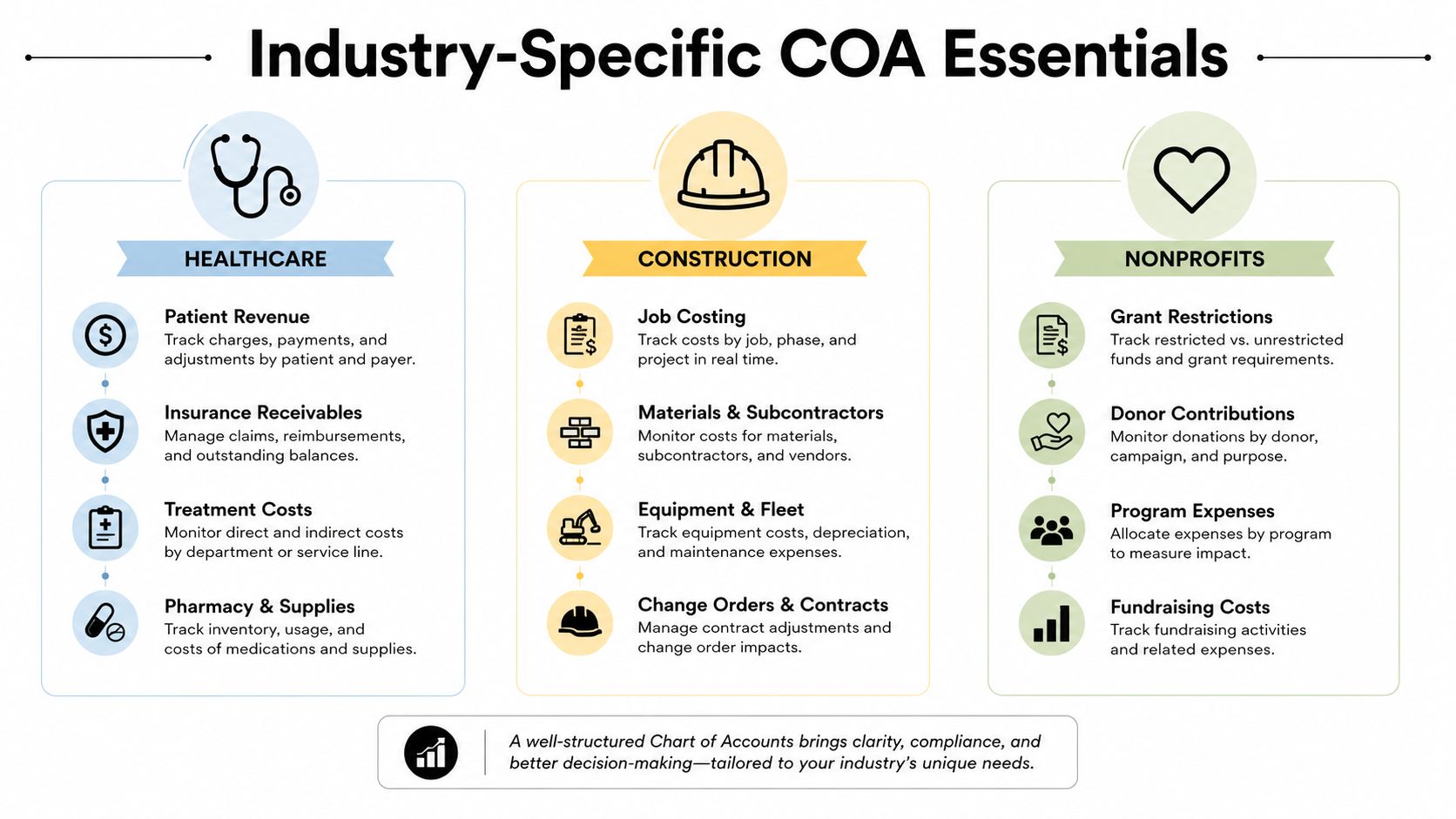
A generic COA might get a new business started, but it rarely fits real operations in healthcare, construction, or nonprofit work. The gaps show up in the accounts that matter most. In healthcare, the default list often misses payer-specific revenue and the cleanup accounts tied to billing flow. In construction, the big miss is job costing. In nonprofits, the issue is fund structure and functional reporting.
Healthcare practices usually need patient revenue broken out by payer class, contractual adjustments, clearinghouse or billing-related accounts, and owner distributions kept separate from wages. That separation helps the practice see how collections behave and keeps ownership compensation from disappearing into operating expenses. If you're running a medical practice, a fractional CFO or accounting partner earns their keep because revenue recognition and cash flow rarely line up cleanly in that environment.
Construction and trades need a COA built around jobs. Revenue and cost of goods sold should track work tied to specific projects, and accounts for retention receivables, retention payables, progress billings, subcontractors, and equipment depreciation need to exist if you want accurate job margin reporting. A contractor who uses one generic labor expense account can still file taxes, but won't know which jobs are making money. For firms trying to set that structure up in QuickBooks without creating a mess later, this QuickBooks COA setup guide is a practical reference.
Nonprofits need a different lens again. Restricted and unrestricted net assets, grant revenue by program, and functional expense classification are central. Without those distinctions, the board gets a vague P&L instead of a report that supports governance and grant compliance.
If you want a church-specific example of how these structures can be adapted, configure church extension fund accounts is worth reviewing because it shows how specialized reporting needs change the account layout.
Industry templates help, but they do not replace judgment. The right chart of accounts still depends on what the owner needs to see each month, which lines need clean year-end support, and where too much detail will only create clutter. A healthcare practice, contractor, or nonprofit can all use a template and still end up with the wrong reporting if nobody asks what decisions the books are supposed to support.
Setting Up the Chart of Accounts in QuickBooks the Right Way
QuickBooks gives you a starting point, but the default list is rarely the right final list. I usually advise clients to remove irrelevant accounts, rename vague ones, and build the structure around the actual business model before the file gets crowded. Intuit's guidance is straightforward, use simple account names, add subaccounts only as needed, and wait until the end of the year or quarter to remove old accounts instead of deleting them immediately per Intuit.
Start with the accounts that matter to reporting and tax prep. Then map the revenue, cost, and operating lines into a structure that can survive year-end review without a redesign. A separate asset account for checking, a separate one for savings, and distinct liability accounts for credit cards and loans keep the books understandable when someone else opens them.

Keep the setup practical, not ornate
A clean setup session should answer three questions. What does the owner want to manage monthly? What does the CPA need for year-end work? What needs its own account versus a subaccount or tracking class? That's the filter.
Don't create an account just because QuickBooks makes it easy. Create it because someone will use the number.
The useful line is between account structure and other tracking tools. Class tracking and location tracking can carry detail that doesn't belong in the COA, which keeps the chart readable while still allowing departmental or site-level analysis. That's the difference between a file built for use and a file built for clutter.
For readers who want a walkthrough of the setup process inside QuickBooks, this chart of accounts setup guide for QuickBooks is a practical companion because it focuses on organization, not just menu clicks.
If you're working with an outside accountant, confirm the structure before going live. That keeps tax line mapping, 1099 prep, and year-end review from turning into a rebuild project after months of posted transactions. One well-planned afternoon usually saves a lot of cleanup later.
Common Mistakes That Undermine a Chart of Accounts Setup
The biggest COA mistakes are rarely dramatic. They are boring, repetitive, and expensive over time. I see over-detailed files with hundreds of accounts, vendor-name accounts that should have been subaccounts or tracking lines, mixed personal and business spending, and category names that mean nothing to the person posting the transaction.
The clean-up rule that saves the most grief is simple. Inactive accounts with no activity for 12 or more months should usually be retired from active use, not deleted, and old accounts belong in an archive section so historical records stay intact without cluttering current reports as noted by CustomCPA. That protects prior-period reporting and keeps the active file usable.
Why more detail usually makes things worse
A bloated COA slows down month-end close. Staff hesitate because they do not know where something belongs. Reports become harder to compare period over period because one manager used six accounts while another used two. The result is a system that looks precise but gives less clarity.
Best-practice guidance also says to use subledgers or dimensional accounting when more detail is needed. That is the right answer more often than not. If the detail does not change a decision, it probably does not belong in the main COA. The same logic applies when owners want to see department or location results, because those questions belong in tracking tools, not in a long list of accounts.
Another common mistake is creating accounts for vendors instead of using tracking classes or subaccounts. That turns the COA into a vendor directory, which is hard to read and even harder to maintain. If one contractor, landlord, or subscription needs special treatment, the better answer is usually a cleaner coding rule, not another account name in the chart.
The other quiet killer is drift. Teams start coding “miscellaneous” because the policy is not written down, and suddenly one expense line becomes five versions of the same thing. Posting owner draws to expense accounts causes a different kind of mess, especially at year-end when the books need to separate compensation, distributions, and true operating costs. A one-page coding policy will not fix every issue, but it gives the bookkeeper and owner a reference point when the books start to slide.
If the structure needs more than bookkeeping judgment, a fractional-CFO-style review helps the owner see how the COA will read in management reports, not just on a tax return. This overview of fractional CFO services is a useful reference for that broader role.
Why Most Small Businesses Should Not Build This Alone
Most owners can set up a chart of accounts in QuickBooks. Fewer can design one that still works after growth, software migration, tax law changes, or a change in management reporting needs. That's where a fractional CFO or outsourced accounting partner earns a real role, not a buzzword role. They look at structure, compliance, and reporting together, which is how you avoid building a file that looks neat but hides risk.
Small businesses also miss compliance blind spots because they don't know what they don't know. Tax reporting requirements change, payroll treatment changes, and industry-specific accounting needs evolve as the company grows. A COA that was fine when revenue was small can become a problem once there are departments, multiple locations, or more complex year-end adjustments.
Bookkeeping and Accounting of Florida Inc. provides full-service bookkeeping, regular financial reporting, and accounting support that can keep a COA organized as the business changes, which is useful when owners want both compliance and management visibility. If you're still defining what a fractional CFO does in a small business, this overview of fractional CFO services is a helpful reference.
The practical takeaway is simple. Some owners should DIY the first pass, but most should have a CPA or ProAdvisor review it before it calcifies. That's especially true in healthcare, construction, and nonprofit work, where the reporting structure has to support more than basic bookkeeping.
If your current chart of accounts doesn't clearly show where the money is coming from, where it's going, and what the business needs to manage each month, let's fix that before it turns into another year-end cleanup. A CPA-led review can tighten the structure, reduce reporting clutter, and keep your books ready for tax season and better decisions. A CTA for Bookkeeping and Accounting of Florida Inc..