
If you're a Jacksonville owner staring at a stack of receipts, a payroll notice, and a tax deadline you keep meaning to handle “this weekend,” you already know the problem. The books are late, the bank balance is a guess, and your CPA gets a shoebox of chaos instead of clean records. That's exactly where cloud accounting services stop being a software choice and start becoming a control decision.
Thank you for reading this post, don't forget to subscribe!The hype is easy. The hard part is deciding who owns the clean-up, the access, the backups, the compliance, and the fallout when something goes sideways. A good cloud setup gives you live numbers and less manual drudgery. A bad one just moves the mess onto a prettier screen.
For growth-minded businesses, that distinction matters because cloud accounting is already mainstream infrastructure, not a novelty. One industry estimate valued the global cloud accounting software market at $7.4 billion in 2023 and projected $16.2 billion by 2030, which implies an 11.5% CAGR over 2023 to 2030, with North America at 40% of global revenue, Europe at 28%, and Asia-Pacific at 22% in 2023 (world cloud accounting market data). If your firm still treats accounting software like a desktop appliance, you're already behind.
What Cloud Accounting Really Means for a Small Business Today
A Jacksonville contractor calls it “the spreadsheet year from hell.” A clinic manager calls it “the month-end scramble.” A nonprofit director calls it “the audit panic that shows up every spring like a bad neighbor.” Different businesses, same disease, too many files, too many receipts, too many people making decisions from stale numbers.
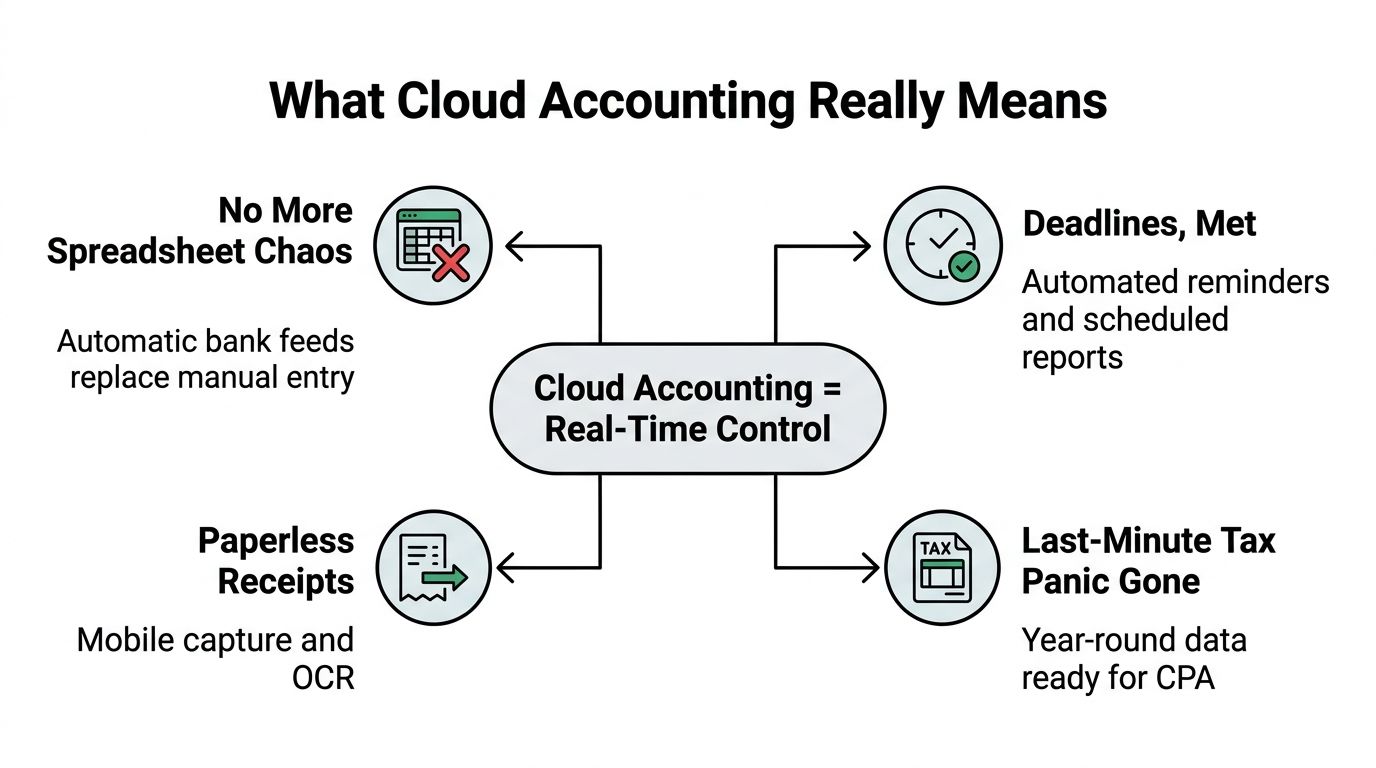
Cloud accounting services replace that mess with one operating system for books, banking, invoicing, approvals, and reporting. The practical payoff is simple, you stop waiting for someone to email a file, reconcile a statement, or “get back to you after lunch.” Your numbers live online, and the right people can see the same version at the same time.
What changes in day-to-day work
The biggest shift isn't technical, it's operational. A desktop package forces the business to revolve around the software. Cloud accounting flips that around, so the software supports the business instead of slowing it down.
You'll notice it first in the boring places, which is where the value usually lives. Bank transactions arrive continuously, receipts get captured from a phone, and reports don't wait for someone to sit at one office computer. That's why the move to the cloud feels less like “new software” and more like “we finally stopped tripping over ourselves.”
Practical rule: if a process still depends on one laptop, one employee, and one perfect afternoon, it's not a process. It's a bottleneck.
The reason this matters is that cloud systems are built to support collaboration. The data is current, the access is controlled, and the CPA doesn't need to chase five people to figure out what happened last Tuesday. For a small business, that usually means fewer surprises, cleaner closes, and less tax-season theater.
Cloud Accounting Services Explained Without the Jargon
Cloud accounting is just accounting software delivered over the internet instead of installed on one office machine. You pay for access, log in through a browser or app, and the provider handles updates, hosting, and maintenance. That's the basic deal, and it's why businesses are moving away from old desktop setups that age like milk in a Florida sunroom.
The useful comparison is this. Traditional software is a standalone house, you own the lot, maintain the plumbing, and fix the roof. Cloud accounting is more like a well-run apartment building. You still own your unit and your stuff, but the building manager handles the structure, security system, and common areas.
What the provider runs and what you still own
Most cloud accounting platforms are multi-tenant SaaS systems, which means one underlying system serves many clients while keeping records separated through methods like database-per-tenant, schema-per-tenant, or row-level security. The trade-off is plain. Stronger isolation usually costs more, while shared structures are cheaper but need tight query controls to prevent cross-client leakage (architecture overview).
A practical cloud accounting architecture uses three layers. The presentation layer is the browser screen you click in. The application layer handles validation, account classification, and routing. The data layer stores the records in managed cloud databases, and WebSocket-based synchronization can keep changes moving in near real time (three-tier cloud accounting architecture).
If you want a plain-English primer before you compare platforms, this cloud guide for small businesses is a solid starting point. It's useful because it shows the difference between “using software” and “running a finance workflow.”
Your vendor should run the infrastructure. You should still run the rules, permissions, and review process. If nobody owns those, you don't have cloud accounting, you have expensive optimism.
The owner's job is to ask whether the system closes faster, reconciles cleaner, and makes errors easier to catch. If the answer is yes, you're buying an operating model. If not, you're buying another subscription.
Benefits for SMBs and Industry-Specific Wins
The same platform doesn't solve every problem the same way. A dental office, a roofing contractor, and a nonprofit all want better books, but they care about different failure points. That's why generic sales pitches about “visibility” are weak. Visibility is fine. Clean decisions are better.

What healthcare, construction, and nonprofits actually gain
Healthcare practices need books that line up with revenue-cycle reporting, claims activity, and audit requests. When the accounting system is current, the practice manager isn't rebuilding month-end from email threads and a stack of printouts. That matters because one sloppy reconciliation can turn into a long conversation with a board, an insurer, or an auditor, and nobody enjoys those meetings.
Construction firms live and die by job costing, payroll timing, and crew-level visibility. Cloud accounting helps owners see which jobs are dragging cash and which ones are carrying the month. It also makes it easier to keep field activity, invoices, and back-office reporting in the same lane instead of three different parking lots.
Nonprofits have their own headache, donor restrictions, board reporting, and grant compliance. Clean cloud records make it easier to produce financials that hold up under scrutiny without turning staff into full-time document hunters. If you need a broader list of operational tools that fit that world, this roundup of tech solutions for business owners is a practical companion read.
The cross-industry payoff is less glamorous but more useful. Month-end closes get shorter, invoice follow-up gets less chaotic, and the owner spends less time asking, “Why doesn't this balance?” That question is a tax on your evenings.
Why the workflow feels cleaner
The advantage isn't that cloud software is fancy. It's that it reduces the number of places where a mistake can hide. That's why teams often feel less friction after the switch, even before they master every feature.
Clean books aren't just for tax season. They're for Tuesday afternoon when you need to decide whether to hire, buy, or wait.
The industry data backs up the direction of travel. One market analysis says the global cloud accounting service market reached US$30.05 billion in 2026 and is projected to rise to US$87.99 billion by 2035, a 12.67% CAGR across 2026 to 2035. It also says 78% of global enterprises had adopted at least one cloud-based financial solution in 2025, up from 52% in 2020, while Eurostat reported 52.74% of EU enterprises used paid cloud computing services in 2025, and cloud use for accounting or financial applications rose by 6.52 percentage points versus 2023 (enterprise cloud adoption data). That's not a fad. That's the market admitting the old way was slow.
Migration Checklist and Step-by-Step Onboarding
Moving to the cloud goes badly when people treat it like a login change. It's not. It's a cleanup project, a redesign project, and a compliance project, all wearing one shirt.
Start with the books, not the software
Before import day, clean up duplicate accounts, reconcile bank and credit card balances, and decide what should stay in the chart of accounts. If your current books are a junk drawer, cloud software will just give you a better-labeled junk drawer. That's not progress.
The setup also needs to reflect the current tax environment. For 2026, the IRS lists the standard deduction at $16,100 for single filers and $32,200 for married couples filing jointly, along with a 72.5 cents per mile business mileage rate (IRS Publication 334). Separately, 2026 guidance reports the Section 179 expensing limit at about $2.56 million with a phase-out beginning around $4 million, and the QBI deduction remains 20% with higher income thresholds for limitation rules (2026 tax law changes). Federal contractor workflows also need attention because the 1099-NEC and 1099-MISC reporting threshold increases from $600 to $2,000 in 2026 (1099 threshold update).
Build the implementation in the right order
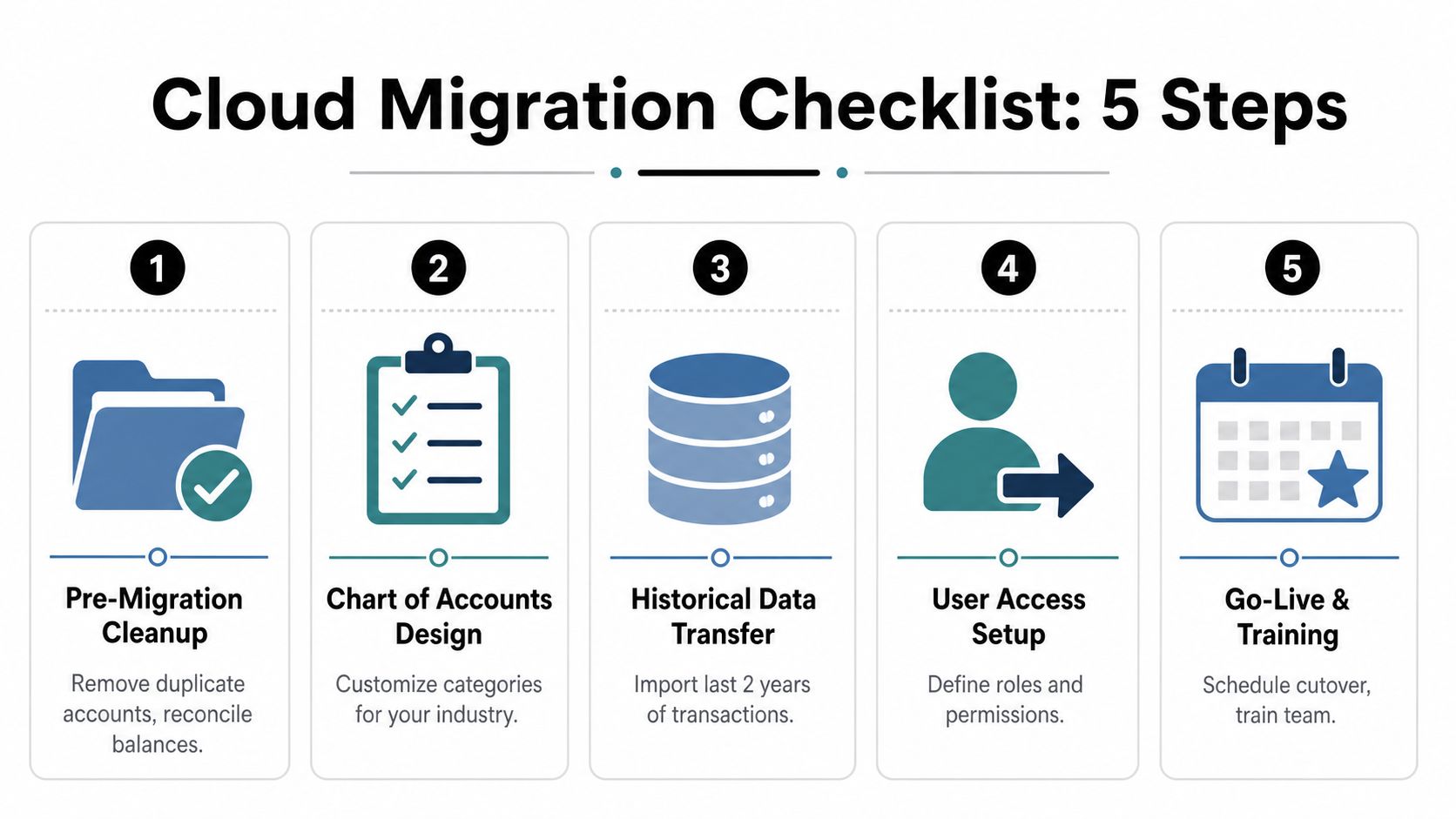
- Pre-migration cleanup. Fix bad balances, remove duplicate vendors, and clear out obsolete accounts.
- Chart of accounts design. Rebuild categories around how your business operates, not how the old software happened to sort things.
- Historical data transfer. Import what you need for reporting and continuity, then verify that the numbers match.
- User access setup. Assign roles carefully, because everyone does not need to see everything.
- Go-live and training. Run a parallel period first, then cut over once the team knows where the buttons are.
For a deeper process map, the accounting software implementation guide is useful because it treats implementation like a project, not a purchase.
The first 30 days are for setup and cleanup, the next 30 are for habits, and the last 30 are for proof. Skip that sequence and you'll spend the next quarter blaming the software for human mistakes.
If your CPA or bookkeeper can't tell you how they'll handle payroll links, bank feeds, vendor setup, and year-end reporting, they're not implementing. They're guessing.
Security, Compliance, and Who Really Owns Your Data
Cloud salespeople love to say the cloud is secure. That's lazy. Secure compared with what, a spreadsheet on someone's personal laptop, or a properly controlled local system? Those aren't the same question, and SMB owners shouldn't accept the shortcut.
The shared-responsibility model is the part people skip
The provider handles platform security, uptime, encryption, and most patching. Your business still owns user permissions, password discipline, audit trails, backup expectations, and continuity planning. If a staff member clicks the wrong phishing link, the cloud doesn't magically absorb the mistake. Humans still work there.
That's why tenant isolation matters in real business terms. Whether the system uses separate databases, separate schemas, or row-level security, the design affects how well client records stay separated and how ugly a bug becomes if one shows up. For regulated clients, especially healthcare and nonprofits handling sensitive records, this is not a side note. It's the whole game.
A practical security review should cover these basics:
- Access control. Who can see payroll, vendor files, and bank data.
- Backups. What the provider stores, what your firm exports, and how fast recovery happens.
- Audit trail. Whether the system shows who changed what and when.
- Vendor risk. What happens if the platform has an outage or support problem.
- Data exit plan. How easy it is to export your books if you leave.
If a provider can't answer those questions in plain English, walk away. You don't need a slogan. You need a continuity plan.
For a more detailed look at the risk side, this cybersecurity in accounting guide is a worthwhile read because it focuses on what SMBs have to manage, not just what vendors promise.
Cloud accounting shifts risk, it doesn't erase it. That's the part most glossy brochures leave out.
Pricing Models and the Real ROI of Cloud Accounting
Cloud pricing usually comes in three flavors, and none of them are mysterious. You either pay per user, pay for a feature tier, or pay extra for add-ons like payroll, inventory, or industry-specific modules. The bill looks simple until you add all the things the salesperson called “optional.”
| Model | How It Bills | Best Fit | Watch Out For |
|---|---|---|---|
| Per user | Monthly or annual fee for each login | Small teams with clear roles | Costs creep as users multiply |
| Tiered plan | Flat package with feature limits | Businesses that know their feature needs | Cheaper tiers often box you in |
| Add-on model | Base plan plus payroll, inventory, or specialized tools | Firms with uneven needs | The total gets ugly fast |
What you're really paying for
The return on cloud accounting is rarely just “software saves money.” It's more specific than that. You save time on month-end, reduce rework, and get better cash forecasting because the books aren't three weeks behind reality. That's the useful part.
The contrarian part is also true. Cloud tools can move basic bookkeeping work from accountants to clients. That means some SMBs will do more themselves than they used to, which can compress traditional bookkeeping revenue while increasing demand for advisory and fractional CFO work. In plain English, the software doesn't kill the relationship, it changes what the relationship is worth.
That's why the right question isn't “Is cloud accounting cheaper?” It's “Does it reduce total cost after training, cleanup, tax risk, and monthly oversight?” If it does, great. If it just shifts labor from the firm to the owner, you need to know that before you sign.
The 2026 tax changes make that calculation more serious. A wrong setup on the 1099-NEC threshold, mileage tracking, Section 179, or the QBI deduction can cost more than the software ever saves. Bad books are expensive. They just bill you later.
Choosing a Provider and Why a Local QuickBooks ProAdvisor With Fractional CFO Matters
Pick a provider the way you'd pick an operating partner, not a catalog item. If you need healthcare, construction, or nonprofit support, ask whether the firm knows reporting, workflow, and compliance in your industry, not just whether they can click around in the software. A real implementation partner asks how you invoice, who approves expenses, and where your reporting breaks today.
A QuickBooks ProAdvisor should do more than set up login credentials. You want someone who can build the chart of accounts properly, clean up prior messes, connect payroll without creating duplicate liabilities, and spot the tax items the software won't flag. That matters this year because the 2026 changes around 1099 reporting, Section 179, QBI, standard deduction, and mileage all affect setup and year-end review.
What to ask before you hire anyone
- Do you handle implementation or just software sales?
- Will you train my staff and document the workflow?
- Can you support my industry, not just my app?
- Will you review tax settings and compliance items every year?
- Do you offer advisory or only bookkeeping?
A Jacksonville-based CPA firm with fractional CFO services is usually the better fit for SMBs that need both clean books and decision support. A vendor can configure the tool. A local advisor can tell you whether your numbers make sense, what to fix next, and when you're about to make a dumb but expensive move.
If you want a plain explanation of how that advisory layer works, this fractional CFO services overview is the right place to start. The short version is simple, a good CFO function gives you strategy without hiring a full-time executive.
Software keeps the books moving. A good advisor keeps the business from drifting.
Bookkeeping and Accounting of Florida Inc. helps Jacksonville and Northeast Florida businesses move to the cloud the right way, with clean setup, compliance support, and advisory oversight that goes beyond data entry. If you want a local team that can handle bookkeeping, tax prep, and fractional CFO guidance without the usual handoff problems, visit Bookkeeping and Accounting of Florida Inc. and talk to people who know what small businesses need to stay compliant and in control.