
A nonprofit director opens a spreadsheet and finds three unanswered questions: Which grant paid for this expense? How much of a restricted donation remains? Can the board receive a reliable financial package before its next meeting? The answers are often buried across bank exports, donor records, email approvals, and manually maintained tabs.
Thank you for reading this post, don't forget to subscribe!QuickBooks for nonprofits can bring those transactions into one accounting system, but the software won't create compliant reporting by itself. Your team still needs a nonprofit chart of accounts, disciplined fund tracking, accurate functional-expense allocations, and a review process that connects daily bookkeeping with IRS and grant requirements. A fractional CFO adds the oversight small organizations often can't justify hiring full time, helping leadership interpret the numbers instead of merely entering them.
Introduction to QuickBooks for Nonprofits
A small charity may receive unrestricted gifts, a grant limited to one program, and donated supplies for an upcoming event. Recording all three as general income can make the ledger look orderly while hiding whether donor restrictions were followed. Before preparing board reports, grant reports, or Form 990 support, the director may need to reconstruct each transaction's purpose.
QuickBooks can organize this activity, provided the setup reflects nonprofit accounting. Intuit's guidance covers class tracking, Profit and Loss by Class, and reviewing a fund's full history by selecting All Dates. Staff can use these features to group transactions by program, funding source, or restriction, but the structure and coding rules must come first. Because this fund-accounting guidance is used in the reporting section, the setup should be documented internally and applied consistently.
The software records the classification your team selects. It does not decide whether an expense belongs to a restricted grant, an operating fund, or a particular program. A payroll transaction assigned to the wrong program, or a restricted grant posted to unrestricted income, can produce a polished report with an inaccurate conclusion.
A broader review may connect bookkeeping, reporting, payroll, tax preparation, and audit support through accounting for nonprofits. Bookkeeping and Accounting of Florida Inc. can also help establish month-end controls and clarify which balances are available for operations. Fractional CFO services add planning and review capacity, particularly as 2026 tax law changes require organizations to reassess compliance procedures, reporting assumptions, and leadership decisions.
Churches encounter similar issues with designated gifts and ministry programs. QuickBooks workarounds for churches explained provides context for adapting business-oriented software to mission-based accounting.
The practical objective is straightforward: trace each dollar from receipt to report, retain documentation for reviewers, and give the board usable information. QuickBooks supplies the platform. Professional guidance turns the platform into a compliance process.
Core Concepts of Nonprofit Fund Accounting
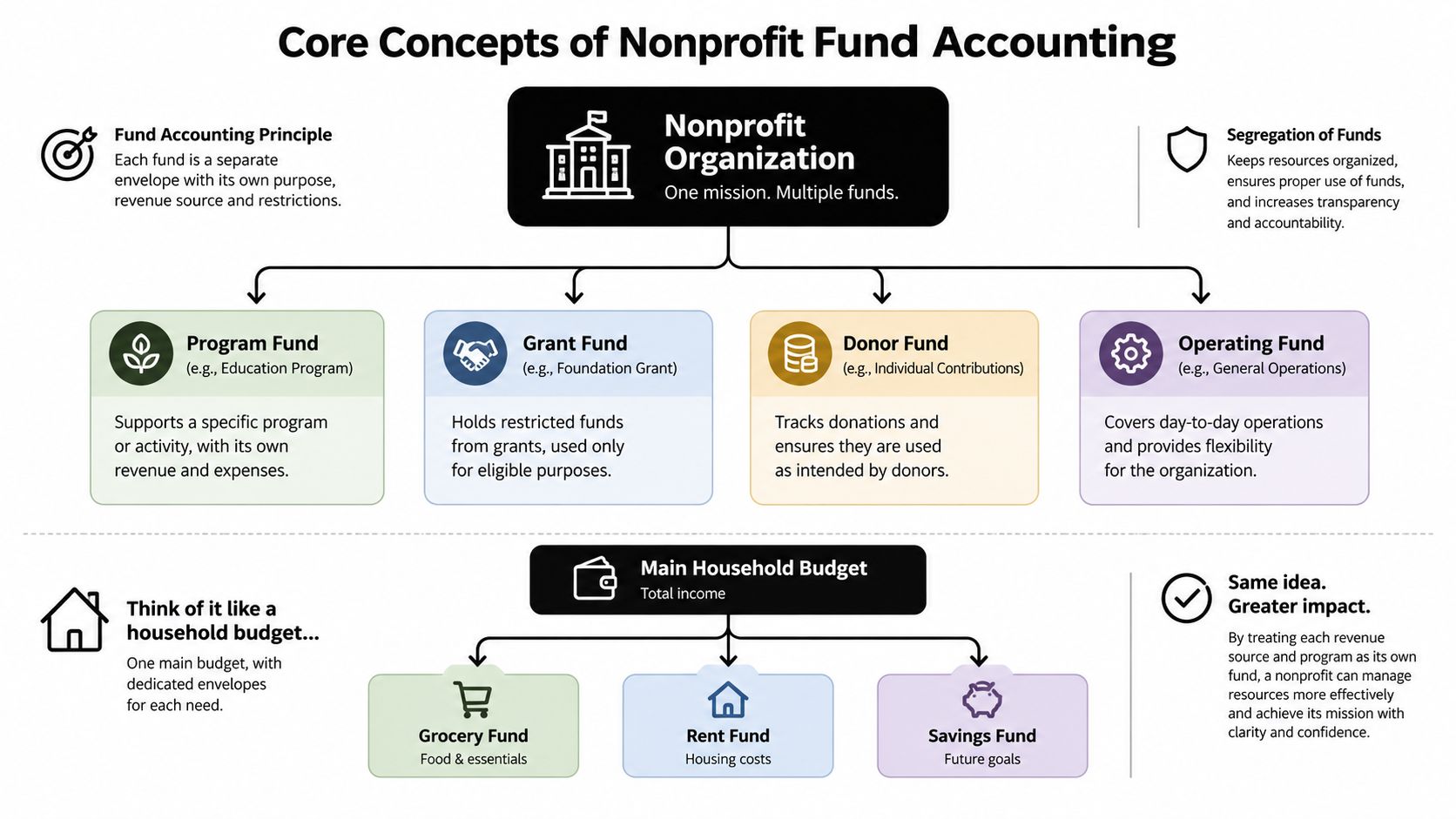
A grant-funded youth program can have money in the same bank account as general operations while remaining unavailable for unrelated expenses. Fund accounting keeps those purposes distinct, much like labeled envelopes within one account. The labels are not merely bookkeeping preferences. They show whether a nonprofit used each resource according to donor instructions, grant terms, and board decisions.
The accounting system must answer two questions together:
- What happened financially? The organization records revenue, expenses, assets, and liabilities.
- Why and for whom did it happen? The organization identifies the program, grant, donor restriction, or operating purpose connected to the transaction.
Think in net asset categories
Nonprofit reports focus on net assets, rather than owner's equity or profit. The accounting structure should distinguish resources without donor restrictions from resources whose use is limited by donor instructions or other conditions. QuickBooks does not provide a dedicated fund-accounting object, so accounts, classes, projects, and consistent transaction rules must carry much of the tracking responsibility.
That limitation does not make QuickBooks unsuitable. It means the organization needs defined rules and qualified review. A bookkeeper can enter transactions, while a CPA or fractional CFO can assess whether a grant is restricted, how shared expenses should be allocated, and when a restriction has been satisfied. Those judgments affect both financial statements and the decisions leaders make from them.
Build the logic before entering transactions
List the organization's actual funding streams and programs before creating classes or recording activity. A separate class for every donor can make reports difficult to maintain unless the board or grant agreement requires that detail. A smaller structure might distinguish operating support, a named grant program, fundraising, and administrative activity.
Natural accounts describe what the organization bought or received. Payroll, rent, supplies, professional services, and travel are natural expense categories. Functional categories describe why the expense occurred, such as program services, management and general, or fundraising. A single transaction may require both dimensions. A software invoice, for example, could be recorded as a technology expense under management and general, while software used only by a program could be assigned to program services.
Connect the structure to compliance
Clean classification supports the IRS filing process. Calendar-year tax-exempt organizations filing Forms 990, 990-EZ, or 990-PF generally face a May 15, 2026 deadline, and Form 8868 provides an automatic six-month extension, according to the cited filing guidance. The guidance also identifies Form 990-N for organizations with gross receipts at or below $50,000, Form 990-EZ for organizations below $200,000 in gross receipts and below $500,000 in assets, and Form 990 at or above those thresholds. Review the 2026 nonprofit filing requirements before relying on the accounting file for return preparation.
These thresholds do not determine every account name. They do show why revenue, expenses, assets, and restrictions need records that remain reliable through year-end. A fractional CFO can convert those reporting needs into monthly review procedures, documentation standards, and questions for the board. That support becomes more valuable as 2026 tax law changes prompt nonprofits to reassess compliance controls and planning assumptions.
Configuring Chart of Accounts Classes and Locations
The chart of accounts is the filing cabinet of QuickBooks. If its folders are vague, reports will be vague too. A nonprofit should separate natural classifications, such as salaries and rent, from functional classifications, such as program services and management and general, then use classes or locations to identify programs, grants, or sites.
Configure the nonprofit company profile
Begin by selecting the nonprofit organization type in QuickBooks and confirming the fiscal year, accounting method, user access, and reporting preferences. Intuit's nonprofit configuration includes Statement of Activity and Statement of Financial Position reports. It also changes invoice terminology to pledge when the account is configured as a nonprofit, which better reflects donor commitments than a conventional sales workflow. See Intuit's nonprofit configuration instructions.
QuickBooks lacks a dedicated fund-accounting object. That means your team must use chart-of-accounts design and class tracking to support period-end reconciliation of restricted balances. A class should answer a management question, not duplicate an account that already answers a different question.
Use classes and locations deliberately
Classes can identify programs, funding pools, or functional activities. Locations can identify offices, campuses, or operating sites. A multi-site nonprofit might use locations for Jacksonville and St. Augustine, while classes identify housing services, education services, fundraising, and administration.
Set a written rule for every transaction:
- Choose the natural account, such as payroll or supplies.
- Select the relevant class, such as a grant-funded program.
- Add a location only when the site affects reporting.
- Attach supporting documentation, including invoices, approvals, and grant references.
- Review uncategorized or unassigned activity before closing the month.
Keep the class list stable. Frequent renaming makes historical comparisons harder and can obscure the connection between board budgets and actual results.
Sample nonprofit chart of accounts
| Account Name | Category | Example Use |
|---|---|---|
| Operating Checking | Asset | Unrestricted operating cash |
| Grant Receivable | Asset | Amounts due under approved grants |
| Accounts Payable | Liability | Unpaid vendor obligations |
| Net Assets Without Donor Restrictions | Net Assets | Resources available for general operations |
| Net Assets With Donor Restrictions | Net Assets | Resources limited by donor purpose or time |
| Individual Contributions | Revenue | Gifts from individual supporters |
| Foundation Grants | Revenue | Awards from private foundations |
| Program Service Revenue | Revenue | Fees connected with mission programs |
| Program Salaries | Expense | Payroll assigned to program delivery |
| Management and General Salaries | Expense | Administrative payroll |
| Fundraising Expense | Expense | Costs of donor development activities |
Use account names that a volunteer, board member, and external CPA can understand without a separate translation guide. For more setup guidance, review how to set up a chart of accounts in QuickBooks.
At month-end, run the Statement of Activity by class and investigate missing assignments. The goal isn't a complicated file. The goal is a file where every report tells the same financial story.
Tracking Donations and Restricted Funds
Donation recording begins with the donor's intent. A cash gift without restrictions shouldn't be posted the same way as a contribution limited to a named program. The accounting entry must preserve the purpose, supporting communication, date, donor record, and any conditions attached to the funds.
Record each gift according to its form
For a cash donation, enter the date, donor, amount, payment method, revenue account, and applicable class or fund. If the gift is restricted, record that restriction in the donor record and transaction memo, then use the account and class structure established during setup.
A pledge represents a commitment rather than cash already deposited. Record the pledge receivable, document the expected payment schedule, and apply later receipts against that receivable. Don't treat an unpaid pledge as cash available for payroll or program spending.
In-kind contributions require documentation of what was received, its purpose, and the valuation method used by the organization. Record the contribution and related expense or asset consistently, then assign the appropriate program or restriction. Your CPA should review unusual noncash gifts before the organization relies on them in external reporting.
Grants deserve their own file trail. Keep the award agreement, approved budget, reporting dates, allowable-cost rules, reimbursement terms, and correspondence together. Then create a grant or class structure that lets staff compare spending with the award terms. The nonprofit grant accounting resource provides additional context for organizing those records.
Prevent restriction errors
A restricted donation can be misclassified in seconds and take hours to repair. Before posting, ask:
- What did the donor authorize? Read the gift letter, campaign language, or grant agreement.
- When can the organization use it? Record time or purpose restrictions clearly.
- Which activity receives the benefit? Assign the correct class, program, or location.
- Who reviews the entry? Use an approval process for unusual or material gifts.
The donor subledger, bank reconciliation, and general ledger should agree. If they don't, stop and investigate before preparing a board package or donor report.
A useful training rule is to require documentation at the point of entry, not months later. Staff should be able to open a transaction and understand why it was classified as restricted, unrestricted, program-related, or administrative.
Generating Essential Reports for Compliance
A nonprofit can produce a polished QuickBooks report and still make a poor compliance decision if its classes, accounts, or restrictions are wrong. Treat the reporting process like a three-person review: the bookkeeper prepares the reports, a manager checks program activity, and a CPA or fractional CFO examines unusual balances and compliance risks. That review also helps leadership respond to 2026 tax-law changes before filing deadlines create pressure.
Start with financial position
Run the Statement of Financial Position for the reporting date. Review cash, receivables, liabilities, and net assets, then compare restricted net asset balances with grant and donor schedules. A restricted balance that does not change while the related program spends money may indicate a missing expense assignment or an unrecorded release.
Check each bank account against its reconciliation and investigate old receivables. A grant receivable should be supported by an award agreement or invoice schedule. Do not leave a stale balance untouched because changing it might make the report less convenient.
Review activities and functional expenses
The Statement of Activities summarizes revenue, expenses, and the change in net assets for a selected period. Run it by class to compare programs or funding streams with their budgets. Investigate negative revenue, unexpected transfers, duplicated deposits, and expenses assigned to the wrong function.
The Statement of Functional Expenses requires judgment because it presents costs by natural type and functional purpose. Rent, payroll, technology, and professional fees may support several activities. Keep a written allocation policy, retain the calculation behind each allocation, and apply the policy consistently.
Prepare Form 990 support
QuickBooks nonprofit reports include Budget by Programs, Statement of Financial Income & Expense, Statement of Functional Expenses-990, Donors & Grants, and Biggest Donors, among others. These reports can support board oversight and Form 990 preparation, but a qualified tax professional must still review the return. Report and class-tracking workflows should match the organization's accounting policies.
Use date ranges that match the reporting period. Filter by class when examining program activity, and export schedules only after reconciling the source accounts. Label each file with its reporting period, then retain review notes so another staff member, CPA, or fractional CFO can reproduce the process.
The May 15, 2026 calendar-year deadline and the available Form 8868 extension should guide the work plan, not postpone it. Assign responsibility for the trial balance, donor schedules, grant schedules, payroll information, and final tax-return package well before filing. A fractional CFO can coordinate these reviews, connect reporting choices to strategy, and help leadership assess how tax-law changes affect budgeting and controls.
Board-ready test: A board member should be able to identify available cash, restricted resources, major funding changes, and program spending without asking staff to rebuild the report manually.
Setup and Migration Checklist
Migration succeeds when the nonprofit maps meaning, not just numbers. Importing a spreadsheet into QuickBooks without preserving fund, donor, program, and restriction information can create a clean-looking opening balance that doesn't support future reporting.
Establish the accounting foundation
Begin with a written implementation file containing the nonprofit's fiscal year, accounting method, reporting requirements, bank accounts, grant agreements, donor restrictions, and approval policies. Then complete these actions in order:
- Enable nonprofit mode. Confirm the organization type and nonprofit report terminology. Verify that the configured reports match the statements leadership expects to review.
- Design the chart of accounts. Separate assets, liabilities, net assets, revenue, and expenses. Keep natural and functional classifications distinct.
- Create classes and locations. Use classes for programs, grants, or functions, and locations for sites when site reporting matters.
- Define restricted funds. Document how the system will identify resources with donor restrictions and how releases will be reviewed.
- Set user permissions. Give staff access appropriate to their duties. Separate entry, approval, payment, and review responsibilities where possible.
- Create custom templates. Adapt donation acknowledgments, pledge records, vendor documentation, and board reports to the nonprofit's language and approval process.
Move historical information carefully
Before importing, preserve a read-only copy of the old system and reconcile its final bank, receivable, payable, donor, grant, and net asset balances. Create a mapping document that shows each old category, its new QuickBooks account, its class, and any treatment changes.
Don't import every historical line automatically. Decide which history leadership needs for trend analysis, which open items must remain active, and which supporting documents must stay outside QuickBooks but remain accessible. Test the import with a small sample and compare the resulting trial balance with the prior system.
Validate before going live
Run opening financial statements, compare them with the approved prior-period reports, and investigate every difference. Reconcile bank accounts, review restricted fund balances, confirm donor and grant schedules, and test a complete transaction from entry through report.
Federal funding requires particular attention. For fiscal years ending on or after September 30, 2025, the Single Audit threshold is $1,000,000 in federal awards expended, replacing the earlier threshold of $750,000. Review the nonprofit audit threshold guidance and make grant expenditure classification part of the migration review.
Train staff using real transactions, not only demonstrations. A written close checklist and named reviewer will protect the system after the consultant leaves.
Integrations and Recommended Workflows
QuickBooks works best when each system has a defined job. A donor CRM can maintain supporter relationships and campaign information. A payment processor can capture online transactions. QuickBooks should remain the accounting record that reconciles deposits, fees, revenue, receivables, and restrictions.
Build an end-to-end gift workflow
A practical online donation workflow looks like this:
- A donor gives through the organization's website or payment processor.
- The CRM stores the donor record, campaign, designation, acknowledgment status, and communication history.
- The payment processor records the gross gift, processing fee, and settlement.
- QuickBooks imports or receives a mapped transaction.
- Staff match the deposit to the bank statement and classify the gift by account, fund, program, and restriction.
- A reviewer checks exceptions, refunds, failed payments, and gifts that lack a designation.
DonorPerfect and Bloomerang can help manage donor relationships, while Stripe and PayPal may handle online payments. The integration is only reliable when the mapping is reviewed. A processor deposit often represents multiple gifts and fees, so posting the net amount as revenue can understate both contribution income and processing expense.
Connect operations to finance
Payroll, event management, volunteer activity, and grant tracking may live in separate systems. Decide which platform owns each data field and how often summaries reach QuickBooks. Don't allow multiple systems to create competing versions of the same donor balance or grant expenditure.
Organizations that coordinate many volunteers may also evaluate volunteer donation software to organize volunteer activity and related contribution records. The accounting team should still define which information belongs in QuickBooks and which belongs in the operational platform.
Control point: Automation should reduce repetitive entry, not eliminate review. Reconcile imported batches to bank activity and source reports every close cycle.
Add financial leadership to the workflow
A bookkeeper can maintain feeds and reconciliations. A fractional CFO can use the resulting data for cash-flow forecasting, budget-versus-actual analysis, grant spending projections, reserve planning, and board dashboards. That senior review helps leadership decide whether a program is financially sustainable, whether a restricted balance can support planned costs, and whether a funding gap requires action.
Cost also belongs in the technology decision. TechSoup's Intuit for Nonprofits information explains that donated QuickBooks Online subscriptions are available, but an organization is limited to one donated subscription in its lifetime and must pay annual renewal fees to retain access. The same source gives an independent estimate of $780 to $1,100 per year for QuickBooks Online Plus and reports use by 56% of nonprofits under $1 million in revenue. Treat those figures as planning information, then confirm current terms before choosing a plan.
Common Pitfalls and Final Thoughts
QuickBooks won't protect a nonprofit from weak procedures. The most common failures are:
- Mixing personal and organizational spending: This damages the audit trail and makes reimbursements difficult to verify.
- Leaving classes blank: Reports then fail to show program or grant activity accurately.
- Treating restricted gifts as general cash: Staff may spend funds for purposes the donor didn't authorize.
- Ignoring the 2026 contractor rule: For payments made starting in 2026, the Form 1099 threshold for independent contractors and rent rises from $600 to $2,000, as summarized in the nonprofit tax update.
- Missing new filing mechanics: The IRS says central organizations must use Form 15644 for annual group ruling submissions, and starting March 9, 2026, Section 501(c)(4) intent-to-operate notices on Form 8976 must be filed electronically through Pay.gov. Read the IRS exempt-organization update.
Small organizations often don't know every requirement that applies to payroll, grants, donor restrictions, audits, and annual filings. A certified QuickBooks ProAdvisor, CPA, and fractional CFO can divide those responsibilities into a repeatable system, review the numbers, and keep leadership focused on mission delivery.
Bookkeeping and Accounting of Florida Inc. provides QuickBooks setup and maintenance, nonprofit bookkeeping, payroll, tax preparation, audit support, and fractional CFO guidance for organizations in Jacksonville and Northeast Florida. Visit Bookkeeping and Accounting of Florida Inc. to discuss a clean reporting structure and an ongoing compliance process for your nonprofit.