
You're probably reading this on a Mac that boots fast, syncs cleanly, and does exactly what you ask. Then you open the books and find a spreadsheet with mystery tabs, duplicate expenses, and one formula that nobody wants to touch because “it might break something.”
That setup works right up until it doesn't.
For Jacksonville business owners, the question isn't whether you can keep limping along with spreadsheets or basic bookkeeping apps. The question is whether your accounting system helps you make decisions, stay compliant, and survive tax season without a blood pressure spike. If you run a clinic, a contractor shop, a retail business, or a nonprofit, small business accounting software for mac is not an office preference. It's part of your financial control system.
Your Mac is a Great Business Tool Your Spreadsheet is Not
A lot of owners start the same way. They invoice from one app, track expenses in another, keep payroll notes in email, and dump everything into a spreadsheet at month end. It feels cheap and flexible. It's also how bad books happen.
The fundamental problem isn't the spreadsheet itself. The actual issue is that spreadsheets don't create controls. They don't reconcile your accounts for you, they don't give your outside accountant clean workflows, and they don't protect you from sloppy categorization that turns into tax trouble later.
Why Mac businesses finally have real options
Mac owners used to get treated like the odd cousin at the software family reunion. That's changed. Apple reported 2.2 billion active devices globally in 2024 in its App Store ecosystem context, which helps explain why vendors now design accounting tools for macOS, iPhone, and iPad instead of treating Mac support like an afterthought, as noted in Apple's small business accounting app listing.
That matters because your accounting software now affects more than data entry. It affects whether your office manager can review bills on a Mac, whether your field team can upload receipts from an iPhone, and whether your accountant can see the same books without waiting on exported files.
What actually matters to your bottom line
If you own a healthcare practice in Jacksonville, you need dependable records, clean payroll handling, and reporting that doesn't collapse when somebody's out sick. If you run construction jobs across Duval or St. Johns, you need job costing, contractor tracking, and tight bank reconciliation. If you run a growing service company, you need invoicing, expense control, and someone watching cash flow before the month gets ugly.
Practical rule: Software is not an IT purchase. It's a finance decision with tax consequences.
That's why I don't recommend picking software based on the prettiest dashboard or the cheapest monthly plan. I recommend choosing the system that fits your workflow, your compliance load, and your growth plans. Then I recommend setting it up right the first time.
The Great Divide Native Mac Apps vs Cloud Platforms
A Jacksonville medical practice gets hit with a payer audit. The office manager is out. The books live on one Mac in the back office. Now you are waiting on one person, one machine, and one set of passwords. In construction, the version of the same problem shows up as missing job costs, delayed draws, and payroll questions no one can answer until somebody gets back to the office.
That is the true divide here. This is not a Mac preference issue. It is an operations and compliance decision.
Native Mac and desktop-first systems keep more of the work tied to a specific computer or internal process. Cloud platforms put the books where your owner, bookkeeper, tax preparer, and fractional CFO can see the same numbers without passing files around. For Jacksonville businesses with payroll, sales tax, subcontractors, insurance reporting, or lender scrutiny, that difference matters fast.
Quick comparison
| Type | Best fit | Strengths | Tradeoffs |
|---|---|---|---|
| Native Mac or desktop-first software | Owners who want tighter local control and deep in-house processing | Offline access, traditional workflow, local control | Harder collaboration, more manual sharing, risk of data silos |
| Cloud accounting platforms | Teams that need remote access and shared visibility | Real-time collaboration, easier accountant access, mobile use across devices | Ongoing subscription model, internet dependency |
When desktop still makes sense
Desktop still has a place. If one person handles the books, the workflow is stable, and you do not need outside access every week, a native Mac or desktop-first setup can work fine.
That is why some owners still choose AccountEdge. Its product lineup focuses on core accounting functions, invoicing, payroll, inventory, imports, exports, and reporting, as shown on its AccountEdge product information. For a small internal team that wants tighter local control, that setup can be perfectly reasonable.
But be honest about the risk. If your controller leaves, your Mac dies, or your CPA needs clean records during tax season, desktop friction shows up immediately.
Why cloud usually wins for growing firms
For healthcare groups, cloud usually wins because access controls, shared visibility, and cleaner handoffs reduce the chance of billing errors, payroll issues, and ugly month-end surprises. For construction companies, cloud usually wins because people in the field, the office, and outside finance all need the same job data while the job is still moving.
That is why I push owners to treat software selection as a finance decision guided by process, reporting, and compliance needs. A fractional CFO should weigh in before you buy anything. Software that fits your Mac but breaks your approval flow, job costing, or audit trail is the wrong software.
If your books depend on one computer and one person, you have a control problem.
If you want a practical framework, our guide on how to choose accounting software for your business model and reporting needs covers the decision points owners skip. If you want another market view, this roundup of Canadian small business accounting tools is useful for seeing how buyers compare desktop and cloud options across similar small business workflows.
My blunt recommendation
For a solo operator with simple books, desktop can still do the job.
For a Jacksonville practice with staff, a contractor running multiple jobs, or any company using outside bookkeeping, payroll, or tax support, go cloud-first. You need shared access, cleaner controls, and fewer points of failure. Habit is not a strategy. It is how small bookkeeping problems turn into expensive compliance problems.
Comparing Core Features for Florida Businesses
Generic software reviews love broad labels like “easy to use” and “great for small business.” That's fluff. You need to know whether the software can handle the daily mess of a real Florida business.
Here's the practical comparison early, before the marketing fog rolls in.
| Platform | Best fit on Mac | Core strengths | Main limitations |
|---|---|---|---|
| QuickBooks Online | Small to midsize businesses needing depth | Payroll, invoicing, bank reconciliation, broad operational coverage | Can feel heavier than a very small business needs |
| Xero | Remote teams and firms that value collaboration | Bank reconciliation, shared workflows, clean collaboration model | Some functions may require a different setup approach than QuickBooks users expect |
| Wave | Freelancers and very small businesses | Free double-entry accounting, simple invoicing, lighter entry point | Thinner workflow depth for growing teams and more complex compliance needs |
Payroll, invoicing, and reconciliation
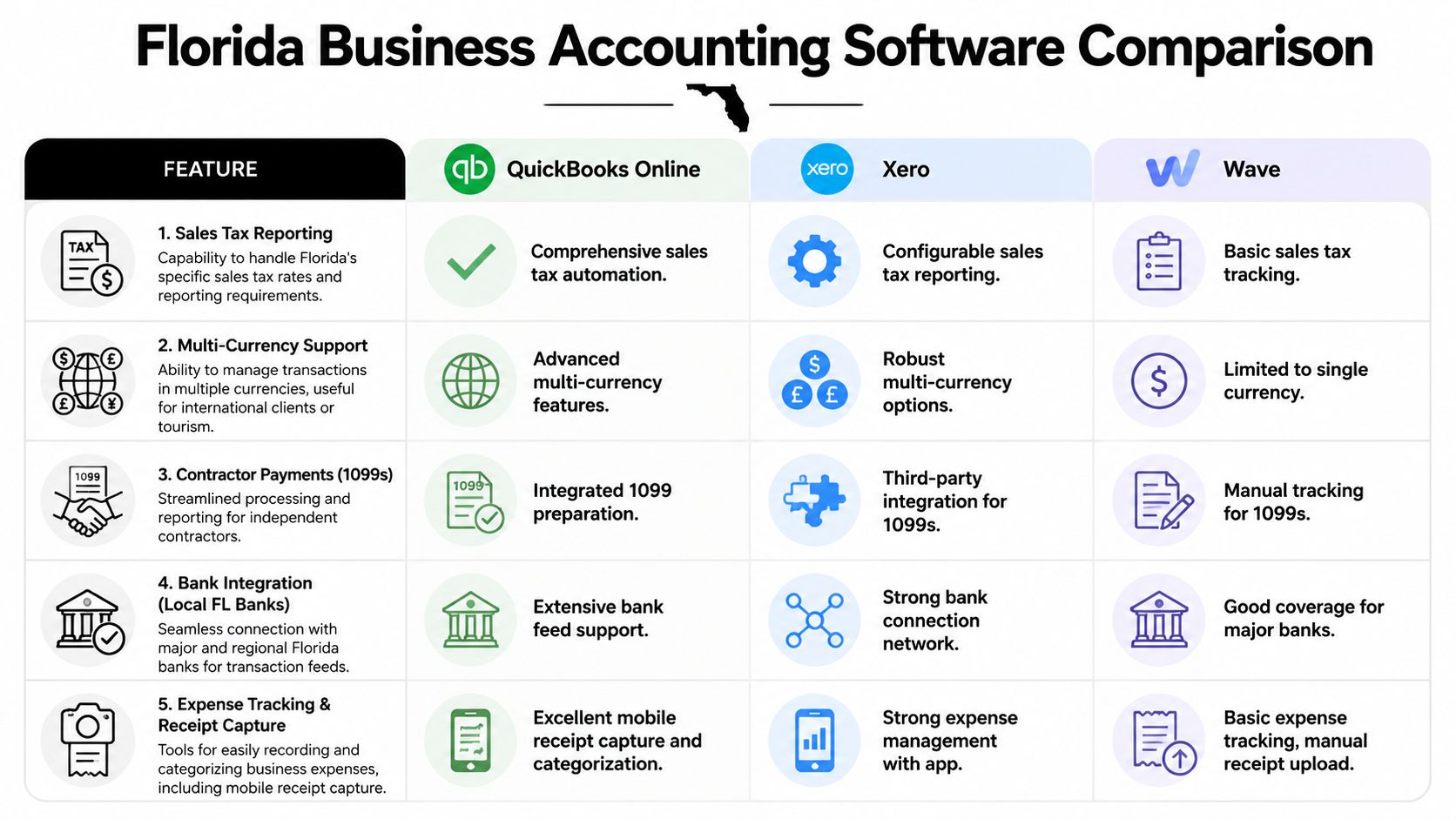
A 2026 comparison of Mac accounting tools notes that the actual separator isn't the logo or entry price. It's workflow depth. The analysis positions QuickBooks and Xero for businesses that need stronger payroll, invoicing, and bank reconciliation, while Wave is better suited to freelancers and smaller operators, according to Setapp's review of the best accounting software for Mac.
That lines up with what I see in practice.
QuickBooks Online: Better fit when payroll, invoicing, and month-end discipline all need to live in one ecosystem.
Xero: Strong fit when your team collaborates remotely and bank reconciliation has to stay smooth.
Wave: Fine for simpler books. Risky when the business grows faster than the software structure.
Healthcare practices in Jacksonville
Healthcare owners don't just need bookkeeping. They need consistency. A medical or dental office deals with payroll, recurring expenses, provider compensation questions, and frequent reporting needs. The software has to support tight categorization and clear review processes.
QuickBooks Online usually fits best when a clinic wants broad bookkeeping support plus cleaner handoff to outside accounting. Xero can work well if the practice values collaboration and simpler cloud workflows. Wave tends to run out of road sooner because healthcare books rarely stay “simple” for long.
If you also deal with grants, restricted funds, or board reporting in a nonprofit healthcare setting, software selection gets even more sensitive. You need the chart of accounts structured correctly from the start, not patched together after year end.
Construction and trades
Construction companies don't need cute dashboards. They need visibility into labor, materials, subcontractors, and billing against jobs. If your software can't help you track project-level profitability clearly, you're flying blind.
QuickBooks Online is often the practical pick for contractors because it sits well inside a broader accounting workflow that owners, office staff, and outside advisors already understand. Xero can work for teams that prioritize remote collaboration. Wave is usually too light once job costing and contractor reporting get serious.
Florida compliance starts to bite at this point. Contractor payments, payroll handling, and recordkeeping can get messy fast if your books are built on workarounds.
Sales tax, 1099s, and multi-entity headaches
Florida businesses need software that can support recurring tax workflows without turning each filing period into a scavenger hunt. You also want a system that won't buckle if you add a second entity, another location, or outside bookkeeping support.
For owners who operate across borders or want a broader market perspective, this roundup of Canadian small business accounting tools is useful because it shows how software evaluation changes when tax rules and reporting needs shift by jurisdiction. The lesson applies here too. Software choice is never just about features. It's about fit.
If you want a broader side-by-side look at mainstream options, our review of the best accounting software for small businesses goes deeper into what each platform handles well and where each one starts to strain.
My recommendation by business type
- Healthcare and clinics: Start with QuickBooks Online unless you have a strong workflow reason to prefer Xero.
- Construction and trades: Lean QuickBooks Online for operational depth and easier support structure.
- Creative firms and remote service teams: Xero deserves a hard look.
- Freelancers and micro-businesses: Wave is acceptable if your books are simple and likely to stay that way.
Most owners don't need more features. They need the right features configured correctly.
Future-Proofing Your Books AI and Advanced Compliance
A lot of software buyers look only at this quarter. That's short-term thinking. Your accounting system should still make sense when your business gets busier, your tax exposure grows, and your reporting requirements get less forgiving.

AI can help, but it doesn't replace judgment
AI in accounting is moving past buzzword territory. Energent.ai's 2026 comparison claims 94.4% accuracy on the Hugging Face DABstep financial analysis benchmark, says the result was validated by Adyen, and states its system can process up to 1,000 files in a single prompt, according to its AI-powered small business accounting software comparison. Those are vendor-reported claims, so treat them as promising, not gospel.
The useful takeaway is operational. AI tools can turn stacks of receipts, statements, and ledgers into structured outputs faster than old manual workflows. That can help with cleanup work, forensic review, and ugly backlog situations.
But don't confuse speed with compliance. Fast bad data is still bad data.
Compliance gets harder as you grow
Healthcare businesses have privacy concerns, documentation concerns, and higher sensitivity around who sees what. Construction firms deal with payroll pressure, contractor records, job-level reporting, and audit exposure when the books are sloppy. Nonprofits have their own reporting logic entirely.
That means future-proofing is partly about software and partly about governance. Who has access. How approvals work. Whether your reports match how the business operates. Whether your chart of accounts supports tax prep instead of fighting it.
For owners thinking beyond basic bookkeeping, tools that surface strategic financial insights for leaders can be useful for turning raw accounting data into planning decisions. That's the right direction. The dashboard is not the strategy. The interpretation is.
A balanced look at the tradeoffs lives in our article on AI in accounting and whether you should trust a robot with your books.
Here's a helpful overview of where the conversation is headed:
New tools can accelerate bookkeeping work. They cannot decide whether your books reflect reality, satisfy regulators, or support a lender review.
Tax law changes make setup matter more
Tax rules change. Filing expectations shift. Documentation requirements don't get more forgiving. Most small businesses don't know what's required until a notice arrives or the CPA has to clean up the mess during tax prep.
That's why every growing business needs someone acting like a fractional CFO, even if they don't need a full-time executive. You need a person who connects software setup to tax planning, cash flow, reporting discipline, and compliance. Otherwise you're just buying apps and hoping for the best.
Why Free Software Can Be Your Most Expensive Mistake
Business owners love “free” the same way kids love “unlimited candy.” It sounds good until somebody gets sick.
The issue with free accounting software isn't that it's always bad. The issue is that owners judge it by monthly price instead of total cost. That's backwards.

Where free starts to hurt
The U.S. Chamber notes that Wave is best free accounting software for invoicing and estimates, and Zoho Books is best for micro-businesses earning $50,000 or less. It also raises the more important issue: guides rarely quantify the actual cost once a business needs payroll, support, add-ons, or cleanup, as discussed in its review of free accounting tools for small businesses.
That's the practical problem. Free is often aimed at the smallest operators, not the businesses adding staff, juggling compliance, and trying to close the books cleanly every month.
Hidden costs owners ignore
- Workarounds eat time: If your software can't handle a core task cleanly, your staff creates manual processes. Manual processes create errors.
- Outside tools pile up: Payroll here, receipt capture there, contractor tracking somewhere else. Suddenly “free” has a support stack.
- Cleanup gets expensive: A year of bad categorization costs more to fix than a year of decent software costs to run.
- Decision-making suffers: If reports are thin or inconsistent, you can't trust margin, cash flow, or tax estimates.
Bottom line: Cheap books often become expensive books right when the business can least afford the distraction.
Who can use free software safely
If you're a solo operator with low transaction volume, no payroll, no inventory, and no growth pressure, free software can be fine for a season. That's a narrow group.
The moment you add employees, contractors, financing needs, tax complexity, or management reporting, the hidden cost starts showing up. Not on the software invoice. In missed deductions, filing mistakes, year-end panic, and owner time.
This is why I tell clients to buy for the next stage of business, not just today's size. You don't need bloated software. You do need software you won't outgrow the minute things start working.
Your Smart Migration and Setup Checklist
Switching platforms isn't hard because the software is mysterious. It's hard because bad data migrates just as easily as good data. If you move a mess, you still have a mess.
Use this checklist before you switch
Clean up what you have now
Reconcile bank and credit card accounts first. Fix duplicate vendors, stale receivables, and random expense categories before anything gets imported.Choose a real cutover date
Don't switch in the middle of confusion. Start at a clean month boundary when possible so reporting stays easier to compare.Rebuild the chart of accounts for your industry
A clinic, a contractor, and a nonprofit should not use the same generic chart of accounts. Build it to match how your business earns, spends, and reports.Map payroll and tax workflows early
Don't assume payroll will “just work.” Decide who runs it, who reviews it, how tax records flow, and how contractor payments will be tracked.
What owners forget
- User permissions matter: Not everyone should have the same access.
- Receipt capture needs a process: If employees don't know how to submit expenses, the feature won't save you.
- Training beats guesswork: One hour of structured training saves months of random errors.
- Parallel review helps: Compare early reports from the new system against your prior records before you trust them blindly.
My implementation advice
Have your bookkeeper, tax preparer, and whoever approves spending involved from the start. If those people aren't aligned, the software won't solve much. A good migration isn't just about importing transactions. It's about setting up a system you can comfortably live with.
The Tool Is Not the Strategy Let Us Be Your Guide
It usually falls apart on a Tuesday afternoon. A Jacksonville clinic manager is chasing insurance payments on a MacBook while payroll questions stack up. A contractor is on the phone about a draw request, but the job costs in the software do not match what was spent in the field. The problem is not the logo on the accounting app. The problem is that nobody built a finance system that matches how the business operates and what regulators expect.
Software records activity. Strategy decides what gets tracked, who reviews it, and what actions follow.
That distinction matters even more in industries with real compliance exposure. Healthcare practices around Jacksonville need books that support clean payroll, owner compensation, vendor controls, and records that hold up when questions come up around reimbursements, patient-related operations, or tax filings. Construction companies need accurate job costing, WIP reporting, subcontractor payment tracking, and a clean process for 1099s, sales tax questions, and lender reporting. If the setup is wrong, the reports are wrong. Then decisions get expensive fast.
What a business owner actually needs
You need a finance lead who can connect the software to the true work of running the company. That means month-end reporting that makes sense, cash flow planning you can use, and controls that keep tax, payroll, and documentation from drifting off course. For many growing businesses, that role is a fractional CFO.
A good fractional CFO does four things well:
- Keeps cash visible: You need to know what is coming in, what is going out, and where the squeeze is likely to hit.
- Builds compliance into the process: Payroll reviews, tax filings, contractor records, and documentation should not depend on memory.
- Shapes reporting around your industry: A medical office needs different visibility than a roofing contractor. One size fits nobody.
- Chooses and configures the software properly: The platform matters less than the chart of accounts, workflows, permissions, and review habits behind it.
Here is the plain truth. Jacksonville healthcare and construction owners do not need another software demo. They need financial oversight tied to the risks of their industry.
That is why the decision should not sit only with IT, the office manager, or whoever uses the Mac most often. It should be guided by someone who understands tax, bookkeeping, payroll, reporting, and the operational pressure points that can put a local practice or contractor in a bind.
My direct recommendation
If you are shopping based on monthly subscription price, stop. If one overworked employee is holding the books together by force of personality, fix that before it breaks. If you are migrating systems, get a finance professional involved before day one, not after the cleanup bill shows up.
One practical option is working with Bookkeeping and Accounting of Florida Inc. for bookkeeping, accounting, payroll, tax preparation, audits, QuickBooks support, and fractional CFO services when you need software setup tied to ongoing financial oversight instead of treated like a one-time tech task.
Good software helps you keep records. Good advice helps you protect margin, stay compliant, and make better calls with confidence.
If you want help choosing the right small business accounting software for mac, cleaning up your books, or getting steady fractional CFO guidance, talk with Bookkeeping and Accounting of Florida Inc.. We help Jacksonville and Northeast Florida businesses build accounting systems that stay organized, support tax compliance, and give owners numbers they can trust.
