
You're probably in one of two spots right now.
Either your sales look healthy, but your bank balance makes no sense. Or your shelves, stockroom, truck inventory, or supply closet say one thing while your books say another. That gap is where small businesses bleed money.
If you sell products, keep parts, issue supplies to jobs, or track billable materials, you need more than bookkeeping. You need accounting software for small business with inventory that ties operations to the financial statements. And even then, software alone won't save you if it's set up badly. I've seen plenty of businesses buy a shiny subscription and still end up with wrong margins, bad tax reporting, and a year-end cleanup bill nobody enjoys.
Why Your Inventory Is a Ticking Financial Time Bomb
A familiar mess looks like this: the owner is moving product, the team is shipping orders, invoices are going out, and everyone assumes things are fine. Then month-end arrives. Inventory counts don't match. Profit looks high on paper, but cash is tight. Someone adjusts a spreadsheet. Someone else changes a quantity in the accounting file. Now nobody trusts the numbers.
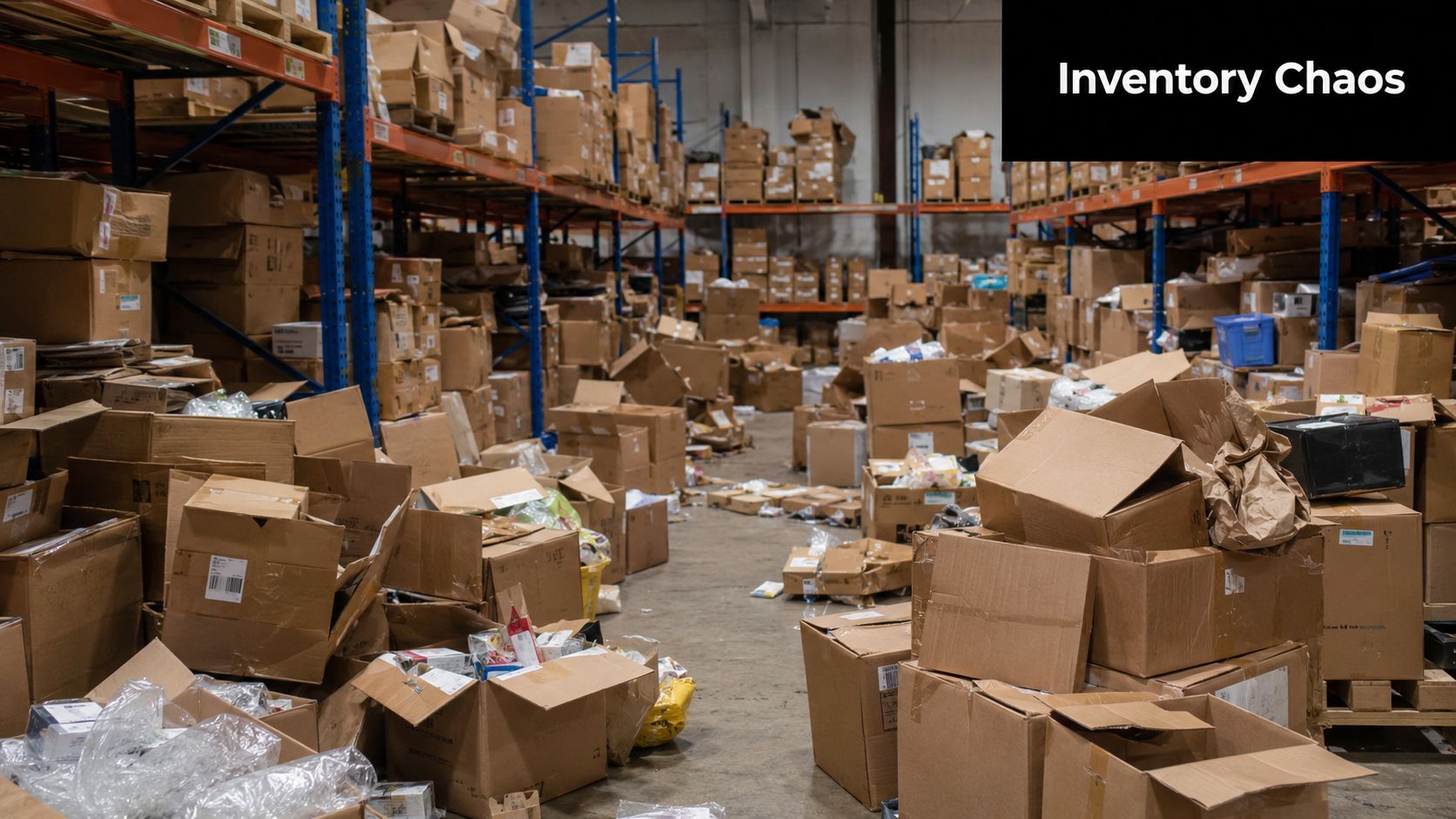
That's not an admin problem. That's a financial control problem.
What goes wrong fast
Inventory errors don't stay in the warehouse. They hit your income statement, balance sheet, purchasing, pricing, and tax reporting. If your count is wrong, your cost of goods sold, margins, and reorder decisions are wrong too.
Here's where owners usually get trapped:
- Separate systems: Sales live in one app, stock counts in another, and accounting somewhere else.
- Late entry: Purchases and returns get entered days later, after decisions have already been made.
- Spreadsheet heroics: One employee becomes the only person who “understands” the inventory file. That's not a process. That's a hostage situation.
- Bad visibility: You reorder items you already have, and miss items you require.
A big turning point came when small businesses moved from desktop tools to cloud systems that combine bookkeeping and stock control in one place. Platforms such as QuickBooks Online Plus and Xero showed why that matters: you no longer need a separate ledger and a separate stock system just to keep books and inventory aligned, as noted by Accounting Seed's overview of integrated cloud accounting platforms.
Why this gets worse in e-commerce and multichannel selling
If you sell through a store, a website, a marketplace, and maybe a phone order here and there, inventory confusion multiplies. Every extra sales channel is one more chance to oversell, undersell, or misstate what you have available.
For a practical outside look at multichannel stock issues, this guide to ecommerce inventory management for SMEs is worth your time.
Practical rule: If your inventory count changes and your financials don't change with it, your system is lying to you.
Most owners don't need more dashboards. They need one clean source of truth. That starts with a reliable process and the right system design. If you want a straightforward primer on the operational side, this resource on how to track inventory for small business lays out the basics clearly.
Understanding Your True Cost of Goods Sold
If you don't understand Cost of Goods Sold, you don't understand your profit. You understand revenue. That's different.
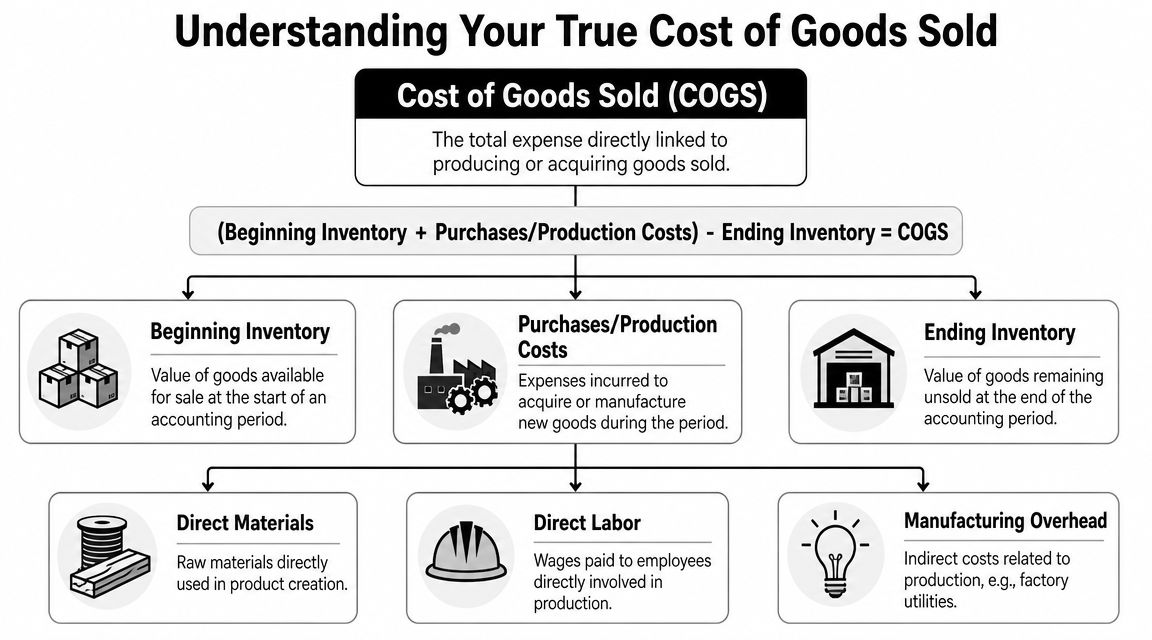
COGS is the direct cost tied to the goods you sold. For a retailer, that usually means what you paid for the items sold. For a manufacturer, it can also include production costs. For contractors or healthcare suppliers using stocked items, it can include materials or supplies consumed in delivering the work.
The formula that tells the truth
At its simplest, COGS follows this logic:
| Item | What it means |
|---|---|
| Beginning inventory | What you had available at the start |
| Plus purchases or production costs | What you bought or made during the period |
| Minus ending inventory | What you still have left |
| Result | What you actually sold |
If that ending inventory number is sloppy, your profit is sloppy. There's no elegant way to say it.
Inventory systems matter here because they help avoid stockouts and overstocking, and by using real-time tracking plus automation for manual entry, they reduce errors and free staff time, according to Rheaply's inventory management overview for small businesses. That operational gain feeds straight into cleaner COGS.
FIFO and weighted average without the accounting jargon headache
Use your kitchen pantry as the example.
You bought soup cans at different times and different costs. When you pull one off the shelf, which cost gets assigned to the can you used? That depends on your inventory valuation method.
- FIFO means first in, first out. The oldest cost gets used first.
- Weighted average blends your inventory costs into an average cost per unit.
- Some owners ask about LIFO, but the bigger point is this: your method affects reported profit and tax results, so this is not a casual setup decision.
Here's the practical difference:
| Method | How it behaves | Why owners care |
|---|---|---|
| FIFO | Uses older item costs first | Often easier to understand operationally |
| Weighted average | Smooths costs across units | Can reduce swings in reported unit cost |
The valuation method isn't just an accounting preference. It changes how profit shows up on the page.
Why software choice matters here
A weak system treats inventory like a simple count. A proper system ties quantity and value together. That means every receipt, sale, return, and adjustment should feed the accounting records correctly.
If you want to understand the accounting math before picking a platform, review this guide on how to calculate cost of goods sold. It helps you evaluate software features based on financial impact, not marketing fluff.
Must-Have Features in Your Inventory Accounting Software
Plenty of tools advertise inventory. Fewer handle it well. If you're comparing options for accounting software for small business with inventory, stop looking at the home page and start looking at the mechanics.
This checklist gives you the right lens.
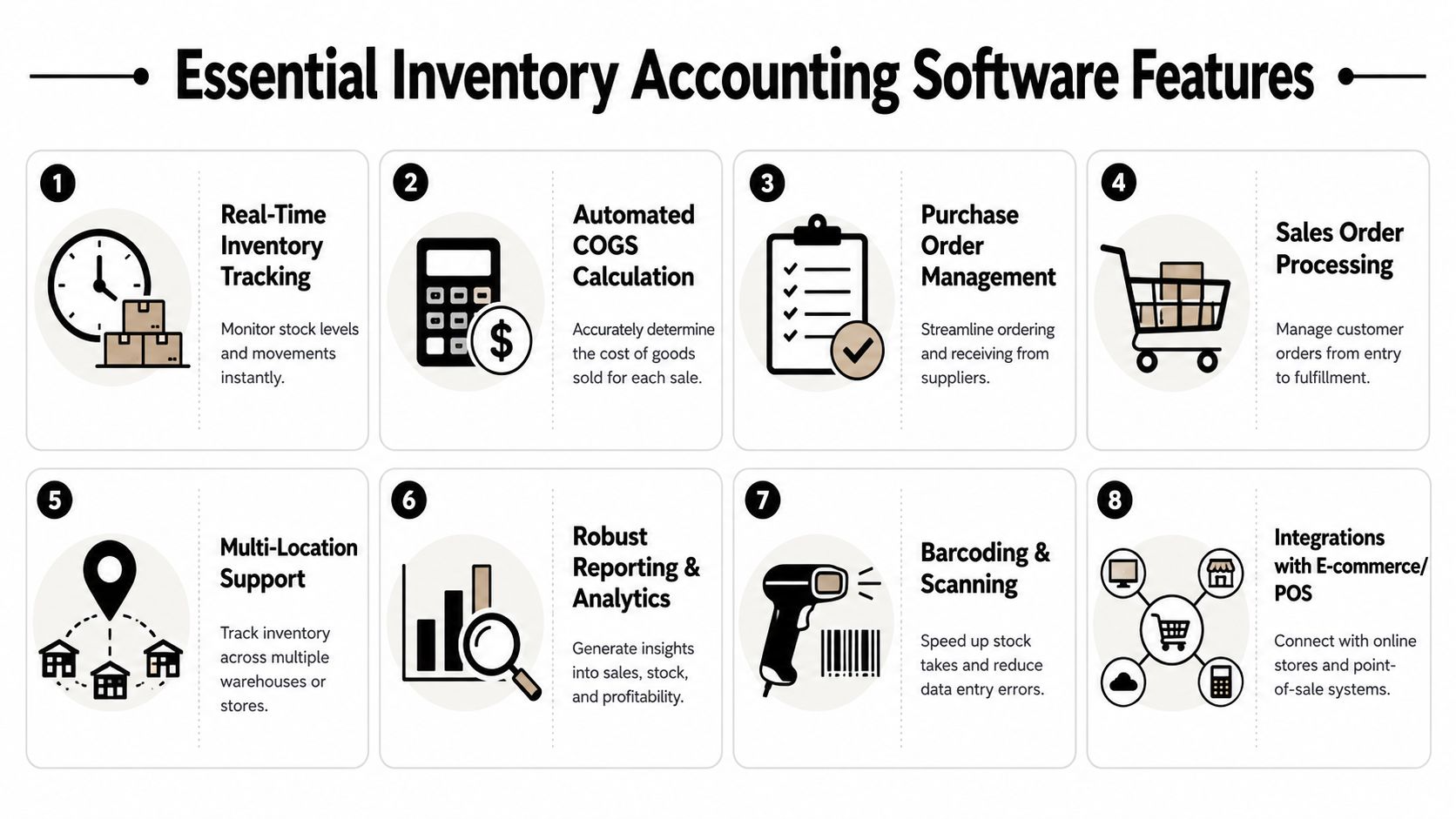
The features that actually solve problems
Real-time synchronization
This is the big one. When a sale, return, receipt, or adjustment posts, the inventory subledger should immediately update both on-hand quantity and valuation accounts. That reduces manual reconciliation and prevents inventory values from drifting away from the general ledger, as explained by Finale Inventory's guide to inventory and accounting software.Purchase order management
You need a clean path from ordering to receiving. Otherwise, items arrive with no clear receiving record, quantities get guessed, and bills don't match what was physically delivered.Barcode scanning
Manual keying causes bad counts. Barcode tools reduce those mistakes and speed up receiving, transfers, and cycle counts.Sales order and fulfillment flow
If your team sells from one screen and ships from another with no connection, mistakes are guaranteed. Orders should reserve or decrement stock in a controlled way.
Before you keep comparing features, it helps to see how software selection should match your business process. This guide on how to choose accounting software is a good filter.
A short demo can also help you spot the difference between flashy screens and useful controls:
What growing companies usually miss
The next layer matters once you have more SKUs, more staff, or more locations.
- Multi-location support so you can track inventory by warehouse, truck, clinic, or storefront
- Variant management for size, color, style, dosage, or packaging differences
- Reporting and analytics that show movement, margin, and reorder needs
- Integrations with e-commerce and POS so sales don't need manual re-entry
For operations that blend software with physical stock handling, these smart inventory management solutions offer a useful look at how syncing inventory activity with real-world movement can simplify control.
Buy software that matches your workflow on your worst day, not your cleanest demo.
A quick pass-fail checklist
| If the software does this | Keep looking |
|---|---|
| Updates stock and accounting together | Good |
| Requires regular spreadsheet imports to stay accurate | Bad |
| Handles returns, adjustments, and receiving cleanly | Good |
| Hides inventory tools behind awkward workarounds | Bad |
| Supports scanning and channel integrations | Good |
| Makes one employee do manual reconciliation every week | Bad |
If you need inventory, don't settle for “it kind of tracks products.” That phrase has funded many cleanup projects.
Tailoring Your Choice for Retail Construction or Healthcare
The best platform depends on what you sell, how you issue it, and what can go wrong if the count is off. Retail, construction, and healthcare all use inventory. They do not use it the same way.
Retail needs speed and variant control
Retail businesses live in SKU chaos. Size, color, style, seasonal demand, bundles, promos, returns, and point-of-sale activity all collide at once. If your software can't handle variants cleanly, your reports become fiction.
Retail owners should prioritize:
- strong POS integration
- e-commerce syncing
- variant and SKU organization
- fast receiving and barcode workflows
- clear reporting on what's moving and what's just taking up shelf space
If you're still counting stock in the back room and updating the books later, you're running retail with one eye closed.
Construction needs job costing, not just item counts
Construction companies often make the mistake of using inventory like a warehouse-only function. That misses the whole point. Materials have to land on the correct job if you want accurate profitability.
A contractor may buy pipe, wire, fasteners, or specialty parts into stock, then issue them across multiple projects. If those costs sit in inventory too long or get dumped into the wrong expense bucket, job margins look better or worse than they really are. Both mistakes are dangerous.
For construction, the right system should support:
- materials issued to jobs
- purchasing tied to projects
- clean tracking of billable versus non-billable items
- coordination between inventory, AP, and job cost reports
Healthcare needs traceability and tighter compliance discipline
Healthcare practices, clinics, and medical suppliers can't treat supplies like generic office inventory. Lot tracking, serial tracking, and expiration awareness matter because compliance and patient safety matter.
A box of gloves is simple. Implantables, medications, testing supplies, or regulated items are not. If your software can't help track what was received, what was used, and what may have expired, you're inviting risk.
In healthcare, “close enough” inventory control is a bad habit with expensive consequences.
One size fits none
Here's the blunt answer. A generic setup that seems fine for a small retailer can fail badly for a contractor or a healthcare practice. The “best” accounting software for small business with inventory depends on your operational pressure points.
Use this quick comparison:
| Industry | Top need | Biggest mistake |
|---|---|---|
| Retail | Variants and sales channel sync | Overselling or miscounting fast-moving SKUs |
| Construction | Job costing with materials | Hiding true project costs |
| Healthcare | Lot and expiration control | Compliance failures and unusable inventory data |
If software reviewers treat all inventory businesses the same, ignore them. They haven't cleaned up enough messes.
Proper Implementation From Day One
Software setup is where DIY enthusiasm goes to die.
Owners assume they can buy a subscription on Friday, import a spreadsheet on Monday, and have clean inventory accounting by Tuesday. That fantasy usually ends with duplicate items, wrong opening balances, and a stack of transactions no one knows how to fix.
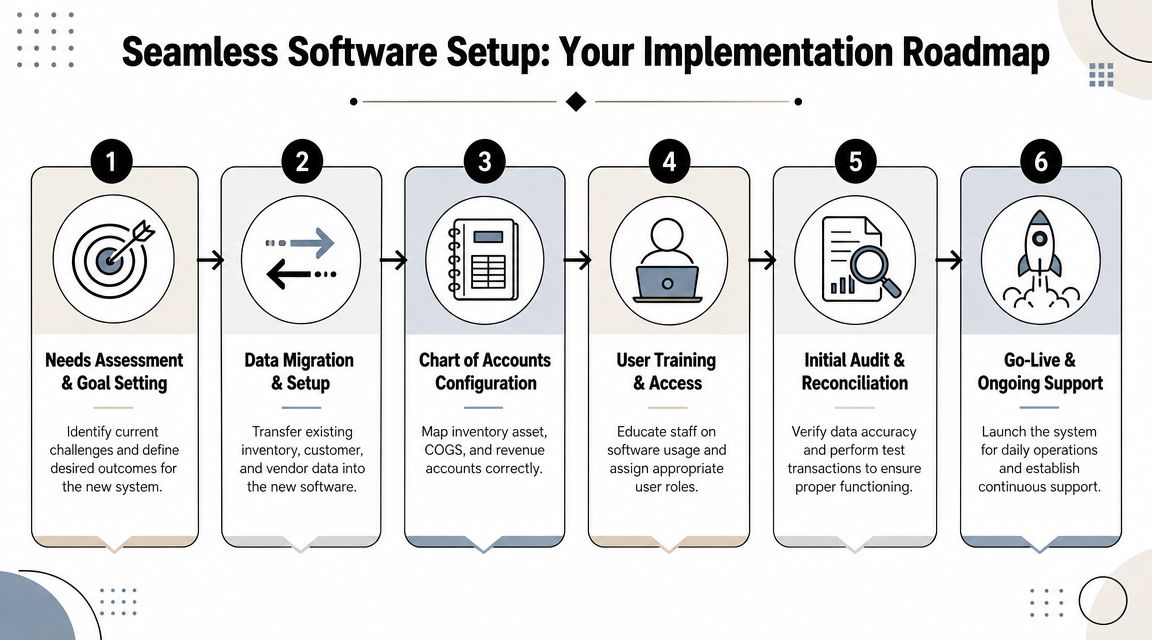
The setup steps that matter
A proper implementation starts with decisions, not data entry.
Define what inventory means in your business
Are you tracking resale goods, raw materials, job materials, medical supplies, or all of the above? If you can't define that clearly, your item list will become a junk drawer.Build the chart of accounts correctly
Inventory asset accounts, COGS accounts, revenue mapping, returns, and adjustments all need a home. Bad account structure creates reporting noise that lingers for years.Clean your item master
Duplicate SKUs, inconsistent naming, and vague descriptions make receiving and reporting harder than they need to be.
The opening balance trap
Your first inventory count matters more than most owners realize. That opening quantity and opening value become the foundation for everything that follows. If they're wrong, the software will happily produce polished nonsense.
Use a disciplined process:
- perform a physical count
- freeze changes while the count is finalized
- confirm units of measure
- verify item costs
- enter the opening balance carefully
- test a few transactions before going live
Garbage in still wins. Software just makes the garbage arrive faster.
Process beats software every time
After setup, your team needs rules. Not vague intentions. Rules.
| Process area | What must be defined |
|---|---|
| Receiving | Who records quantities, damages, and vendor discrepancies |
| Fulfillment | When inventory is relieved and by whom |
| Returns | How items come back into stock and at what value |
| Adjustments | Who approves shrinkage, spoilage, or write-offs |
| Counts | How cycle counts or full counts are performed |
Training matters too. If one employee knows the system and everyone else improvises, you don't have a workflow. You have a future correction entry.
Most inventory accounting failures don't start with bad software. They start with rushed implementation, loose permissions, bad item data, and no reconciliation habits. Fix those on day one, or you'll pay for them at year-end.
Why Your Software Is Useless Without an Expert Guide
Here's the hard truth. Software records transactions. It does not exercise judgment.
It won't tell you that your item setup is wrong, your chart of accounts is muddy, your workflow creates compliance risk, or your margins look inflated because inventory adjustments are masking operational problems. It definitely won't sit you down and explain why your books say you made money while your cash says otherwise.
Cheap plans get expensive in the real world
A lot of small-business tools hook owners with low entry pricing. That sounds smart until inventory features get pushed into premium tiers, or you need add-ons, or your staff starts doing manual reconciliations to fill the gaps. Often, the cost of cheap software shows up through workflow gaps, stockouts, data errors, and cleanup time, especially for businesses with more complex inventory needs, as noted in BILL's guide to small business accounting software.
That's why “low monthly cost” is a weak buying standard.
Compliance is where small businesses get blindsided
Most small businesses don't know everything required to stay compliant. That's not an insult. It's a fact of running a business while also trying to sell, hire, manage cash, and keep customers happy.
Inventory touches more than bookkeeping:
- sales tax handling
- purchase documentation
- returns and credits
- cost capitalization questions
- record retention
- payroll coordination when labor affects production or jobs
- tax law changes that affect reporting choices and year-end planning
You don't need panic. You need guidance.
A QuickBooks ProAdvisor helps with setup. A fractional CFO helps with decisions.
Those are different roles, and growing businesses often need both.
A qualified setup expert makes sure the file structure, inventory workflows, and reporting logic aren't crooked from day one. A fractional CFO goes further. They help owners understand margins, purchasing discipline, inventory turnover patterns, cash demands, and what the numbers show.
That matters because most owners don't need one more software login. They need someone who can answer questions like:
- Are we buying too much?
- Are project materials being captured correctly?
- Are our margins shrinking or just being reported badly?
- Which product lines help cash flow and which ones are a hidden drain?
- Are we ready for tax season, or are we about to hand our CPA a mess?
Good software stores the data. Good advisors stop the expensive mistakes.
My direct recommendation
If your business carries inventory, don't buy software first and ask accounting questions later. Decide how you need inventory to flow through purchasing, sales, returns, job costing, and financial reporting. Then choose the system. Then set it up properly. Then review the numbers with someone who knows what they're looking at.
That's how you stay compliant, keep your books clean, and use your financials as a management tool instead of a postmortem.
If your inventory, bookkeeping, and reporting don't line up, get help before the next month-end turns into another cleanup project. Bookkeeping and Accounting of Florida Inc. helps small businesses in Florida set up clean accounting systems, stay compliant, and make sense of inventory-heavy operations with bookkeeping support, tax guidance, QuickBooks ProAdvisor expertise, and fractional CFO insight.
