

You've got invoices going out, money moving through the bank, and maybe a payroll deadline approaching. Then someone asks for a profit-and-loss statement, and your “QuickBooks setup new company” project turns into a scavenger hunt through personal accounts, spreadsheet tabs, and a file nobody trusts.
Thank you for reading this post, don't forget to subscribe!That's the point where Jacksonville business owners discover that opening QuickBooks isn't the same as setting up accounting. A useful company file must reflect the legal entity, tax reporting, bank activity, payroll, customers, vendors, and the management questions your business has. The file is the foundation. The accounting design is what makes it dependable.
The Setup Most Small Businesses Get Wrong
Monday morning, the bank feed is connected, invoices are going out, and the owner thinks the QuickBooks setup is done. Two months later, payroll looks off, sales tax does not tie out, and nobody can answer a basic question about profit by service line. That is the setup small businesses get wrong. They build a file fast, then expect it to behave like a reporting system.
QuickBooks Online will let you create a clean company quickly. It also keeps each company separate. If you are starting another business, or cleaning up a mess by opening a fresh file for the right entity, follow Intuit's guidance on creating another QuickBooks company file. The software part is simple. The accounting design part is where owners get burned.

Where a weak setup actually bills you later
Bad setup rarely hurts on day one. It hurts when you need clean payroll reports, contractor records, sales tax detail, cash flow visibility, or support for an IRS question. Then you pay in cleanup hours, reclassified transactions, duplicate entries, missing support, and year-end drama. Cheap setup gets expensive fast. I have seen that movie too many times.
The IRS is plain about recordkeeping. Your system needs to clearly show income and expenses, and it needs support behind the entries, including invoices, receipts, paid bills, deposit slips, and canceled checks. Software is fine, but only if the records are complete, accurate, and accessible. Read The IRS recordkeeping guidance. It is a reminder that compliance starts with structure, not button-clicking.
Practical rule: Don't create the file until you know what the reports must prove.
A ProAdvisor-led setup treats QuickBooks as a financial-design project. That means we start with how the business runs. What do you sell. How do customers pay. Who gets paid through payroll, and who gets a 1099. Which liabilities need tracking every month. What does the owner need to see without guessing. That is where fractional CFO thinking belongs, right at setup, because the chart, workflows, and controls should serve management and compliance at the same time.
Different businesses need different reporting logic. A medical practice may need separate clinical and nonclinical revenue. A contractor may need job costing and tighter payroll discipline. A nonprofit may need reporting that separates restricted contributions from operating income. Churches and nonprofits can also benefit from specialized context in these Cloudvara church accounting tips.
QuickBooks stores transactions. A properly designed file tells the truth. That difference is the whole job.
Before You Click Create, Make These Decisions
QuickBooks uses information such as company name, industry, business type, and tax form to generate an initial structure and enable features. Those choices are convenient, but they aren't harmless defaults. Your first decisions influence the chart of accounts, tax reporting, management reports, and future cleanup.
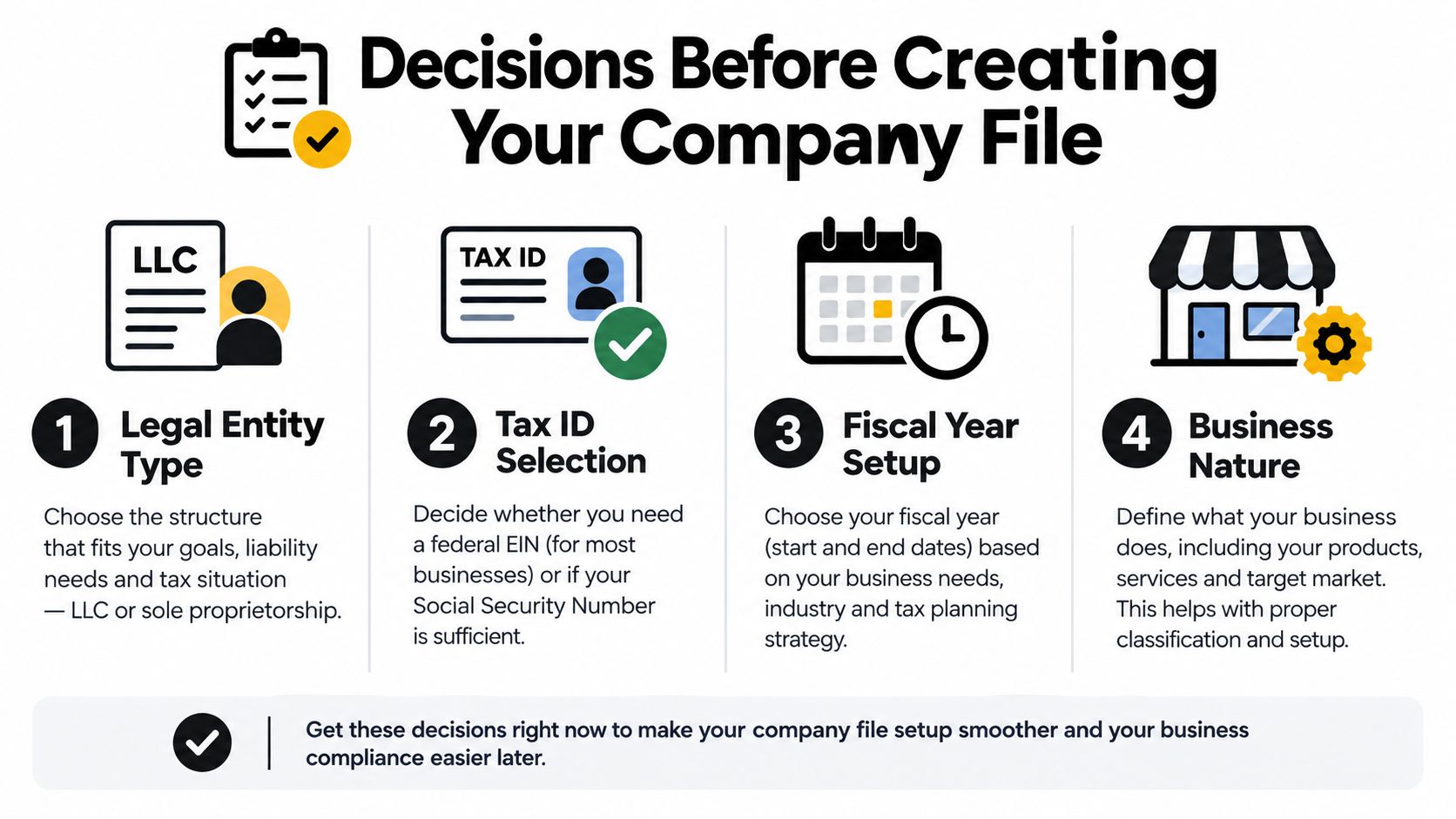
Start with the legal identity. Confirm whether the business operates as a sole proprietorship, LLC, S corporation, C corporation, nonprofit, or another structure. Then confirm the tax form and Employer Identification Number. The QuickBooks file should match the entity that owns the income, expenses, bank accounts, payroll, and tax obligations.
Write the setup decisions down
A Jacksonville business owner should settle these items before creating the company:
- Legal entity: Identify the entity whose books you're building. Don't combine separate businesses because the same owner controls them.
- Tax reporting: Confirm the tax form and jurisdictions that affect reporting.
- Reporting basis: Choose cash or accrual reporting deliberately. Your tax preparer and management needs should drive the choice.
- Fiscal year: Establish the reporting year before importing activity.
- Cutover date: Pick one date when the new file begins. Every opening balance and imported transaction must respect it.
- Business nature: Identify revenue streams, payroll, inventory, customer deposits, projects, jobs, restricted funds, or progress billing.
- Tracking dimensions: Decide whether locations, classes, customers, projects, or jobs will answer real management questions.
The cutover date deserves special attention. If you don't agree on when the new books begin, one person will enter historical transactions while another enters summarized balances. That's how duplicate income, expenses, receivables, and bank activity enter a file before the first monthly close.
The owner interview matters
Our ProAdvisor interview for Jacksonville clients is practical, not ceremonial. Healthcare operators need to explain how they separate services, providers, payroll, and locations. Construction companies need to describe jobs, subcontractors, materials, retainage, and progress billing. Retail owners need to identify sales channels and payment processors. Nonprofits need to clarify funds, grants, programs, and reporting obligations.
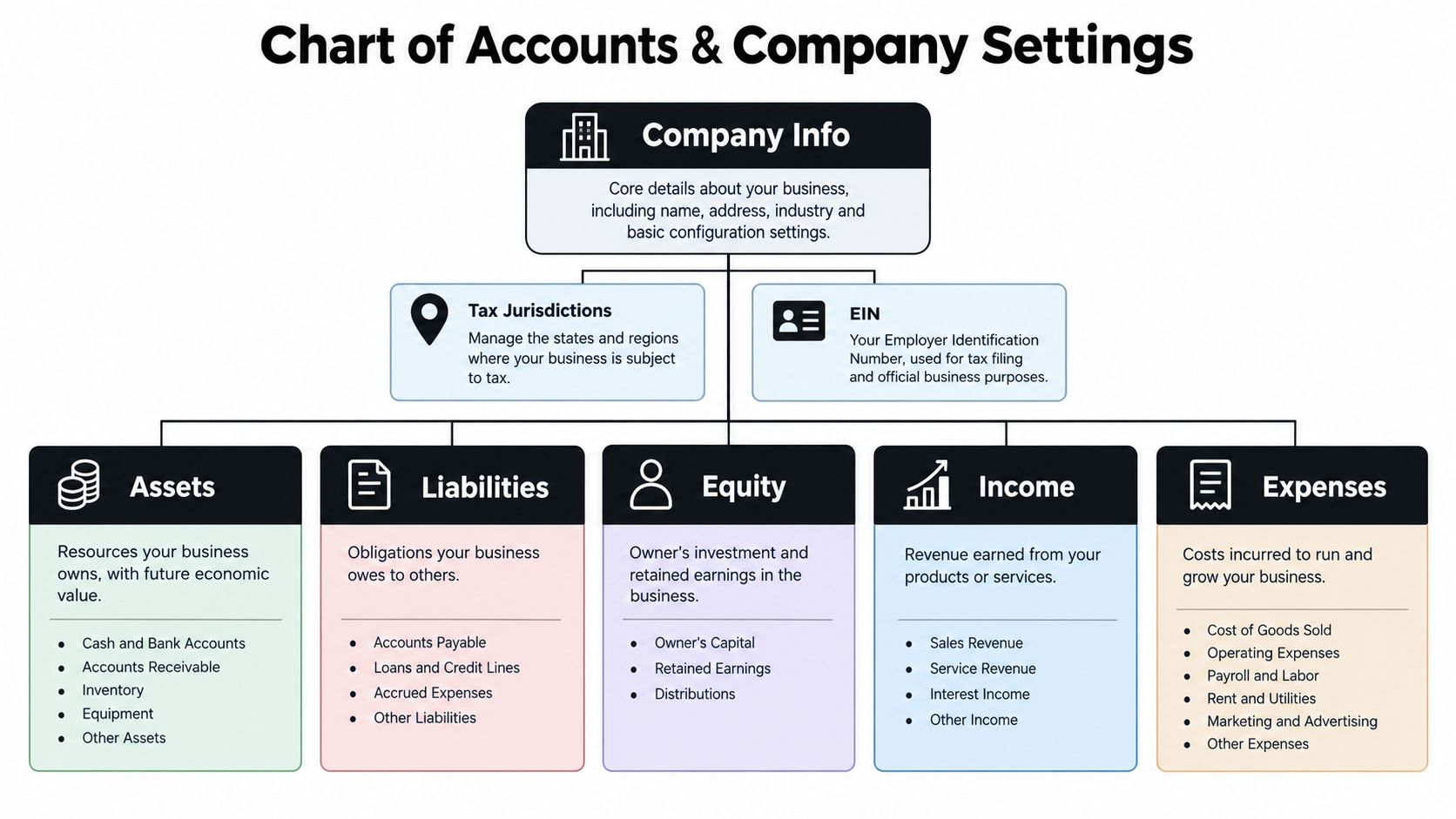
QuickBooks Online automatically customizes the initial chart of accounts based on the selected business entity. New accounts are created through Accounting > Chart of accounts > New, where you enter the account name, type, detail type, and optional parent-account structure. Intuit's chart of accounts guidance explains the mechanics. The ProAdvisor's job is deciding what the company needs before those mechanics begin.
Building the Chart of Accounts and Company Settings
A chart of accounts isn't a junk drawer. It's the reporting skeleton for the business. If you create an expense account every time someone asks where a receipt goes, the profit-and-loss statement becomes long, repetitive, and hard to manage. If you create too few accounts, important differences disappear.
Configure the company profile with the legal company name, address, EIN, fiscal year, tax settings, and applicable jurisdictions. Then build the chart around actual reporting requirements. Use account types and detail types consistently, and document naming conventions so another bookkeeper can understand the file without calling you during dinner.
Customize with restraint
Subaccounts can be useful when management needs detail under a broader category. They become counterproductive when every vendor, location, or minor purchase gets its own branch. Use classes, locations, projects, and customers when they produce a report someone will review.
A construction company may need job-level profitability. A healthcare practice may need service-line reporting. A nonprofit may need fund-oriented reporting. Those needs belong in the design conversation, not in a last-minute cleanup after the first tax return. For another perspective on fund-oriented structures, review this CEFCore church fund setup resource.
Your bank-feed plan matters just as much as the account list. Decide which bank and credit-card accounts belong to the company, how transfers will be handled, which rules are safe to automate, and who reviews downloaded transactions. Don't connect every account just because QuickBooks offers a connection. A bank feed imports data. It doesn't know whether a payment is a loan principal reduction, an owner distribution, a reimbursable expense, or a personal purchase.
Use a naming convention that works across entities. If the same owner operates multiple businesses, similar names can create confusion in dashboards, downloaded reports, and shared accountant access. The file name, company profile, bank accounts, vendors, and customers should make the legal separation obvious.
For a hands-on reference, keep this guide to setting up a chart of accounts in QuickBooks available while you work. Then have an accounting professional review the result before connecting feeds or importing transactions. A clean account list saves time every month. A poorly designed one keeps charging interest through every report.
Opening Balances, Bank Feeds, and First Reconciliation
Friday afternoon in Jacksonville, the owner wants reports by Monday, the bank feed is live, and QuickBooks looks busy. Busy is not the same as right. Opening balances decide whether your file becomes a decision tool or a very expensive junk drawer. We treat this step like financial design, because the numbers you load here drive reporting, lender questions, sales-tax reviews, and cleanup costs later.
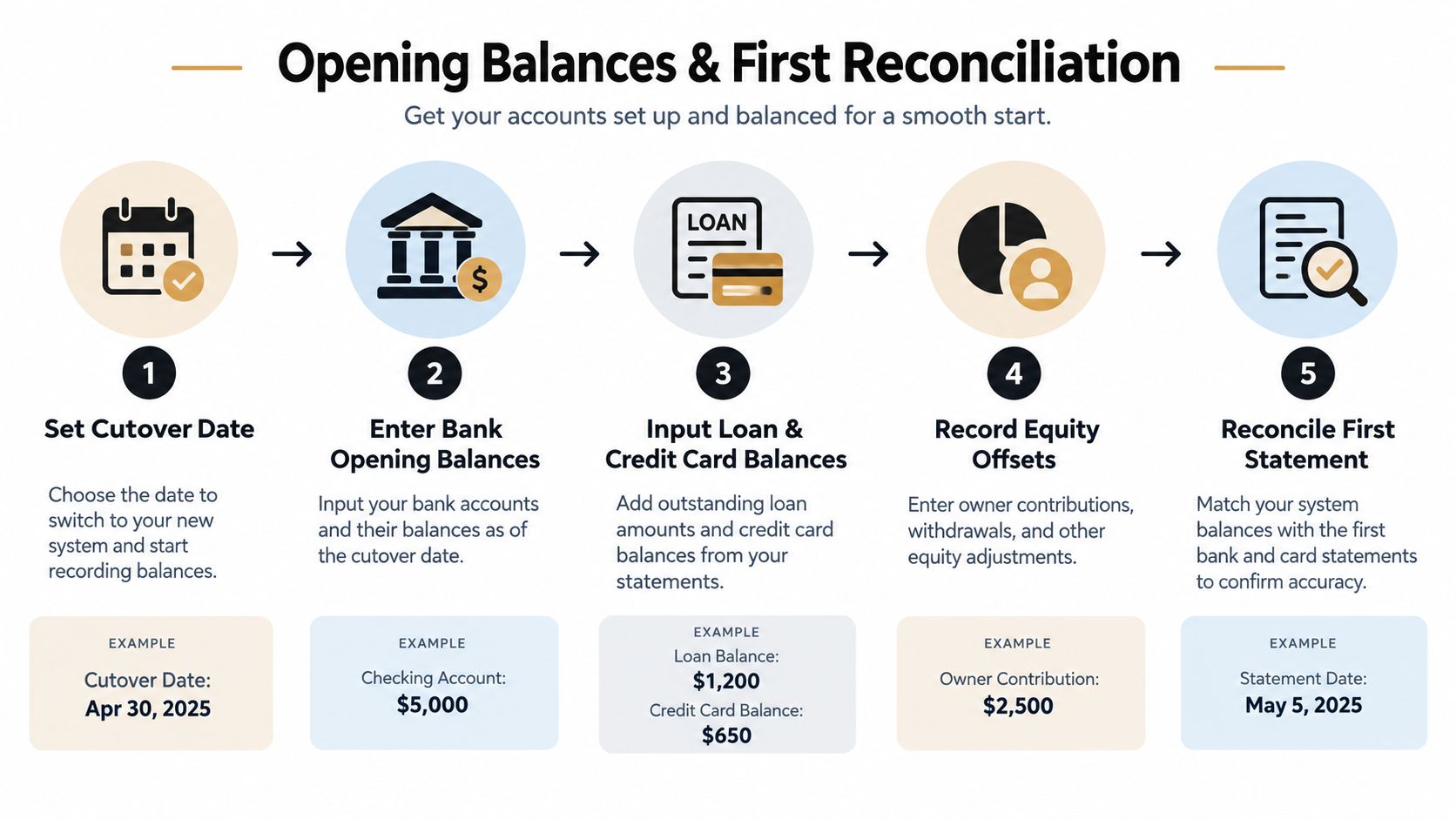
QuickBooks records each opening amount as of a specific date, and it may send the other side to Opening Balance Equity. Get the date wrong, use the wrong account type, or mix summary balances with detailed history, and your balance sheet starts lying on day one. QuickBooks' opening balance guidance explains the mechanics. A ProAdvisor's job is to make sure the mechanics match the business reality.
For each bank, credit-card, liability, asset, and equity account, use the agreed start date and keep the statement, reconciliation, or loan record that supports the number. For a new bank account, use the date the account opened. For an existing account, use the beginning date of the next statement period. Then stop and check the whole conversion map before anyone starts coding transactions.
Use one cutover date
Pick one cutover date and defend it. If you enter a fixed asset as an opening balance, do not also record the original purchase inside the same opening period. If you import old bank activity, do not load a summary opening balance that covers that same history. That is how one truck becomes two trucks, one credit-card charge becomes two expenses, and one messy month turns into a year of nonsense.
Watch for the usual wrecks:
- Wrong cutover date: The opening balance does not match the first statement period.
- Duplicated bank activity: Imported transactions overlap with manual entries or converted history.
- Unexplained equity: Opening Balance Equity sits there because nobody cleared the offset properly.
- Forced reconciliation: Someone changes the book balance to match the bank instead of identifying timing items.
- Ignored liabilities: Payroll taxes, loans, credit cards, and undeposited funds do not tie to source records.
Good setup supports a daily bookkeeping rhythm. It should be easy to record transactions, keep source documents, and review exceptions before they pile up. Its recordkeeping guidance is useful for keeping that discipline in place.
Apply a three-way quality check
Before we call a file ready, we test three things. The opening trial balance must balance. Every bank and credit-card account must agree to an outside statement. A sample of imported transactions must trace back to invoices, bills, receipts, deposit detail, or other support.
Then reconcile the first statement and document the conversion period. Use this bank reconciliation guide if you want the step-by-step process. If the file includes payroll liabilities, loans, fixed assets, or multiple entities, get a professional review before you trust the reports.
Customers, Vendors, Payroll, and Integrations
Once the accounting structure is sound, the operating layer needs discipline. Import customers and vendors with clean names, addresses, tax information, payment terms, and contact details. Don't create three vendor records because three employees entered the same subcontractor's name differently. Duplicate records make bills, payments, and year-end reporting harder to trust.
Sales-tax settings should reflect the business's actual obligations and sales process. Payroll should connect to the correct expense and liability accounts, with employee records, pay schedules, tax details, and prior payroll information reviewed before the first run. Payment processors, e-commerce platforms, customer relationship management tools, and time-tracking systems also need a defined flow into QuickBooks.
A CRM integration can help connect customer activity to accounting, but only when someone decides which data belongs in each system. This resource on integrating QuickBooks with CRM offers useful context for thinking through that connection.
Don't misread the 1099 change
For payments made after December 31, 2025, the federal information-reporting threshold for certain business payments rises from $600 to $2,000 for calendar year 2026. The change affects whether a business must issue Forms 1099-NEC or 1099-MISC and whether backup withholding rules apply. The IRS employment-tax recordkeeping guidance explains the threshold change.
That does not mean you can stop tracking contractor payments. Classify contractors, vendors, reimbursements, and other payees correctly. Collect taxpayer identification information where required, separate personal payments from business expenses, and review the vendor report before year-end. A higher threshold doesn't repair a bad vendor list or an expense coded to the wrong account.
Our setup work for Northeast Florida clients focuses on clean connections. Healthcare practices need payroll and service revenue to land in usable reports. Contractors need labor, subcontractor costs, and jobs to remain visible. Nonprofits need contributions and operating expenses organized for their reporting responsibilities. If you need help with the payroll side, use this guide to set up payroll for a small business, then have the finished configuration reviewed.
Why Faster Setup Is Not Better Setup
You can open a new QuickBooks file in an afternoon. Then six weeks later you are staring at a profit-and-loss that says one thing, your bank balance says another, and your CPA is asking why a truck, a loan payment, and the owner's personal swipe all landed in expenses. Fast setup creates that mess every day.
QuickBooks can pull bank activity, suggest categories, and automate routine entries. Use those features. Just don't confuse speed with design. Software can import transactions, but it cannot choose your accounting policy, decide how owner activity should be treated, or cleanly separate revenue streams that need different reporting.
We see this with Jacksonville clients all the time. A contractor buys equipment and books it to office supplies. A medical practice mixes clinical income with retail sales. A nonprofit drops restricted funds into ordinary revenue. The file still “works.” The reports do not.
A working file isn't a defensible system
A defensible setup gives you consistent coding, document support, reconciled balances, permission controls, approval flow, and reports that match how you run the business. That is the standard.
It matters when you are setting prices, hiring, applying for financing, checking why cash is tight, or answering tax questions. Pretty numbers inside QuickBooks do not help if deposits are incomplete, liabilities are buried, or expenses are sitting in the wrong buckets. We build setups to survive scrutiny, not just data entry.
The fastest setup is the one that doesn't make you rebuild the books later.
This is why I treat setup as financial design work. A ProAdvisor should build the file around decisions the owner needs to make. A fractional CFO adds the layer many small businesses skip. That senior review covers cash flow, unusual results, internal controls, deadlines, and whether the reports support pricing, payroll, borrowing, and growth decisions.
The IRS does expect businesses to keep records that clearly show income and expenses and to maintain the forms and supporting documents tied to those records. An accounting professional helps you meet that expectation and keep the books explainable under IRS guidance on professional accounting oversight.
Why every growing company needs senior guidance
You do not need a full-time CFO to get senior financial judgment. You do need someone who can look past imported transactions and ask better questions. Are margins real? Are liabilities complete? Is cash collection slipping? Are payroll and tax items landing where they should?
That is why the ProAdvisor plus fractional CFO model works so well for growing Jacksonville companies. We build the QuickBooks environment, review what the numbers are saying, and fix weak spots before they turn into year-end pain. The owner gets usable reporting, cleaner compliance, and fewer expensive surprises. That beats a quick setup every single time.
Your 30-60-90 Day Plan and How We Stay With You
A strong QuickBooks setup should produce a working operating rhythm, not a one-time file handoff. Use the first 30 days to finalize the company profile, legal and tax information, chart of accounts, cutover date, opening balances, bank connections, payroll settings, and first reconciliation. Keep the source statements and supporting documents with the conversion work.
During days 31-60, review the reports people will use. Confirm that classes, locations, jobs, projects, customers, products, payroll liabilities, and payment processors are producing useful information. Remove unnecessary accounts and correct transactions that reveal a design problem. This is the point at which a contractor discovers whether job costs are visible and a healthcare practice confirms whether service lines report cleanly.
Move into a monthly close
By days 61-90, the company should have a recurring close process. That process includes transaction review, bank and credit-card reconciliation, payroll-liability review, accounts receivable and payable checks, document collection, financial-statement review, and a fractional CFO discussion about cash flow and unusual results.
The IRS requires records that clearly show business income and expenses and ordinarily include accounting journals and ledgers. The IRS generally recommends retaining ordinary tax records for at least three years, while employment-tax records generally require four years. The IRS small-business recordkeeping guidance explains those retention expectations.
Bookkeeping and Accounting of Florida Inc. provides QuickBooks setup and maintenance, bookkeeping, payroll, tax preparation, internal and independent audits, reviews, healthcare accounting, forensic audits, and flexible fractional CFO services for businesses in Jacksonville and Northeast Florida. The firm works with healthcare, construction, retail, nonprofit, and other growing companies that need accurate financials, compliance support, and practical reporting. As certified QuickBooks ProAdvisors, the team can configure new QuickBooks Online, Desktop, or Enterprise files and transfer relevant information from another accounting system while keeping the new structure clean.
A clean close is cheaper than a year-end fire drill.
Staying engaged with an accounting firm also gives the owner a place to ask the questions that software can't answer. Which records are required? Is the vendor classified correctly? Does payroll liability agree with the filing? Should a cash-flow problem change hiring, pricing, or payment terms? Most small businesses don't know every obligation they've taken on, and they shouldn't have to learn by receiving a notice.
The practical path is straightforward. Build the file around the business, reconcile it against source records, review the reports with someone who understands the operations, and keep professional oversight in place as the company changes.
Bookkeeping and Accounting of Florida Inc. can set up your new QuickBooks company file, organize payroll and integrations, establish reliable reconciliations, and provide fractional CFO guidance after the setup is complete. Visit Bookkeeping and Accounting of Florida Inc. to schedule a consultation and turn your QuickBooks file into accounting you can use.