
Payroll processing is the recurring system an employer uses to calculate wages, apply required deductions, pay workers, and report and remit employment taxes, and it is a control function, not just paycheck printing. For 2026, Social Security tax stops at $184,500 of an employee's wages, while Florida reemployment tax applies only to the first $7,000 per employee at a rate from 0.1% to 5.4%.
Thank you for reading this post, don't forget to subscribe!It's Thursday night in Jacksonville. The crew is gone, the clinic is closed, or the nonprofit board packet is due, and you're still matching a spreadsheet to a shoebox of receipts. Someone's hours look off. A subcontractor invoice is sitting in the same pile as W-2 wages. You tell yourself you'll fix the tax piece after payday.
That habit is how good owners get into bad payroll. The paycheck can be right and the filing still wrong. The deposit can clear and the return can still be late. Software will multiply whatever you typed. It won't decide who belongs on payroll, which hours are overtime, or which state tax you aren't allowed to pull from a worker's check.
If you've never had a CPA walk the register against the bank and the tax accounts, you're guessing. Most small businesses don't know the full list of what payroll requires, and the penalties don't care that you were busy.
What Payroll Processing Really Means for a Small Business
Start with that owner and the shoebox. Pay went out. Nobody can say, a month later, which hours were approved, which deductions were elected, or which dollars were employer tax rather than net pay. That's not a bookkeeping style. That's a missing system.
Payroll processing became a national legal duty with the Social Security Act, signed August 14, 1935. The law built a payroll-tax way to fund old-age benefits and required withholding so employee contributions moved into the Social Security Trust Fund. Taxes were first collected in January 1937. Under the original setup, employees and employers each paid 1% of covered earnings up to a $3,000 wage base, with the rate scheduled to rise to 3% on each side by 1949, according to the Social Security Administration's history of budget treatment.
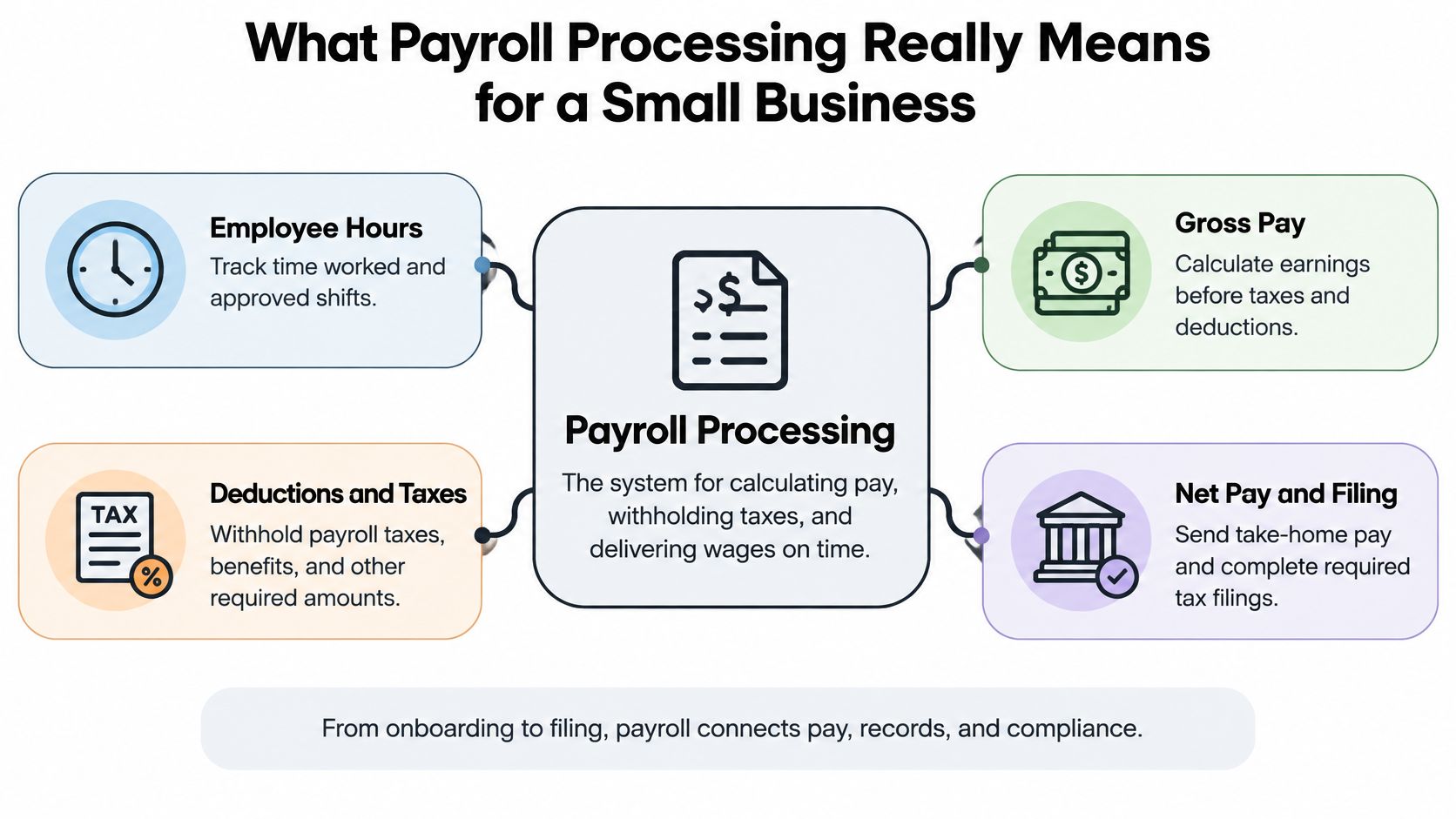
That history is why what is payroll processing isn't a software feature. Each run ties compensation records to withholding, employer contributions, government reporting, and benefit funding.
The four pieces that keep it honest
Accuracy rests on four things, and skipping one breaks the others.
- Dependable employee data: Legal name, tax elections, pay rate, and classification have to match the person you hired.
- Correct wage calculations: Hours, salary, overtime, tips, and differentials have to land in gross pay before anyone touches a tax table.
- Timely tax deposits: Employee withholding and employer tax have to leave your account on the schedule the IRS assigned you.
- Organized records: Registers, filings, and payment confirmations have to survive a question from a worker, a lender, or an auditor.
Practical rule: If you can't trace one paycheck from approved hours to the general ledger and the tax confirmation, you don't have payroll processing. You have a payment.
The rest of this guide walks the cycle, the 2026 federal changes, Florida's reemployment tax, classification risk, fraud controls, and when a CPA or fractional CFO should own the process instead of a subscription alone.
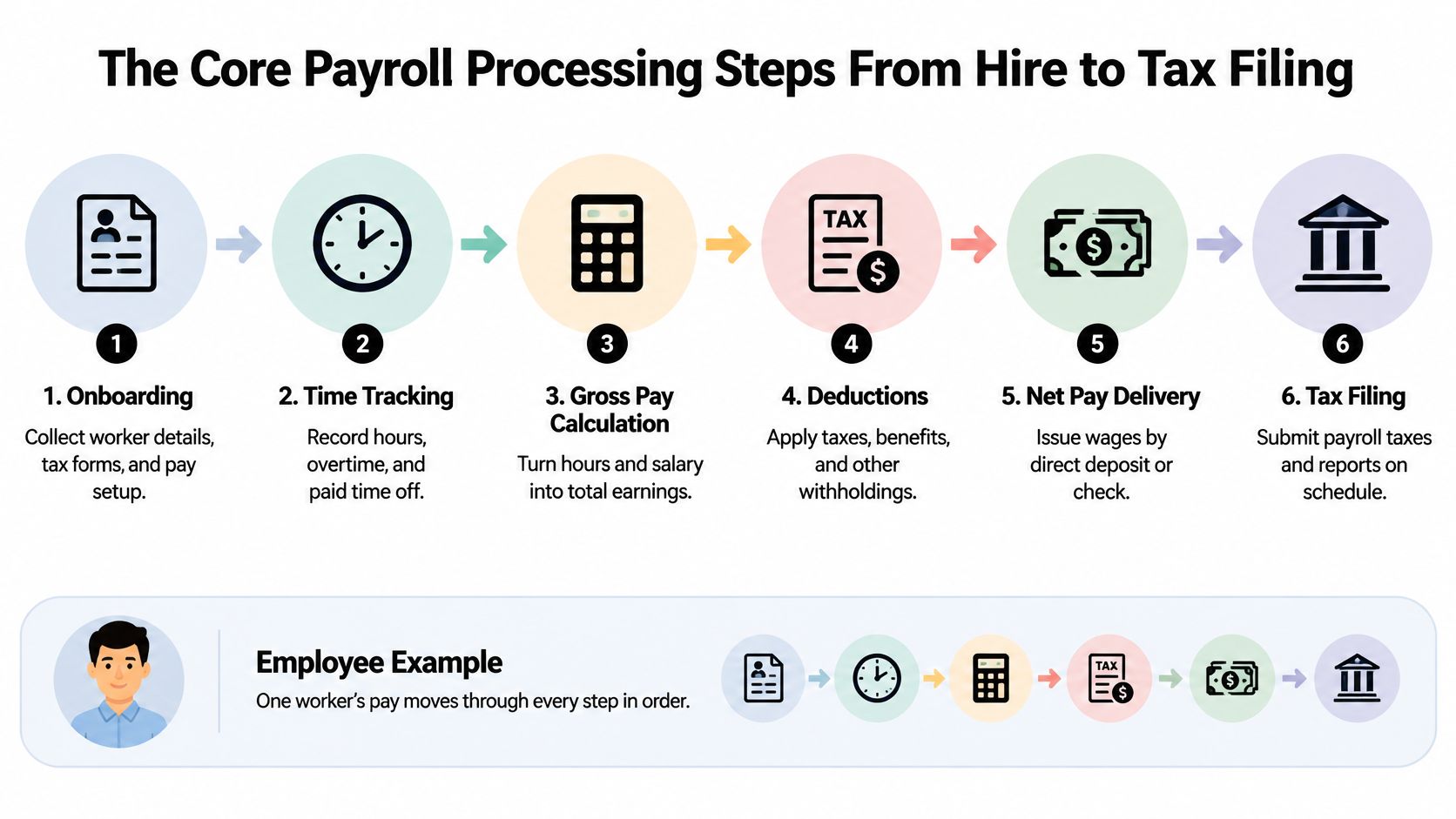
The Core Payroll Processing Steps From Hire to Tax Filing
Take one worker, a medical assistant on a Jacksonville clinic's biweekly payroll. The same order applies to a laborer or a nonprofit program coordinator. Skip a step and the later math can't save you.
Before the first check
Onboarding is a classification decision, not a form dump. You decide whether this person is an employee or a contractor, collect withholding elections, and lock the pay rate. Time capture comes next. Approved hours, overtime, paid time off, tips, and shift differentials have to be in the file before gross pay is calculated. A missing punch isn't a rounding error. It's wages you may still owe.
Gross to net, then the books
Gross wages come first. Employee withholding elections apply next. You compute employee and employer Social Security and Medicare taxes, account for federal income-tax withholding, and only then produce net pay. That net amount is what hits the bank. The gross, the taxes, and the deductions hit the general ledger as expense and liability. If those two stories don't match, your financials are lying even when the worker got paid.
Deposit is not the same job as the return
Employers generally must deposit federal income tax withheld plus both shares of Social Security and Medicare. Those federal deposits must be made electronically, on a monthly or semiweekly schedule set each year. Making the deposit doesn't satisfy the return. Most employers who withhold file Form 941 quarterly, and deposit timing follows the assigned schedule and the payment dates, per the IRS rules on depositing and reporting employment taxes.
Before you close the period, match three things.
- The payroll register to the bank-funded net payroll.
- The tax-liability accounts to what the register says you owe.
- The electronic confirmations to both of those figures.
That trail catches duplicate employees, a bad tax setup, an off-cycle run, and a cash mismatch before the quarter locks.
Federal Payroll Taxes and the 2026 Rules That Changed
Social Security is financed mainly by a combined payroll-tax rate of 12.4% on covered earnings, 6.2% from the employee and 6.2% from the employer, up to the annual wage limit. Medicare sits in the same federal employment-tax frame. Federal income-tax withholding follows the worker's filing status, income, deductions, and credits. The rate didn't always look like this. It moved from 3% in 1950 to 12.4% in the modern system, which is the plainest evidence that payroll obligations grow rather than shrink, as the National Archives account of Social Security financing lays out.
You stay liable for those taxes even when a payroll service keys the checks. A provider is an agent. The IRS still looks at the employer.
What 2026 actually changed
For 2026, you withhold Social Security tax only up to $184,500 of an employee's annual wages. IRS Publication 15-T picks up withholding-table changes from Public Law 119-21, including the permanent extension of individual tax rates, the permanent increase in the standard deduction, and the end of personal exemptions. Last year's software settings are not a compliance plan. IRS Publication 505 is the reference for how those withholding rules fit together, and a bookkeeping team should update the calc, reconcile the liability, and document that the procedure matches current law.
| Item | 2026 Figure | Who Pays |
|---|---|---|
| Social Security combined rate | 12.4% (6.2% + 6.2%) | Employee and employer, up to the wage limit |
| Social Security wage limit | $184,500 | Withholding stops above this for the employee |
| Withholding tables | Publication 15-T under Public Law 119-21 | Employer applies employee elections |
| Medicare and income-tax withholding | Part of the federal employment-tax frame | Employee withholding, employer Medicare match, employer remits |
Watch the wage-base cutoff in cash planning. Once a higher-paid employee crosses $184,500, the 6.2% employee share and your 6.2% match both stop for Social Security. Medicare doesn't follow that cap. If your forecast still accrues Social Security all year, you'll overstate labor cost in the back half and wonder why cash looks better than the budget.
Owners who want the filing side in one place should read our note on the payroll tax deposit schedule. Year-end W-2s are a separate control. If your forms are inconsistent, browse W-2 document templates and compare them to what your register supports before you file.
Outdated tax tables don't create a small error. They create a wrong liability on every check until someone notices.
Florida Reemployment Tax and Quarterly Filing Deadlines
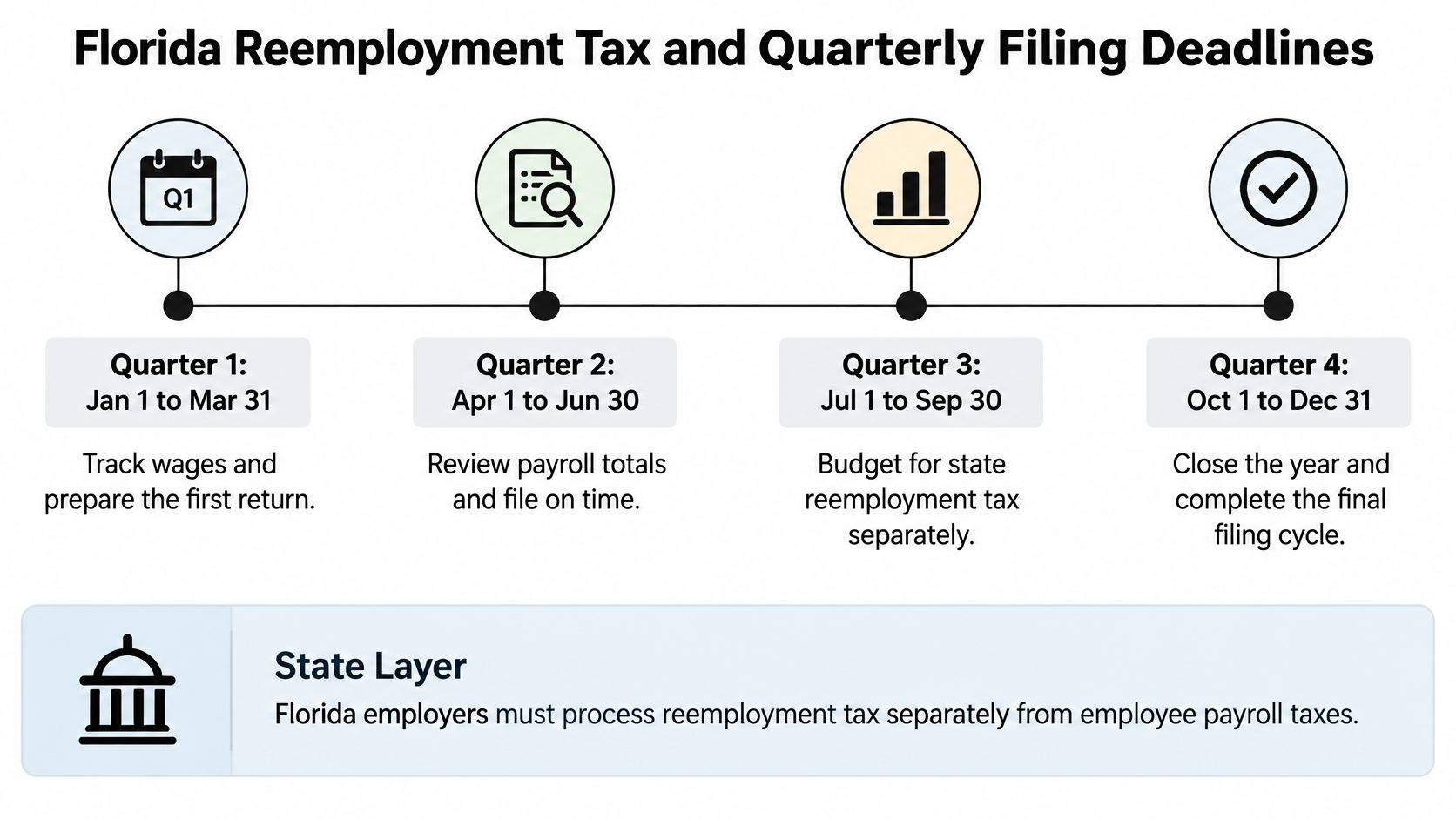
Florida reemployment tax is not a deduction. Workers don't pay it, and you may not take it out of their pay. You budget it as an employer cost, separate from federal withholding.
The tax hits only the first $7,000 of wages you pay each employee in a calendar year. For 2026, the stated rate range is 0.1% to 5.4%, which is $7 to $378 per employee on that wage base. A new employer generally starts at 2.7%. The Florida Department of Revenue's reemployment tax page is the rate source, and Jacksonville and Northeast Florida employers miss it constantly because national payroll blogs never mention it.
How the wage base actually behaves
Track cumulative taxable wages by employee. Apply your assigned rate. Stop when that person hits $7,000.
A new employer at 2.7% owes $189 on a worker who earns at least the wage base ($7,000 times 2.7%). A minimum-rate employer owes $7. A maximum-rate employer owes $378. Same employee, same wages, wildly different cash. If your software keeps accruing after the threshold, you're reserving money you don't owe and distorting job cost.
The RT-6 calendar
The quarterly RT-6 report and payment are due April 30, July 31, October 31, and January 31 for the preceding quarter. The report is due on the first day of the month after the quarter ends and is late if it isn't postmarked by that month's last day. Employers that had 10 or more employees in any quarter of the preceding state fiscal year must file wage data and pay electronically. Those deadlines and the electronic rule are on the Florida reemployment tax return and payment page.
Build a simple close for each quarter.
- Count employees against the 10-employee electronic threshold before you assume a paper filing is allowed.
- Accrue the tax in the general ledger as an employer expense, never as a payroll deduction.
- Stop the calc employee by employee at $7,000 and tie the accrual to the RT-6.
- Keep the confirmation with the payroll register so a later question doesn't depend on someone's memory.
Worker Classification and the Compliance Risks Software Cannot Fix
Buying payroll software doesn't classify your workers. It calculates whatever status you assigned. If that status is wrong, the direct deposit is just a faster mistake.

Most explainers stop at gross pay, deductions, net pay, deposits, and filings. They skip the decisions that actually move the number. Employee versus contractor. Overtime. Breaks. Tips. Job-specific records. That gap hits construction, healthcare, and the trades hardest, because those shops live on subcontractors, shifts, and hours that change every week.
A 2025 Maryland workplace-fraud report identified 6,896 misclassified workers and more than $174.1 million in unreported wages. That's not a paperwork quibble. It's a liability, documented in the Maryland Workplace Fraud Task Force annual report. Florida contractors and clinics face the same fact pattern even when the headline is from another state.
What the software can't repair
Wage theft isn't one trick. It includes unpaid minimum wage or overtime, tip theft, misclassification, payroll fraud, and missing required breaks. Accurate processing can't fix incomplete time records, a bad classification, or a deduction nobody authorized. That's governance, and it sits upstream of the payroll run.
Ask three questions before you add anyone to a pay run, and read our breakdown of 1099 versus W-2 worker classification before you answer the first one.
- Who belongs on payroll? Control over the work, not the worker's preference for a 1099, decides it.
- What pay must be in gross? Hours, prevailing project labor, tips, and differentials, not just the base rate.
- What evidence do you keep? Approved time, classification notes, and the deduction authorization.
A tipped server, a prevailing-wage laborer, and a "contractor" who works your shifts under your foreman are three different files. Treating them as one export is how owners get surprise assessments.
The Department of Labor's short briefing on small-business wage rules is worth 15 minutes if you still think headcount protects you.
In-House Payroll vs Outsourced Payroll vs a CPA-Managed Process
Payroll files hold bank accounts, tax identifiers, pay rates, and sometimes health deductions. That's a high-value personal-data system, not a shared spreadsheet. NIST's payroll cybersecurity checklist tells you to define permissions by role, apply least privilege, limit privileged admins, review access regularly, and protect audit logs.
The person who prepares payroll shouldn't also change master data, approve the run, and release the money. Use dual approval on bank-account changes and on submission. Protect logs of rate and deduction edits. Write down cutoff times. Reconcile headcount and year-to-date totals on a schedule. For a small employer, the minimum that works is quarterly access recertification, split prep and approval where you have the staff, multi-factor authentication, encrypted transmission, and retention of registers, filings, confirmations, and change history.
Three ways owners actually run it
| Approach | Typical Cost Profile | Compliance Risk | Owner Time Required |
|---|---|---|---|
| In-house with software | Lower vendor fees, high hidden owner hours | High if classification, Florida tax, or deposits are DIY | Highest, every cycle |
| Payroll service alone | Subscription plus per-employee fees | Medium, you remain liable and controls may be thin | Medium, you still review and fund |
| CPA-managed process | Professional fees, fewer penalty and cleanup costs | Lower when books, tax, and payroll share one close | Lowest day to day |
A service that only prints checks won't challenge a 1099 that should be a W-2, won't tie reemployment tax to the ledger, and won't tell you the labor margin on a job. That's the gap.
Bookkeeping and Accounting of Florida Inc. is a locally owned CPA firm in Jacksonville with more than 20 years across healthcare, construction, retail, and nonprofits. The work covers payroll, bookkeeping, tax preparation, audits, and fractional CFO services. As certified QuickBooks ProAdvisors, the team keeps the books tied to the payroll register so year-end isn't a reconstruction project. That's one option next to in-house software and a standalone payroll bureau. Pick it when you want the register, the liability accounts, and the filings in one set of hands.
Before you choose, check four things. Who can change a bank account. Who approves the run. Who owns Form 941 and the RT-6. Who explains a variance before the money moves. If the answer to all four is "me, when I have time," you don't have a process.
Payroll Fraud, AI, and the Controls That Actually Protect You
The question that matters now isn't how payroll math works. It's how you keep a bad run, or a criminal, from moving the money.
The IRS has warned about schemes where criminals impersonate executives and ask for employee W-2 or Social Security data. 2026 guidance flagged AI-enabled impersonation as an emerging version of that trick. A polished email that sounds like you is not a reason to send a wage file.
There's a human cost on the compliance side too. The U.S. Department of Labor recovered more than $259 million in back wages for nearly 177,000 workers in fiscal year 2025, about $1,465 per worker. At the same time, an industry survey found roughly one-third of payroll teams using AI for data entry, error detection, or compliance work, with more employee self-service, pay-on-demand, and chatbots planned. Those figures are summarized in Thomson Reuters' piece on why treating payroll as easy is costing companies.
Automation speeds up whatever you failed to check
AI can cut repetitive keying errors. It can also push a wrong rate to every employee before lunch, or expose W-2 data through a chatbot nobody governed. Self-service and pay-on-demand raise the same issue. Faster payment with weak approval is just a faster loss.
Run this before every cycle. It takes less time than explaining a bad file to the bank.
- Segregate duties: The preparer doesn't approve, and the approver doesn't edit master data in the same sitting.
- Read a variance report: Headcount, hours, and gross pay versus the last run, with a name on every exception.
- Call back bank changes: Use a known phone number, not the number in the email that requested the change.
- Lock W-2 and Social Security data: No executive-looking request gets a file without a second, out-of-band confirmation.
- Document the approval: Date, person, and what they reviewed, kept with the register.
A callback on a bank change is the cheapest control you'll ever run. Skipping it is how payroll fraud actually clears.
If your team is small, you can still split the moment. You prepare on Tuesday. A second person, or your CPA, approves on Wednesday. Nobody releases funds from the same login that edited the rate.
Turning Payroll Data Into Decisions With Fractional CFO Support
Clean payroll is the richest labor-cost file you own. Most owners use it once, to pay people, then ignore it until a lender or a tax notice asks a question.
The Fair Labor Standards Act requires covered employers to pay eligible employees at least one and one-half times their regular rate for hours over 40 in a workweek, and to keep time and payroll records. The Department of Labor is explicit that small businesses don't get a special exemption. Coverage can reach enterprises with at least $500,000 in annual sales, or an individual employee engaged in interstate commerce. Size alone doesn't get you out, which the Department of Labor's small-business compliance page states directly. You classify correctly, capture compensable time, compute overtime on the right regular rate, and keep the records. Owners often don't know which of those rules hit their shop. That's the compliance hole, and it's why a bookkeeping and accounting relationship beats another login.
What the numbers should do next
Once the register is trustworthy, a fractional CFO turns it into decisions you can't get from a payroll app.
- Labor-cost forecasts: Hours and rates by job or provider, not a single lump called "payroll."
- Margin analysis: Which clinic service, which construction job, which program actually covers its labor.
- Hiring plans: What the next employee does to cash before you post the ad.
- Cash timing: Deposits, the RT-6, and net pay on one calendar so payday doesn't surprise the operating account.
Every growing company needs that guidance. A full-time CFO is the wrong cost for most Jacksonville employers. Fractional CFO services give you senior planning, cash-flow management, and a deadline calendar without the full-time salary. You stay liable for employment taxes no matter who clicks submit. A firm that ties payroll records to the general ledger means you aren't interpreting every federal and Florida rule alone.
Don't wait for the quarter to close with a mystery liability. Book a payroll and compliance review, confirm classification, tax setup, deposit timing, and bank-change controls, and put a second set of eyes on the next run before it funds.
Bookkeeping and Accounting of Florida Inc. handles payroll, bookkeeping, tax filings, and fractional CFO guidance for Jacksonville and Northeast Florida employers who are done guessing at classification, deposits, and labor cost. If your register, your Florida reemployment tax, and your cash forecast don't tell the same story, that's the gap we close. Visit Bookkeeping and Accounting of Florida Inc. and schedule a payroll review before the next quarter locks.