
Tuesday in March has a familiar rhythm. An office manager is matching bank deposits, a physician is asking why last month's revenue still shows as pending, and the owner is exporting payroll reports again because nobody trusts the first file. Across Jacksonville, the same pattern appears in remodeling companies, medical practices, nonprofits, and family-owned businesses. People are working hard, but the accounting workflow depends on spreadsheets, inbox searches, repeated data entry, and someone remembering the next step.
Thank you for reading this post, don't forget to subscribe!That system is more than inconvenient. In 2026, tax reporting changes make incomplete vendor, payroll, and payment records a compliance problem, not merely an administrative nuisance. The 1099-NEC threshold for payments made in 2026 rises from $600 to $2,000, while qualified tips and qualified overtime compensation must be separately reported to workers on applicable Forms W-2 or 1099-NEC, as explained by the IRS payroll information and Grant Thornton's 2026 business tax planning guide.
Accounting process automation gives owners a cleaner alternative. It moves routine work into connected, controlled workflows, then puts a CPA or fractional CFO in charge of reviewing exceptions, protecting controls, and turning financial data into decisions. Software handles repetition. Experienced people handle judgment.
The Month-End Close That Never Ends
A Jacksonville dental clinic starts each month matching insurance deposits to patient accounts, checking co-pay activity, and rebuilding payroll support. A subcontractor-led remodeling company chases invoices from job sites, assigns costs to projects, and searches for missing W-9 information. A nonprofit reconciles restricted grant revenue while assembling a board packet from separate spreadsheets.
The owners are working. Their workflow is failing. Staff download, rename, copy, email, enter, review, correct, and re-enter the same transaction. A missing receipt can stall a reconciliation. An unclear approval can leave a bill buried in an inbox until someone asks for it.
Why 2026 raises the stakes
For payments made before 2026, the Form 1099 reporting threshold remains $600. Payments made in 2026 use a $2,000 threshold. Because the rule applies to payments made during 2026 rather than forms filed later, businesses need accurate payee records, W-9 information, and cumulative payment ledgers throughout the year. The IRS explanation of 1099 filing requirements explains the filing requirements and timing.
Payroll systems also need separate tracking for qualified tips and qualified overtime compensation so year-end reporting does not depend on a spreadsheet assembled from memory. Companies receiving payments through apps and online platforms must prepare for the restored Form 1099-K threshold of $20,000 in gross payments and 200 transactions for tax years 2025 and 2026 and beyond, according to this professional tax summary of the 2026 1099 changes.
Practical rule: If your team reconstructs the year at tax time, the process was not controlled during the year.
Automation removes handoffs, re-keying, and routine chasing. It does not replace accounting judgment. A fractional CFO or CPA should own exception review, vendor-record controls, payroll mapping, and the close checklist while the software handles repeatable work.
The target is a dependable month-end close with a clear owner, documented procedures, and records that can withstand questions from a CPA, auditor, tax agency, lender, or board. A dashboard without accountability is just a prettier way to be late.
What Accounting Process Automation Actually Means
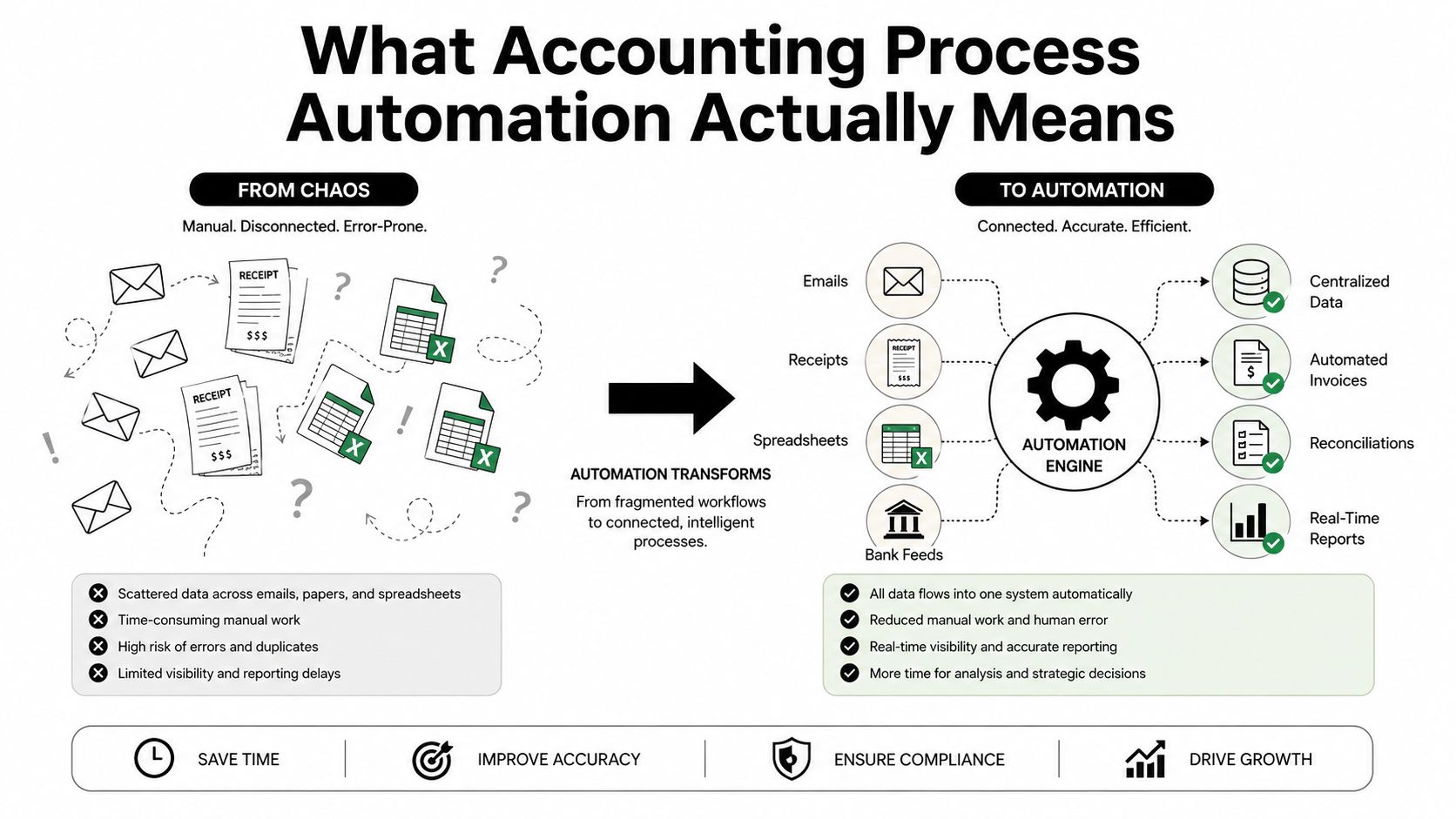
Accounting process automation uses software, rules, and connected systems to move predictable financial work through a controlled workflow. Think of a vendor bill. In a manual process, someone opens an email, downloads a PDF, reads the invoice, types the vendor and amount into QuickBooks, asks a manager for approval, and later checks whether the payment posted.
In an automated process, the system captures the invoice, extracts relevant details, applies coding rules, routes the bill to the right approver, posts approved information to the ledger, schedules payment, and flags exceptions. A human still decides whether the bill is legitimate, whether the job or department coding is correct, and whether an unusual payment deserves investigation.
The useful connection is the handoff
QuickBooks Online, payroll platforms, bill-pay applications, expense tools, and ERP systems can each perform useful tasks. The value comes from how they exchange information:
- Payroll to general ledger: Payroll liabilities and wage expense post consistently instead of relying on a manually prepared journal entry.
- Vendor invoices to job costing: Approved bills retain project, customer, and cost-code information for contractors.
- Restricted revenue to fund accounting: Nonprofit receipts preserve the fund or grant coding needed for accurate reporting.
- Bank feeds to reconciliations: Transactions flow into the accounting system, where rules and review procedures support matching.
Owners evaluating connected workflows can also review MCP for project managers for broader context on how structured tool connections can support project-related coordination. It isn't an accounting system, but project managers and finance teams often need the same reliable handoffs between operational information and financial records.
Automation needs guardrails
A system should preserve an audit trail, approval limits, coding rules, and separation of duties. It shouldn't upload everything first and ask questions later. A vendor master change, unusual payment, new bank account, or manual journal entry needs a defined review path.
For Jacksonville businesses that want help organizing these connections, cloud accounting services can provide the accounting structure around the technology. Software is only useful when the chart of accounts, user permissions, reconciliations, and review cadence are properly maintained.
The practical test is simple. Can the owner see what entered the system, who approved it, where it posted, what evidence supports it, and which exceptions remain unresolved? If not, the company has acquired software, not accounting process automation.
Why the ROI Is Real and Measurable
Automation ROI becomes credible when you count the work, not when a vendor demonstrates a polished screen. Start with the full cost of one invoice, including preparation, approval, coding, entry, correction, payment, and follow-up. Recent industry benchmarks place manual invoice processing at about $12.88 to $19.83 per invoice, with processing taking around 14.6 days, while automated processing can reduce cost to roughly $3 or less and cut cycle time by more than half, according to AP automation benchmark data.
A separate benchmark reports top-performing AP teams at approximately $2.78 per invoice and 3.1 days, compared with an all-buyer average of $10.89 per invoice and 10.9 days, as shown in Corpay's AP productivity benchmarks. These figures don't guarantee a particular result for your business. They show the size of the performance gap available when approval latency, repeated entry, and exception handling are managed properly.
Build a baseline before buying
Track the current workflow for 60 to 90 days before changing it. Record invoice volume, staff time, approval delays, duplicate payments, correction work, days to close, and transactions posted without re-keying. Then automate one workflow and compare the same measures.
| Measure | Manual baseline | After automation |
|---|---|---|
| Invoice cost | Higher labor and rework burden | Lower unit cost when routine steps are controlled |
| Invoice cycle | Longer receipt-to-payment delay | Faster routing and approval |
| Human intervention | Frequent entry, follow-up, and correction | Staff focus on exceptions and review |
| Close process | Dependent on spreadsheets and memory | Supported by recurring tasks and documented evidence |
| Compliance preparation | Records reconstructed near deadlines | Payee, payroll, and payment data maintained during the year |
Count capacity, cash, and control
The value isn't limited to bookkeeping hours. A contractor can identify unapproved job costs before sending a progress billing. A clinic can investigate deposit mismatches sooner. A nonprofit can prepare restricted-fund reporting with supporting records already attached.
Measure total implementation cost too. Include subscriptions, setup, training, exception handling, and CPA oversight. A project that saves labor but creates weak approvals isn't a successful implementation. The strongest business case combines recovered capacity, faster cash visibility, fewer errors, and fewer compliance surprises.
Best-in-class AP automation reaches about 49.2% touchless processing with an exception rate near 9%, according to Cadel's AP automation benchmarks. Touchless processing is a target for mature operations, not permission to eliminate review. The right objective is to let software clear predictable transactions while trained staff concentrate on exceptions.
Which Processes to Automate First
Don't start with the most impressive technology. Start with the process that steals the most time and creates the most risk this month. For most small and midsize companies, that means comparing accounts payable and invoicing, payroll, bank and credit-card reconciliations, and expense management.
| Process | Automate When… | Healthcare Example | Construction Example | Nonprofit Example |
|---|---|---|---|---|
| AP and invoicing | Bills arrive through multiple inboxes or approvals stall | Route medical supply invoices by location and approver | Code vendor bills to jobs and cost categories | Preserve grant or program coding on approved bills |
| Payroll | Payroll journals, overtime, or liabilities require repeated manual work | Separate clinical and administrative labor | Connect payroll to job costing | Allocate staff costs to programs and restricted funds |
| Reconciliations | Bank and card activity is downloaded and matched manually | Match insurance deposits and patient payments | Reconcile project receipts and operating accounts | Match donations, grants, and bank activity to fund records |
| Expense management | Employees email receipts or submit incomplete reports | Capture travel and clinical supply expenses | Attach receipts to field and project spending | Document program expenses for fund reporting |
Start with AP when the inbox is the bottleneck
AP automation usually offers the clearest first project because invoice intake, coding, approval, and payment follow a repeatable sequence. Businesses that need a deeper comparison of accounting platforms can use the AccountShare accounting software comparison guide while assessing integrations, permissions, reporting, and total ownership cost.
A Jacksonville healthcare practice may need to match insurance receipts and patient co-pays rather than merely pay bills. A remodeling firm needs vendor invoices tied to jobs before it can trust gross margin. A nonprofit needs every expense connected to the correct program or grant. The same AP tool won't solve those three control requirements without thoughtful configuration.
Payroll and reconciliations come next
Payroll automation pays off when the system posts reliable entries, preserves wage categories, and supports reporting for tips and overtime. Reconciliation automation is valuable when bank feeds and rules handle predictable matches while a reviewer investigates unusual deposits, transfers, and uncategorized transactions.
Expense management matters when receipts arrive late or without business purpose. Capture the receipt at the point of purchase, require the right approval, and attach the evidence to the transaction.
For a practical explanation of the invoice-to-payment workflow, review accounts payable automation. My decision rule is straightforward: automate the process that hurts most this month, not the process that sounds most advanced.
A 90-Day Implementation Roadmap
A successful rollout doesn't begin by deleting every spreadsheet. It begins by identifying which spreadsheet is dangerous, which one is merely ugly, and which one should have retired years ago.
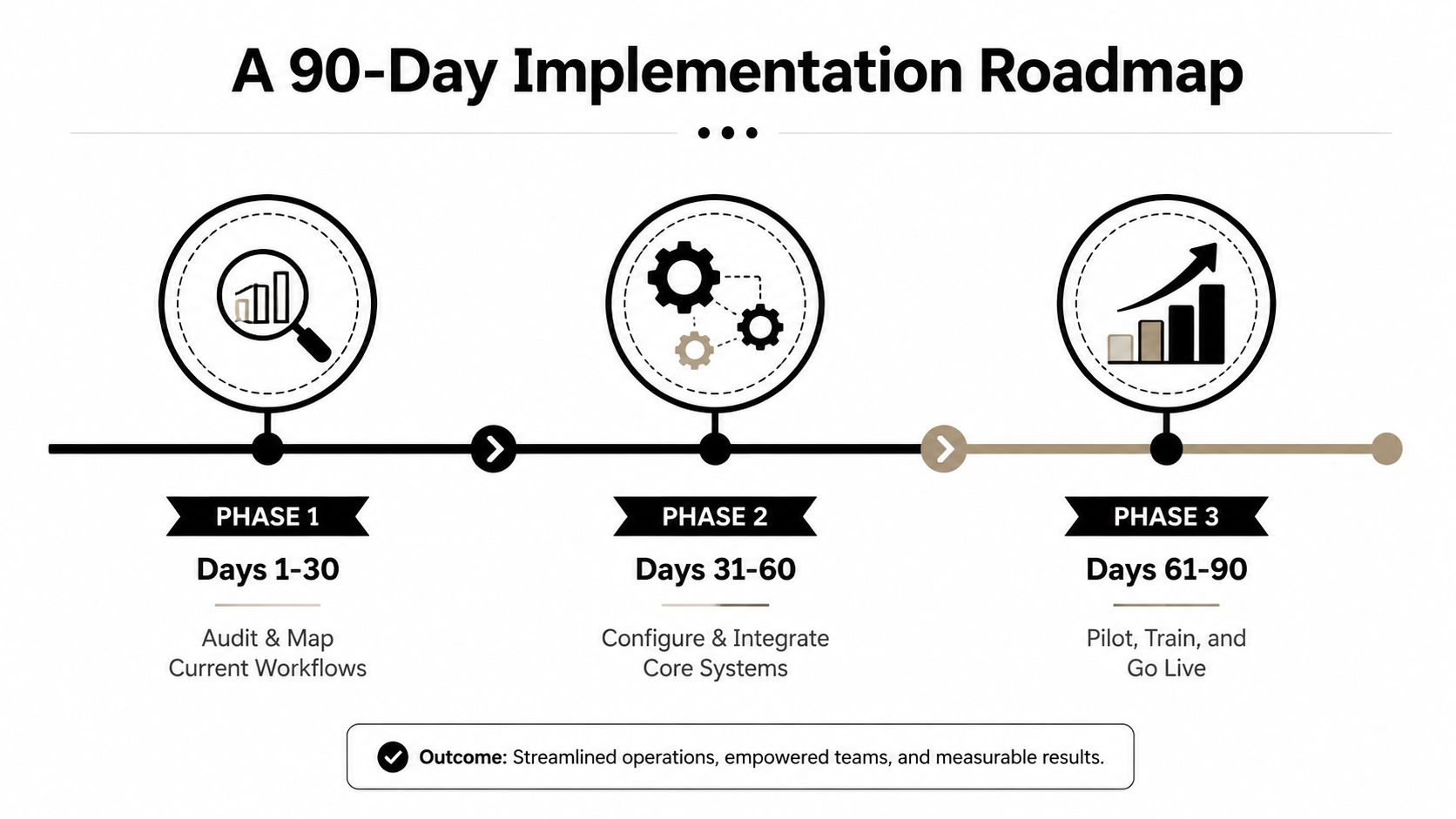
Days 1 to 30, audit and map
Review the chart of accounts, vendor list, customer records, payroll setup, bank feeds, and recurring journal entries. Map every handoff for the two or three workflows you might automate first. Confirm that QuickBooks Online or the ERP is current, clean, and configured for the business's actual reporting needs.
Write down who enters, approves, pays, reconciles, and reviews each transaction. An owner should be able to answer:
- Where does the transaction begin? Identify the email, portal, bank feed, payroll system, or paper process.
- Who approves it? Name the role, not just “management.”
- What evidence is required? Define receipts, invoices, purchase orders, contracts, or grant support.
- Where does it post? Confirm the account, class, location, job, or fund coding.
Days 31 to 60, configure and connect
Connect bank feeds and establish rules-based coding for predictable activity. Build approval workflows in QuickBooks Online, Bill.com, Ramp, or another suitable platform. Configure payroll to post to the general ledger automatically, then document role-based access and enable two-factor authentication.
For implementation support that connects accounting software with operating procedures, accounting software implementation services can help keep configuration from becoming a technology-only project.
Days 61 to 90, test and launch
Run one close cycle in parallel. Compare automated results with the existing process, stress-test approvals, review exceptions, and confirm that supporting documentation remains accessible. Train staff on the new approval chain before making the workflow mandatory.
Owner checkpoint: How many invoices cleared without human touch? Who can change vendor master records? Where is the audit trail stored?
Don't skip the parallel month. That's how you catch miscoded grant revenue, incorrect job costs, or payroll mapping errors before an auditor, lender, or tax preparer does.
Common Pitfalls and How to Avoid Them
Automation fails when software is fitted to a process nobody has documented. A company can buy AP, expense, payroll, reporting, and reconciliation tools, then make staff move data between five screens. That is a new manual process with subscription fees.
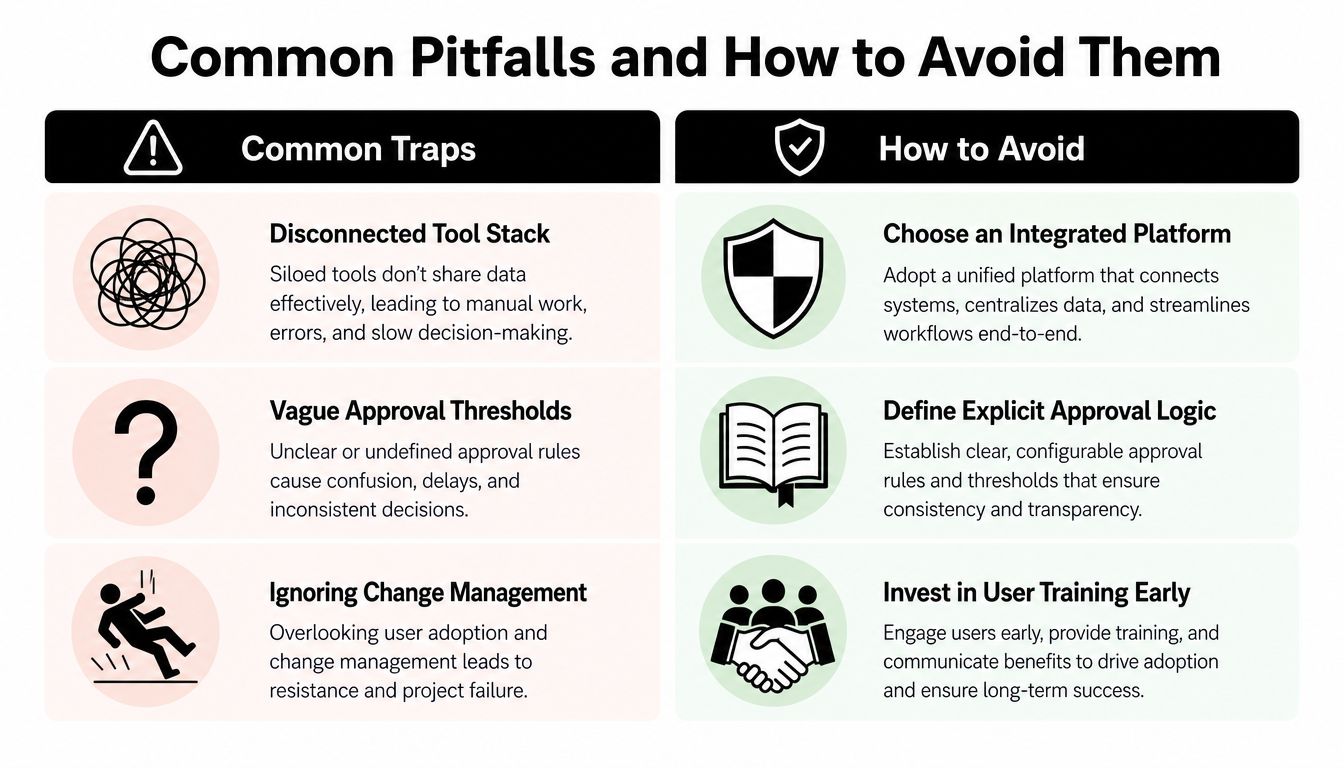
Tool sprawl creates a new manual process
Accountants report that switching between too many tools slows work, while routine tasks often remain unautomated, according to the State of AI in Accounting report. Buying software does not prove that accounting work flows efficiently. A finance team can explore AI and still leave daily accounting dependent on exports, renamed files, and re-uploaded spreadsheets.
Choose fewer connected tools where practical. Confirm that transactions reach QuickBooks or the ERP with usable coding, approvals, and supporting evidence. Have the fractional CFO own the system map, review exceptions each month, and reject any integration that creates more handwork than it removes.
Faster errors are still errors
AP teams still manually enter many invoices, and invoice errors remain common, according to the Concur AP automation trends report. The recommendation is straightforward. Automation needs validation, exception review, and control evidence, not document capture alone.
Set dual approval above a defined threshold. Restrict vendor-master edits to one named controller. Reconcile automated feeds monthly, review unusual journal entries, and maintain a written change log. The fractional CFO should test those controls during the close and assign an owner to every unresolved exception. Otherwise, the workflow becomes a faster way to post bad information.
The 2026 tax-reporting changes require specific checks:
- 1099-NEC classification: Track cumulative payments by payee against the new reporting threshold and retain the information used to support the filing decision. Use the IRS guidance on information returns and filing requirements rather than relying on a vendor's default setting.
- Tips and overtime: Separate qualified amounts in payroll records and year-end reporting. Have the payroll reviewer confirm the mapping before filing.
- 1099-K readiness: Reconcile payment-platform receipts to sales records using the applicable gross-payment and transaction thresholds.
Control principle: Treat automation as a compliance-and-governance upgrade, not a cost-cutting contest. The fractional CFO is accountable for proving that the controls work.
How a CPA Firm and Fractional CFO Make It Stick
Software doesn't fix a broken process. It accelerates the broken process and gives it a login screen. A CPA-led implementation adds accounting judgment, while a fractional CFO keeps the workflow connected to cash, pricing, compliance, and business decisions.
Owners typically need practical support across several service categories:
- AP and bill-pay oversight: Review invoice coding, approval exceptions, vendor changes, and payment timing.
- Monthly close and reconciliation: Maintain accurate books, investigate variances, and document support.
- Tax compliance: Coordinate sales tax, multi-state filings, payroll reporting, and information returns.
- 1099-NEC and W-2 preparation: Tie vendor and payroll records to the 2026 reporting requirements.
- Cash-flow forecasting: Show when obligations, payroll, collections, and capital needs will affect available cash.
- KPI dashboards: Track revenue, gross margin, receivables, labor, job costs, and operating expenses.
- Board-ready reporting: Give nonprofit boards and business owners reports they can understand and use.
The fractional CFO owns accountability
A fractional CFO isn't a decorative title placed above a dashboard. The role includes monthly review meetings, cash-flow forecasting, bank-covenant tracking, pricing analysis, job-cost decisions, and accountability for the automation roadmap itself.
For a healthcare group, that may mean connecting visit volume, collections, payroll, and denied claims to cash planning. For a contractor, it may mean using current job costs to challenge a bid before the next project begins. For a nonprofit, it may mean explaining restricted and unrestricted activity clearly to the board.
A representative engagement pattern might involve a multi-location medical group that needs a shorter close, reliable deposit reconciliation, and consistent payroll coding. The firm would first document the existing workflow, configure automation around approved rules, run a parallel close, and establish monthly CFO review. That is a typical process pattern, not a guaranteed result or a promise that every organization will achieve the same outcome.
The difference between software ownership and operational improvement is accountability. Someone must review the exceptions, challenge questionable coding, update procedures, and tell the owner what the numbers mean.
Your 30-60-90 Action Plan and Checklist
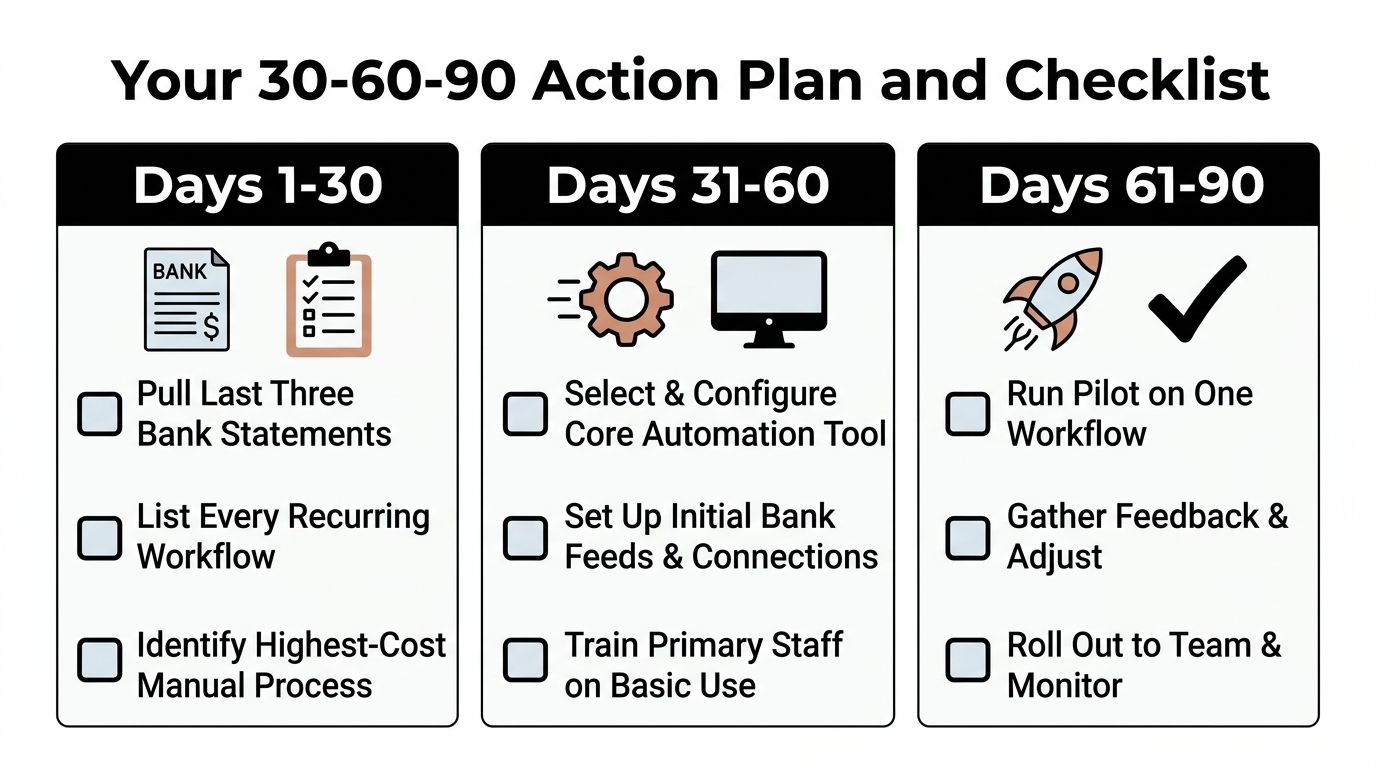
A non-technical owner can start Monday. You do not need to configure every integration. You do need a written workflow, named owners, approval rules, and evidence that each control works. Treat automation as a compliance and control upgrade, not a software shopping trip.
Days 1 to 30
- Pull the last three bank statements: Compare each with the accounting system and list unresolved differences.
- List recurring workflows: Include AP, payroll, reconciliations, expenses, billing, grant tracking, and tax reporting.
- Find the highest-cost manual process: Record staff time, owner involvement, corrections, delays, and compliance exposure.
- Book a CPA assessment: Request a process review with an automation plan, not a sales demonstration.
Days 31 to 60
- Map the chosen workflow: Document intake, coding, approval, posting, payment, reconciliation, and review.
- Set approval thresholds: Require dual approval above a defined dollar amount and limit access to sensitive records.
- Connect core systems: Link bank feeds and payroll to QuickBooks Online or the ERP only when the setup posts accurately.
- Document controls: Assign responsibility for vendors, payments, journal entries, reconciliations, and change reviews.
- Train primary staff: Explain the new process and exception path before launch.
Days 61 to 90
- Pilot one workflow: Start with AP, payroll, reconciliations, or expenses. Measure cycle time, exceptions, and correction patterns.
- Review compliance data: For payments made in 2026, apply the $2,000 1099-NEC threshold. The earlier $600 threshold applies to payments made before 2026, according to the IRS filing requirement guidance.
- Separate payroll categories: Confirm that qualified tips and qualified overtime compensation are reported separately where applicable.
- Reconcile platform payments: Prepare for the $20,000 and 200-transaction Form 1099-K standards for 2025 and 2026 and beyond.
- Schedule quarterly CFO reviews: Examine cash flow, controls, KPIs, tax-reporting readiness, and the next automation project.
Keep human review for unusual transactions, judgment-heavy coding, major vendor changes, and exceptions that could affect compliance or cash. Automation should route those items, not approve them automatically.
Bookkeeping and Accounting of Florida Inc. helps Jacksonville and Northeast Florida businesses organize bookkeeping, AP automation, payroll, tax reporting, reconciliations, and QuickBooks or ERP workflows with CPA-led oversight. Visit Bookkeeping and Accounting of Florida Inc. to schedule a guided accounting process automation and fractional CFO assessment before 2026 reporting problems become year-end surprises.