
A healthy bank balance can lie to you.
Thank you for reading this post, don't forget to subscribe!A Jacksonville business owner may see plenty of money in the account on Wednesday, approve a hire, schedule a capital purchase, and still discover on Friday that payroll, taxes, vendor bills, and delayed customer payments have turned that balance into a short runway. Cash flow forecasting tools exist to answer the question a bank statement cannot: what will be available when the bills come due?
The market reflects that need. The cash flow forecast service market is estimated at $1.34 billion in 2024, projected to reach $1.50 billion in 2025, and forecast to climb to $2.33 billion by 2029, according to the cash flow forecast service market report. The SME cash flow forecasting tool market is separately estimated at $1.45 billion in 2025, with a projection of $2.98 billion by 2034, according to Intel Market Research.
The right software matters, but fit matters more. Healthcare reimbursements, construction retainage, nonprofit grant restrictions, QuickBooks data quality, payroll tax deposits, and 2026 tax changes all affect what a useful forecast must capture. A dashboard alone won't keep your business solvent or compliant. Clean books, a reliable process, and someone who knows how to interpret the numbers will.
When the Bank Account Says Yes but Payroll Says No
On Wednesday morning, a Jacksonville home health agency owner sees $180,000 in the operating account. The number looks comfortable until two insurance receivables are re-bundled and pushed out, while a $74,000 payroll run is scheduled for Friday. The account balance says the business is fine. The timing says the runway is only twelve days.
That isn't a bookkeeping mystery. It's a visibility problem. The bank balance is a rearview mirror. It tells you what has already happened, not whether reimbursements will arrive before payroll, whether a vendor will pull an automatic payment, or whether a tax deposit is about to leave the account. A forecast puts those future obligations on the dashboard before they become emergencies.
Most small businesses run on QuickBooks, spreadsheets, and owner instinct. That combination can work while collections are predictable and expenses arrive on schedule. It breaks down when an insurance payer delays a reimbursement, a construction customer holds retainage, or a nonprofit waits for a grant drawdown.
A properly managed 13-week forecast is the operational benchmark for near-term liquidity because it connects current receivables, payables, and payroll timing to upcoming decisions. Technical literature also makes the practical point that complex sequence models can help when cash movements contain seasonality and cross-series dependencies, while simpler methods may work better when data is sparse or stable. The technical literature on machine-learning cash flow forecasting supports matching the forecasting method to the business, not buying the flashiest model.
Practical rule: A forecast should tell you what action to take before cash gets tight, not explain afterward why the account fell short.
Start with the basics, including a reliable payroll tax deposit schedule. Resources such as Compass+ shows how to avoid overdrafts also reinforce the importance of matching bill timing to available cash.
The useful answer for this owner isn't merely “buy software.” It's a connected process that defines cash flow forecasting, identifies the required features, cleans the underlying data, reflects industry timing, compares a tool with fractional CFO support, and captures the compliance changes affecting 2026.
What Cash Flow Forecasting Tools Actually Do
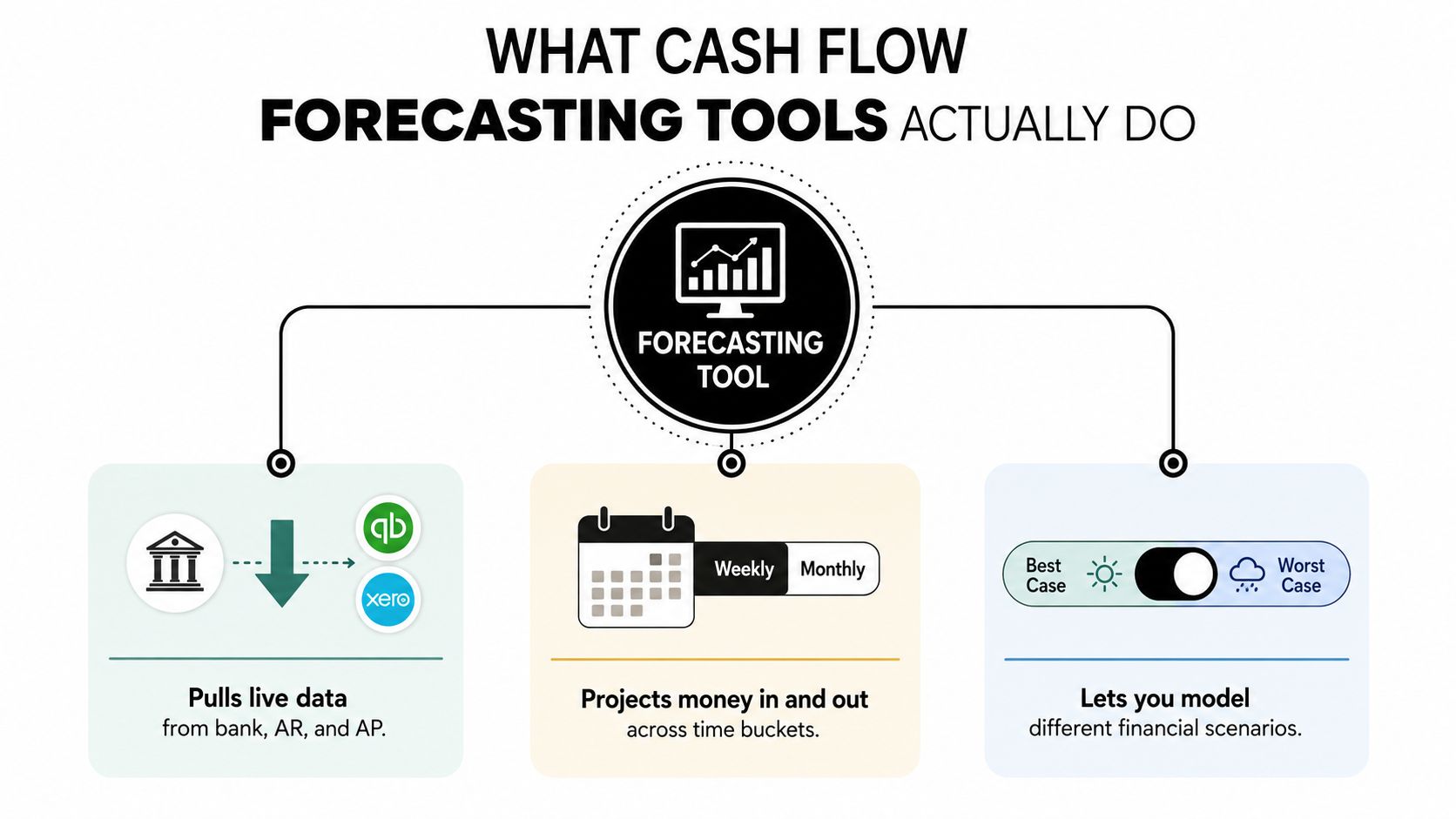
Cash flow forecasting tools pull information from bank accounts, credit cards, accounting systems, accounts receivable, and accounts payable. They project expected inflows and outflows into weekly or monthly time buckets, then let you model what happens if collections slow, expenses rise, or a planned purchase moves forward.
A spreadsheet is a thermometer. You check it, record the temperature, and make a judgment. A forecasting platform works more like a thermostat. It keeps updating the expected position against a target, then alerts you when the projected balance moves into uncomfortable territory.
Small businesses generally use one of three approaches:
- Static reports: These describe historical cash movement. They're useful for review, but they don't answer whether next week's receipts will cover payroll.
- Rolling spreadsheets: These can project upcoming activity, but manual bank imports, overwritten formulas, and inconsistent assumptions make them fragile.
- Purpose-built platforms: These automate data feeds, compare scenarios, and flag projected cash pressure before the payment date arrives.
The difference isn't a prettier chart. A real cash flow forecasting tool can reconcile the forecast against current bank activity, show best-case and worst-case scenarios side by side, and alert you when projected cash falls below a payroll floor, debt requirement, or operating reserve.
That makes the 13-week view especially useful for short-term liquidity. You can also maintain a longer monthly view for tax planning, financing, hiring, and capital spending. The best setup uses both horizons without pretending that a twelve-month projection can predict every invoice date precisely.
A business owner might set a 60-day minimum cash floor, then test two scenarios: expected collections and delayed collections. That simple exercise can change whether the company hires, borrows, delays a purchase, or starts collections calls today. For businesses evaluating financing, a resource such as the Capital Express MCA calculator can help frame repayment timing within a broader cash analysis.
The promise is practical, not magical. You won't eliminate uncertainty. You will see it earlier and make decisions with more than a bank balance and a hunch.
Features and Data Inputs That Separate Real Tools from Fancy Spreadsheets
A forecasting platform earns its keep through its inputs and controls. If it only repackages a general ledger balance, you're paying for decoration.
The data must reflect how cash moves
A credible tool should connect directly to bank and credit-card feeds, QuickBooks Online, accounts receivable aging, accounts payable schedules, payroll, tax obligations, and loan activity. It should also handle recurring transactions such as software subscriptions, debt amortization, payroll taxes, benefits, and owner distributions.
Industry-specific information is where generic products often stumble. Healthcare needs expected insurance payments, payer mix, contractual adjustments, and patient collections. Construction needs job costing, AIA billing, subcontractor draws, deposits, change orders, and retainage. Nonprofits need grant award timing, reimbursement schedules, restricted cash, and spending deadlines.
QuickBooks Online synchronization is table stakes. A construction company should also confirm that the product can read job-costing and billing data. A healthcare practice should ask whether the tool can distinguish a billed amount from the amount a payer is contractually expected to reimburse.
The tool needs decision features
Look for a rolling 13-week forecast, a 12-month view, best-case, base-case, and worst-case scenarios, hiring and capital-purchase toggles, forecast-versus-actual reporting, and mobile alerts. A system that shows a projected shortfall but doesn't tell you which assumptions caused it is a report, not a decision tool.
| Feature | Why It Matters | Must-Have vs. Nice-to-Have |
|---|---|---|
| Bank and credit-card feeds | Keeps opening cash and transactions current | Must-have |
| QuickBooks Online sync | Connects the forecast to the accounting system | Must-have |
| AR aging and collection assumptions | Separates recorded receivables from expected cash | Must-have |
| AP schedules and vendor terms | Shows when obligations will actually leave the account | Must-have |
| Rolling 13-week view | Supports near-term liquidity decisions | Must-have |
| Scenario modeling | Tests delayed collections, hiring, and purchases | Must-have |
| Job, payer, or grant-level tracking | Reflects industry-specific timing | Must-have for affected industries |
| Mobile alerts | Provides convenient exception monitoring | Nice-to-have, unless management is highly mobile |
| Advanced AI dashboards | May improve analysis, but cannot repair bad inputs | Nice-to-have |
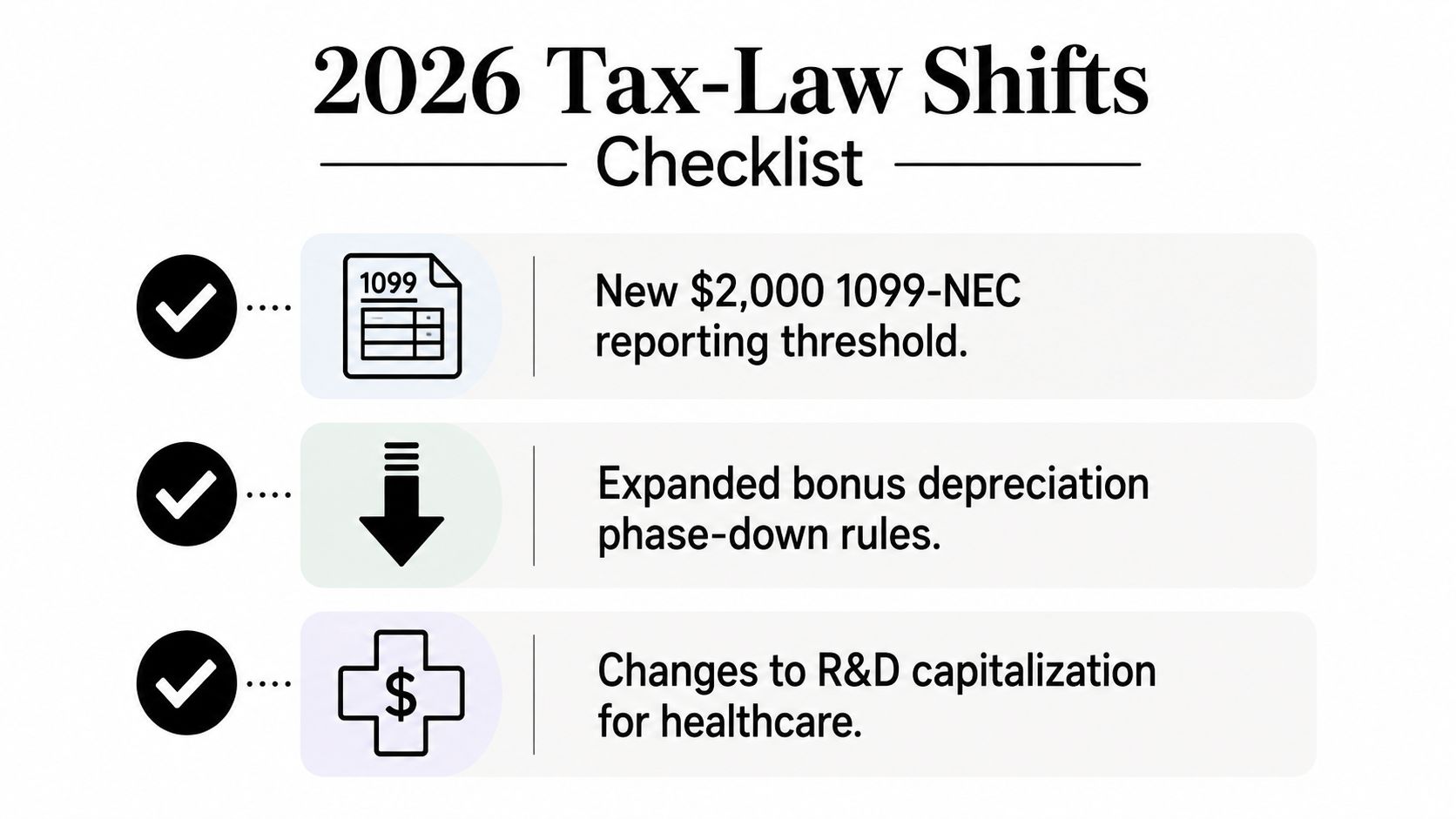
Quiet line items cause plenty of forecast damage. Owner draws, 401(k) matches, quarterly estimates, debt payments, and tax deposits deserve explicit treatment. The 2026 reporting rules also require attention to third-party payment activity. For 2026, the Form 1099-K threshold for platforms such as PayPal and Venmo returns to $20,000 and 200 transactions, while the 1099-NEC and 1099-MISC threshold rises to $2,000, according to the 2026 tax changes summary.
Before signing a contract, score every tool against these inputs and features. Use how to choose accounting software as a starting point, but don't let a vendor demo replace an honest review of your own data and payment cycle.
Implementing a Forecast Without Breaking Your Books
Treat the forecast as a managed reporting layer, not a second accounting system. QuickBooks remains the accounting record. The forecasting tool should organize reconciled information and assumptions into a forward-looking view.
Start with the opening position. Reconcile bank accounts, credit cards, accounts receivable, accounts payable, payroll, taxes, and loans in QuickBooks before you connect additional operational data. An impressive model built on an incorrect opening balance will still produce an incorrect answer.
Separate cash into useful categories rather than blending everything into one total:
- Operating cash, available for ordinary business activity.
- Restricted cash, unavailable for general spending.
- Debt activity, including draws, principal, and interest.
- Owner distributions, which should not disappear into ordinary expenses.
- Capital spending, including planned equipment or property purchases.
Build the 13-week operating forecast first. Use expected collection dates and payment dates, not just invoice and bill totals. Then create a 12-month view for tax estimates, borrowing decisions, hiring, and major purchases.
Connect systems before adding complexity
Connect the bank feeds and QuickBooks before importing customer, vendor, job, project, or grant details. Map income and expense accounts consistently, preserve classes and tracking categories, and identify which costs are committed versus discretionary.
Use actuals for completed periods. Add assumptions only for activity that has not occurred, such as expected collections, recurring bills, payroll changes, debt payments, and revenue not yet recorded. Don't overwrite actual transactions to make the model look smoother.
Test the setup with a limited group of transactions. Compare forecast totals with QuickBooks reports, investigate differences, and document who updates assumptions and when. A business that receives rental income, for example, should distinguish lease timing, deposits, repairs, and financing obligations rather than just adding projected rent to a monthly total. A resource on a rental income business plan can help owners think through those operating assumptions.
Begin with one reliable forecast. Review it weekly, replace completed periods with actuals, and roll the horizon forward. Add more scenarios only after the baseline has earned trust.
How Healthcare, Construction, and Nonprofits Use Forecasts Differently
A generic cash flow template can mislead three businesses that appear financially healthy on paper. The timing of cash matters more than the label attached to revenue.
A healthcare practice may record services today but wait for insurance reimbursement, patient collections, or claim resolution. Its forecast should use aging-based collection assumptions, payer mix, contractual adjustments, payroll, benefits, and periodic equipment purchases. The key scenario isn't just “revenue up or down.” It may be “reimbursements delayed while payroll remains fixed” or “equipment purchased before collections arrive.”
Construction companies need job-level forecasting. Progress billings, retainage, change orders, deposits, subcontractor draws, and cost overruns create timing gaps that a company-wide revenue line can hide. A profitable project can still create a cash shortage when subcontractors require payment before the owner receives the next progress billing.
Nonprofits have a different constraint. Cash in the bank isn't automatically available for payroll or administration. The forecast should distinguish restricted and unrestricted cash, grant award dates, reimbursement schedules, donor concentration, and spending deadlines. A nonprofit needs to know how much unrestricted money is available for operations, not merely how much total cash exists.
| Industry | Key Forecast Drivers | Primary Risk Signal |
|---|---|---|
| Healthcare | Insurance reimbursements, payer mix, patient collections, payroll, equipment purchases | Claims or reimbursements arriving after fixed payroll and operating obligations |
| Construction | Progress billings, retainage, change orders, subcontractor draws, job costs | Job-level cash deficit caused by costs arriving before collections |
| Nonprofits | Restricted funds, grant timing, reimbursements, donor commitments, program spending | Total cash appears adequate while unrestricted operating cash is insufficient |
The software can be similar across these organizations. The data model shouldn't be. Healthcare accounting needs a payer-aware collection view. Construction accounting needs job costing and payment milestones. Nonprofit accounting needs fund restrictions and compliant reporting.
That is why “best cash flow forecasting tool” is usually the wrong search question. Ask which platform understands the timing rules that can put your payroll, vendors, projects, or programs under pressure.
Why Stale Data Kills Even the Best Forecasting Tool
A forecasting tool can be fast, polished, and completely wrong. If QuickBooks contains uncategorized transactions, duplicate bills, old invoices, missing deposits, or unreviewed bank-feed rules, the software will confidently project the wrong cash position.
That can be more dangerous than an ugly spreadsheet. A clean dashboard may persuade an owner that a shortage is manageable while payroll is approaching and the receivables listed as collectible are tied up in disputes or delayed remittances. Recent coverage of cash flow forecasting emphasizes that bank balances and unprocessed AR aren't enough, especially when remittances, disputes, and promise-to-pay commitments affect actual collection timing. The Transformance review of cash flow forecasting software makes the important distinction between faster updates and complete operational data.
Reconciliation beats artificial intelligence
More charts won't repair bad bookkeeping. Assign a specific person to review bank and card feeds, match deposits to invoices, confirm vendor bills, and update commitments every week. Establish a cutoff so the owner, bookkeeper, and finance team agree on which transactions belong in the current forecast.
Track forecast-versus-actual differences. Repeated misses deserve investigation, particularly in collections, job costs, payroll, and tax payments. If the forecast consistently assumes invoices will arrive earlier than they do, change the collection assumption instead of blaming the software.
A short monthly close should confirm:
- Cash accounts: Reconcile operating accounts and credit cards.
- Receivables: Review aging, disputes, payment promises, and expected dates.
- Payables: Confirm vendor terms, upcoming bills, and committed project costs.
- Restrictions: Verify that restricted funds remain separate from operating cash.
- Assumptions: Document major changes to payroll, taxes, debt, capital purchases, and collections.
The uncomfortable truth: Real-time access to incomplete data only produces bad forecasts faster.
QuickBooks integration moves information efficiently, but it doesn't replace judgment. A bookkeeper or accountant still needs to decide whether a transaction is ordinary, unusual, restricted, reimbursable, or tax-related.
The objective isn't perfect prediction. It's a current, reconciled view that gives management time to act. If your team ignores the forecast, fix the update process before buying more software.
Choosing Between a Tool and a Fractional CFO
Software and fractional CFO services solve different problems. A tool organizes information and runs calculations. A fractional CFO interprets variance, challenges assumptions, stress-tests decisions, and connects the forecast to tax planning and business strategy.
Use four questions to decide where your business sits:
- How many transactions and revenue streams do you manage?
- Does the business have one entity or several?
- Can the owner interpret forecast outputs without help?
- Does management need simple visibility or complex scenario modeling?
For a business with straightforward AR and AP, a product such as Float or LiveFlow connected to QuickBooks may provide enough forecasting capacity. The tool can display expected cash, organize scenarios, and reduce manual spreadsheet maintenance.
The calculation changes when the business has multiple entities, grant-restricted funds, construction retainage, complicated healthcare collections, or rapid growth. At that point, someone must decide whether a variance reflects a late payment, an accounting error, a project overrun, a tax obligation, or a flawed assumption. Software won't make that judgment for you.
| Business Signal | Forecasting Tool | Fractional CFO |
|---|---|---|
| Straightforward cash receipts and payments | Strong fit for automated visibility | May be more support than needed |
| Owner needs recurring alerts | Strong fit | Can establish thresholds and review the alerts |
| Multiple entities or complex restrictions | May require specialized configuration | Interprets structure and governance needs |
| Retainage, grants, or payer-specific collections | Useful only with the right integrations | Connects operational detail to liquidity decisions |
| Tax planning and capital spending | Models timing | Aligns decisions with tax and financing consequences |
| Owner can't interpret variances | Limited by itself | Provides explanation and action planning |
The market for fractional CFO services exists because growing companies need senior financial guidance without the cost and commitment of a permanent executive hire. Independent finance coverage describes fractional CFOs as supporting reporting, decision-making, and cash-flow forecasting through ongoing or project-based arrangements, often at a lower overall cost than a full-time hire. See what fractional CFO services include before deciding that software alone is enough.
Bookkeeping and Accounting of Florida Inc. can serve as the bridge between the two. The firm can help set up the forecasting tool, keep QuickBooks organized underneath it, and provide fractional CFO support when the business needs interpretation, tax coordination, and forward-looking guidance.
All companies need someone guiding the numbers. That person may be the owner for a while. Eventually, relying on instinct alone becomes an expensive habit.
Staying Compliant and Ahead of 2026 With the Right Partner
A forecast for 2026 needs to capture more than collections and expenses. It must reflect tax timing, reporting obligations, capital purchases, contractor payments, payroll data, and the assumptions behind each decision.
For 2026, the reporting threshold for Forms 1099-NEC and 1099-MISC rises from $600 to $2,000, with future inflation adjustments, and backup withholding follows the same threshold, according to the 2026 tax changes guidance. That change affects contractor tracking and cash planning. Your books still need complete transaction records even when a particular payment falls below a reporting threshold.
The One Big Beautiful Bill Act permanently restored 100% bonus depreciation for qualified new and used assets acquired and placed in service after January 19, 2025. It also made the Section 199A qualified business income deduction permanent and enhanced it for 2026, as explained by Kirsch CPA's tax-law update.
Employers must separately report qualified tips and qualified overtime compensation on Forms W-2 or 1099-NEC. The advanced manufacturing investment credit also rises from 25% to 35% for qualifying property placed in service after December 31, 2025, according to Grant Thornton's 2026 business tax-planning guide.
Compliance belongs inside the forecast
Bonus depreciation can change the timing of equipment purchases and tax deductions. Contractor reporting changes can affect how you code payments and collect vendor information. Tip and overtime reporting creates payroll data requirements that must flow through clean books, payroll records, and year-end forms.
A static annual budget won't keep up with those moving parts. A rolling 13-week cash flow forecast, refreshed at least weekly for operations and reviewed regularly for tax and financing decisions, gives management a practical control. It shows when cash leaves, which obligations are committed, and whether a tax-sensitive purchase fits the available liquidity.
Most small businesses don't know every filing, payroll, contractor, sales-tax, or recordkeeping requirement that applies to them. That's not a character flaw. Owners are busy running clinics, crews, stores, agencies, and programs. They need a bookkeeping and accounting partner who keeps the records current, identifies missing requirements, and brings in CPA and fractional CFO judgment when the decision has consequences.
The sensible package combines QuickBooks reconciliation, cash flow forecasting tools, payroll and tax support, industry-specific accounting, and fractional CFO oversight. Book a discovery call, map the gaps in your current books and forecast, and leave with a practical forecast template and a 2026 compliance checklist.
Bookkeeping and Accounting of Florida Inc. offers clean QuickBooks bookkeeping, payroll and tax support, industry-focused accounting, cash flow projections, and fractional CFO guidance for Jacksonville and Northeast Florida businesses. Visit Bookkeeping and Accounting of Florida Inc. to schedule a conversation, identify your forecasting and compliance gaps, and put a dependable financial process in place.