
A Jacksonville business owner opens the payroll register after payday and sees gross wages, tax withholdings, benefit deductions, and employer taxes all sitting in separate columns. The money has left the bank, but the general ledger still looks like a puzzle assembled by someone who dislikes small businesses.
Thank you for reading this post, don't forget to subscribe!That confusion creates expensive downstream problems. A payroll posting that mixes employee withholdings with employer expenses can produce inaccurate profit reports, liability balances that don't match tax filings, incorrect W-2 information, and letters from the IRS or state agencies. Payroll accounting entries aren't clerical decoration. They translate payroll activity into balanced debits and credits that tell the truth about wages, obligations, cash, and profitability.
What Payroll Accounting Entries Actually Do in Your Books
Payroll accounting entries connect three records that owners often review separately: the payroll register, the bank account, and the general ledger. The register tells you what employees earned and what was withheld. The bank statement shows what the company paid. The ledger must explain both without pretending that every dollar connected to payroll was an expense.
A payroll posting generally separates gross wages, employee withholdings, employer payroll taxes, and net pay. Gross wages and employer-side taxes affect the income statement. Withheld income taxes, employee payroll taxes, benefit deductions, and net wages owed remain liabilities until the business sends the money to the appropriate agency, provider, or employee.
Practical rule: If a payroll liability account doesn't identify who is owed and why, it isn't ready for a clean reconciliation.
A Jacksonville retailer might process payroll through a provider, pay employees by direct deposit, and still have books that show only one vague debit called “payroll.” That shortcut hides the amounts owed to the IRS, the state, retirement providers, and benefit carriers. It also makes it difficult to explain why the payroll register doesn't agree with the balance sheet.
The small business payroll compliance guide is useful background for owners who need to understand the wider compliance responsibilities around payroll. The accounting entry itself remains the control point. It should show what was earned, what was withheld, what the employer absorbed, and what remains payable.
The rest of this reference gives you the account mappings, posting logic, QuickBooks locations, period-end treatment, and reconciliation controls that keep payroll from becoming an annual cleanup project.
The Chart of Accounts Behind Every Payroll Entry
Before anyone posts wages, build a chart of accounts that gives each payroll obligation its own place. A single “payroll taxes” liability account may look tidy, but it forces employee deductions, employer taxes, and benefit obligations into one bucket. That makes a tax payment difficult to trace and a reconciliation harder than it needs to be.
Use expense accounts for costs the company incurs and liability accounts for amounts the company owes. Typical accounts include Wages and Salaries Expense, Employer Payroll Tax Expense, Federal Income Tax Withholdable, Social Security Withholdable, Medicare Withholdable, State Income Tax Withholdable, FUTA Payable, SUTA Payable, Wages Payable, and Employee Benefits Payable.
Assign each account a job
- Wages and Salaries Expense: Records gross employee compensation before deductions.
- Employer Payroll Tax Expense: Records the employer share of payroll taxes and unemployment costs.
- Employee withholding liabilities: Track amounts deducted from employee pay and held for agencies or providers.
- Employer tax liabilities: Track taxes incurred by the business that haven't yet been remitted.
- Benefits and retirement liabilities: Hold health premiums, retirement contributions, and other deductions until payment.
- Wages Payable or Payroll Clearing: Holds net pay between payroll processing and settlement.
Clear names prevent a common error: treating an employee withholding as though it were an employer expense. Payroll guidance distinguishes expenses from payable accounts because the business owes withheld and employer amounts until they are paid or remitted. This chart of accounts setup resource can help owners establish the structure before payroll volume makes cleanup painful.
| Account Name | Type | Balance Sheet Impact | What It Tracks |
|---|---|---|---|
| Wages and Salaries Expense | Expense | No direct balance sheet balance | Gross compensation earned |
| Employer Payroll Tax Expense | Expense | No direct balance sheet balance | Employer-side payroll tax cost |
| Federal Income Tax Withholdable | Current liability | Credit increases amount owed | Federal income tax withheld from employees |
| Social Security and Medicare Payable | Current liability | Credit increases amount owed | Employee and employer payroll tax obligations |
| FUTA and SUTA Payable | Current liability | Credit increases amount owed | Federal and state unemployment liabilities |
| Employee Benefits Payable | Current liability | Credit increases amount owed | Health, retirement, and other deductions |
| Wages Payable | Current liability | Credit increases amount owed | Net wages due to employees |
Use expense categorization guidance from BankStatementWizard when reviewing how payroll-related costs fit into the broader bookkeeping structure. In QuickBooks, map these accounts through payroll setup and payroll item configuration, not by guessing at the end of the month.
Recording the Primary Payroll Entry for Gross Wages and Withholdings
The primary payroll entry records the employee side of payroll. Start with the full amount employees earned, then credit each withholding liability separately. The net amount due to employees becomes the balancing credit to Payroll Clearing, Wages Payable, or Cash, depending on how the payroll system records settlement.
The structure looks like this:
| Account | Debit | Credit |
|---|---|---|
| Wages and Salaries Expense | Gross wages | |
| Federal Income Tax Withholdable | Employee federal withholding | |
| Social Security Withholdable | Employee Social Security withholding | |
| Medicare Withholdable | Employee Medicare withholding | |
| State Income Tax Withholdable | State withholding, where applicable | |
| Health or Benefits Payable | Employee benefit deductions | |
| Retirement Plan Payable | Employee retirement deductions | |
| Payroll Clearing or Wages Payable | Net pay |
The debit to wages expense represents the employee's full earned compensation. The credits for federal, state, Social Security, Medicare, health, and retirement deductions aren't additional expenses. They're liabilities created because the company withheld money from the employee and now has a duty to remit it.
The exact withholding calculation isn't a flat deduction chosen for convenience. For automated federal payroll systems, the IRS directs employers to use the applicable methods and tables in Publication 15-T. That calculation affects the liability account credited in the journal entry, so an incorrect payroll setup becomes an accounting problem as soon as the entry posts.
The balancing test
Add every debit and every credit before approving the posting. The total debit to wages expense must equal the combined credits for employee withholdings and net pay. If the entry doesn't balance, don't force it with a miscellaneous expense account. Find the missing deduction, incorrect net pay amount, or mapping error.
QuickBooks payroll usually creates this entry when you process payroll through its payroll module. If a third-party provider such as ADP or Gusto handles payroll, the provider's journal report should drive a manual journal entry or integration mapping. The report must identify gross pay, each liability, and net pay. A bank-feed transaction alone can't reconstruct that detail reliably.
The Separate Employer Payroll Tax Entry You Cannot Skip
The payroll run can look correct while the company's tax cost is missing from the books. That omission distorts profit, leaves employer liabilities unrecorded, and can produce mismatched payroll reports when an agency asks how a deposit was calculated.
Employer payroll taxes belong in a separate entry from gross wages and employee withholdings. In QuickBooks Online, record a manual posting through + New > Journal entry, or confirm that the payroll integration created the same accounts and amounts.
| Tax | Employer Rate | Wage Base / Limit | Debit Account | Credit Account |
|---|---|---|---|---|
| Social Security | 6.2% | 2026 wage base of $184,500 | Employer Social Security Tax Expense | Employer Social Security Payable |
| Medicare | 1.45% | No wage base limit | Employer Medicare Tax Expense | Employer Medicare Payable |
| FUTA | Depends on applicable federal rules | Confirm current applicable limit | Employer Unemployment Tax Expense | FUTA Payable |
| SUTA | Depends on state, employer, and account status | Confirm state rules | Employer Unemployment Tax Expense | SUTA Payable |
The IRS Publication 15 guidance states that the 2026 Social Security tax rate is 6.2% for the employer and 6.2% for the employee, with a $184,500 Social Security wage base. Medicare remains 1.45% for each side, with no wage base limit. Use those rules to verify the employer expense and the matching liability before approving the posting.
Debit the employer tax expense because the company incurred the cost. Credit the payable because the company owes the agency. Combining employer taxes with employee deductions hides the company's operating cost and makes an IRS letter harder to reconcile.
Keep each payable visible in the QuickBooks Chart of Accounts and review the balances in the Payroll Taxes center before making a deposit. Separate accounts for employer and employee Social Security, Medicare, FUTA, and SUTA show exactly what remains unpaid. That clarity prevents a tax payment from becoming a guessing exercise.
A fractional CFO adds the safeguard small businesses often skip: review the payroll register, journal entry, liability balances, and tax payment report together before filing or paying. That review catches mapping errors before they become amended returns or IRS correspondence.
Clearing the Liabilities When You Pay the Tax Agencies
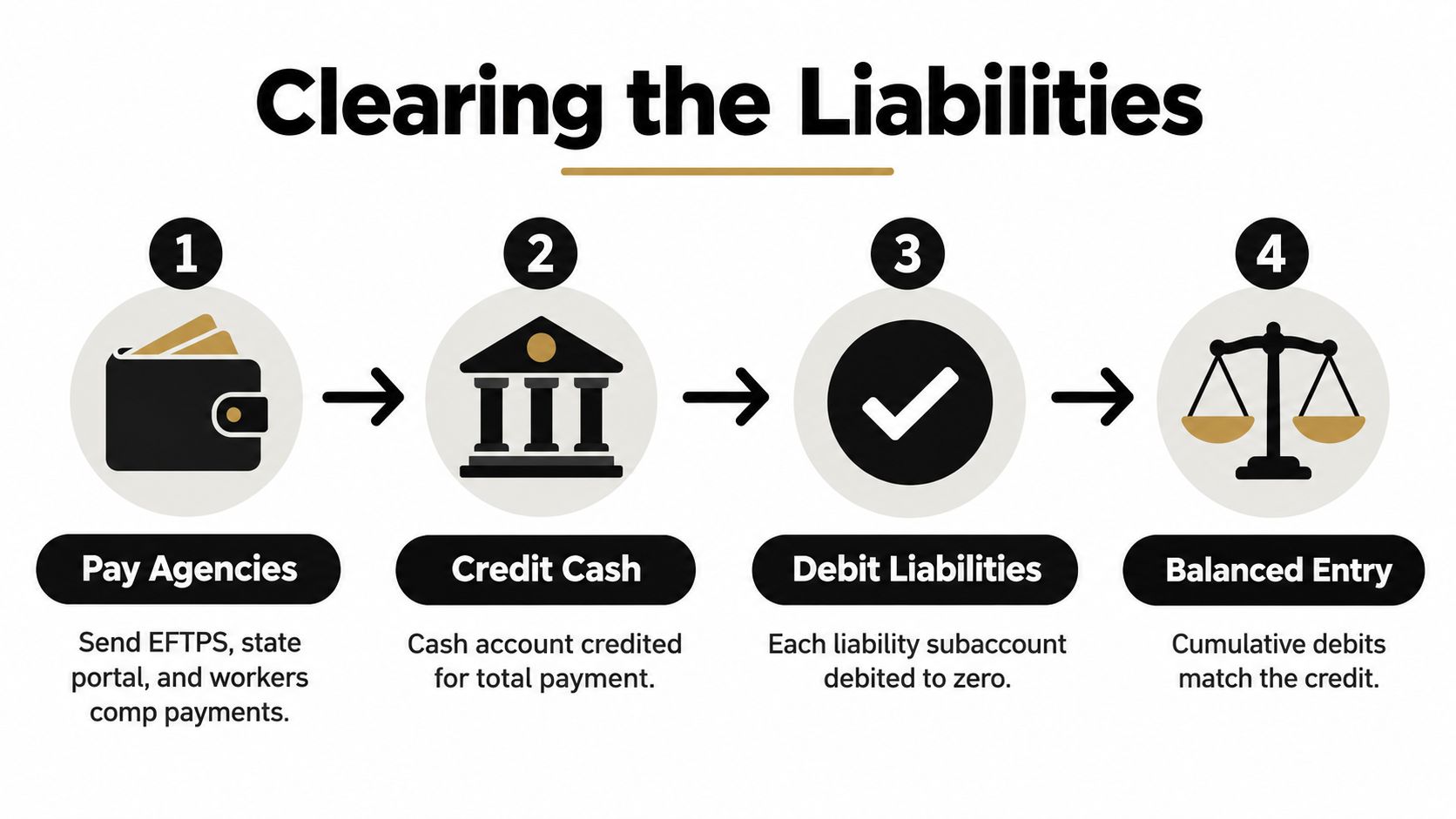
The payment entry settles liabilities already recorded. It doesn't create a new payroll expense merely because cash leaves the bank. Debit each liability account being paid, then credit Cash for the total remittance.
| Account | Debit | Credit |
|---|---|---|
| Federal Income Tax Withholdable | Amount remitted | |
| Employee Social Security Payable | Amount remitted | |
| Employer Social Security Payable | Amount remitted | |
| Employee Medicare Payable | Amount remitted | |
| Employer Medicare Payable | Amount remitted | |
| FUTA Payable | Amount remitted | |
| SUTA Payable | Amount remitted | |
| Cash | Total payment |
The total debit should equal the cash credit. If the agency payment covers several payroll cycles, clear the accumulated liability across those cycles rather than posting the entire payment to Payroll Tax Expense. That expense account was used when the company incurred the employer cost. Using it again at payment double-counts the expense.
Small rounding differences can appear when payroll reports, tax vouchers, and ledger postings use different calculation precision. Don't leave unexplained balances sitting in a liability account. Trace the difference to the payroll report, document the cause, and use an appropriate adjustment only after confirming that the issue isn't a missing or duplicated payment.
The payroll tax deposit schedule resource helps organize the timing side of the process. The accounting side still requires a payment confirmation, the correct liability accounts, and a bank transaction that agrees with the remittance.
Accrued Wages and the Reversing Entry Trick
Month-end payroll creates a timing problem when employees earn wages before the books close but receive payment afterward. If the final workdays of a period fall before a later pay date, accrual-basis accounting should recognize the earned wages and related obligations in the period when the work occurred.
The accrual entry generally looks like this:
| Account | Debit | Credit |
|---|---|---|
| Wages and Salaries Expense | Wages earned but unpaid | |
| Employer Payroll Tax Expense | Employer taxes earned but unpaid | |
| Wages Payable | Net wages owed | |
| Employee Withholding Liabilities | Withholdings associated with accrued wages | |
| Employer Tax Payables | Employer taxes owed |
The entry doesn't credit Cash because no payroll payment has occurred yet. It records the expense and liability so the financial statements don't understate labor costs at period-end.
Reverse before the next payroll cycle
A reversing entry flips the accrual on the first day of the next accounting period. It debits the accrued liability accounts and credits the related expense accounts. When the normal payroll entry posts later, it records the full payroll transaction without leaving the prior-period accrual stranded in the ledger.
| Timing | Debit | Credit |
|---|---|---|
| Period-end accrual | Wage and employer tax expenses | Wages and tax liabilities |
| First day of next period | Accrued liabilities | Wage and employer tax expenses |
| Normal payroll processing | Wages and employer tax expenses, as applicable | Payroll liabilities and net pay |
Set the reversing entry to automatic when your accounting system supports it. Then attach the payroll register, accrual calculation, and later payroll report to the close file. That documentation shows why the liability appeared, why it reversed, and how the subsequent payroll cleared the timing issue.

Sample Entries for Bonuses Benefits and Garnishments
The core payroll pattern stays recognizable, but special payments and deductions require careful account mapping. A bonus increases compensation expense. A benefit deduction creates a payable. A garnishment creates a legal remittance obligation. A contractor payment follows a different accounting path altogether.
| Scenario | Debit Account | Credit Account | Tax Treatment |
|---|---|---|---|
| Employee bonus | Bonus or Salaries Expense | Withholding liabilities and Payroll Clearing | Apply the current supplemental wage and payroll tax rules |
| Employee health deduction | Payroll or Benefits Payable structure | Employee Benefits Payable | Follow the plan's pre-tax or post-tax treatment |
| Employer health contribution | Employee Benefits Expense | Benefits Payable | Record the employer portion separately from employee deductions |
| Employee retirement contribution | Wages or payroll clearing structure | 401(k) Payable | Hold until remitted to the retirement provider |
| Child support garnishment | Wages Expense for gross earnings | Garnishment Payable and net pay liability | Remit under the applicable order |
| Independent contractor payment | Contract Labor Expense | Accounts Payable or Cash | Don't process as employee payroll |
A bonus belongs in compensation expense at the gross amount. The withholding treatment depends on current federal and state rules, the employee's circumstances, and the payroll provider's configuration. Don't hard-code a bonus percentage into a manual journal entry without confirming the applicable calculation.
Employee benefits need two separate questions. What did the employee contribute, and what did the employer contribute? The employee deduction credits a benefits payable account. The employer contribution debits benefits expense and credits the corresponding payable.
Garnishments deserve the same discipline. The employee's gross wages remain gross wages. The ordered amount is credited to Garnishment Payable, and the employee receives the reduced net amount. A 1099 contractor doesn't belong in this workflow. Record the contractor cost as contract labor and settle it through accounts payable or cash, subject to the applicable information-reporting and classification requirements.
How These Entries Map Inside QuickBooks
QuickBooks can automate payroll postings, but automation only works when the payroll items point to the right accounts. A wrong mapping produces a perfectly balanced wrong entry, which is more dangerous than an obvious error because it can survive a casual review.
QuickBooks Desktop
In QuickBooks Desktop, review the Employees menu and open the Employee Center for employee and payroll details. Use Payroll Setup to inspect chart-of-accounts mappings, then review the Enter Payroll Checks area when working with payroll records and manual adjustments.
The payroll process should split gross wages, employee withholdings, employer taxes, and net pay into the accounts established in the chart of accounts. A third-party payroll provider may require a journal entry imported from its payroll journal report. Don't book the provider's total cash withdrawal as wages expense.
QuickBooks Online
QuickBooks Online creates payroll-related entries through the payroll workflow when payroll is processed. Review the mapping under Settings, then Payroll Settings, and confirm that employee tax payables, employer tax expense, state liabilities, benefits, and retirement accounts point to the intended ledger accounts.
Use Company, Make General Journal Entries for legitimate manual adjustments, accruals, and corrections. Keep the payroll register and explanation attached to the entry. The Reconcile function should resolve the cash activity without leaving unexplained payroll differences.
Use QuickBooks Online setup support when the file needs account mapping, payroll configuration, or cleanup before the next filing. The screen matters because it identifies where the posting originated. A journal entry without a source report is just a number with excellent confidence.
2026 Tax Law Changes That Change Your Payroll Entries
A wrong wage-base setting does more than misstate one payroll entry. It creates mismatched liability reports, distorts the employer tax expense, and can lead to missed filings or an IRS letter. For 2026, the Social Security wage base is $184,500. The Social Security rate remains 6.2% for both the employer and employee, while Medicare remains 1.45% for each side with no wage base limit. Use the IRS payroll tax guidance in Publication 15 to review the employer matching entry.
After an employee reaches the applicable Social Security wage base, additional wages no longer create Social Security withholding or the matching employer Social Security expense. Medicare continues under its separate rule. Confirm that distinction in both the payroll calculation and liability reconciliation.
Year-end reporting also changed. The IRS says the 2026 W-2 instructions add reporting codes for qualified overtime, cash tips, and certain employer Trump Account contributions. Qualified overtime uses Code TT in Box 12, cash tips use Code TP, and certain related details appear in Box 14b, as described in the IRS payroll professionals update.
In QuickBooks, review these settings under Payroll Settings before processing the first affected payroll. A fractional CFO can verify the entry, the liability report, and the filing data before a configuration error becomes an expensive cleanup.
Why a Fractional CFO Is the Compliance Layer Most Small Businesses Miss
A payroll run can look correct on payday and still leave the books exposed. The true test is whether the register, journal entries, tax liabilities, and filed returns agree before an IRS letter arrives.
A fractional CFO supplies senior review without the cost of a full-time controller. Have that reviewer inspect the payroll register in QuickBooks under Payroll > Payroll taxes, then confirm the related accounts in Accounting > Chart of accounts. The review should cover:
- Monthly payroll close: Compare the register with the general ledger, bank activity, and liability balances. This catches postings that make payroll reports and financial statements disagree.
- Quarterly tax reconciliation: Tie payroll liabilities to filed federal and state forms before a tax agency finds the mismatch.
- Year-end reporting review: Cross-check W-2 and 1099 data against payroll and expense ledgers, reducing avoidable correction work.
- Process documentation: Write a standard procedure that a new bookkeeper can follow without recreating your payroll process from scratch.
The Mordor Intelligence's payroll services market analysis cites the global payroll services market at USD 35.32 billion in 2026. The risk is not software spend. It is an unreviewed posting that creates an IRS notice, lender question, or year-end adjustment.
A fractional CFO reviews the register-to-ledger tie-out before filing, tests whether liabilities clear correctly, and challenges unexplained balances. That person becomes the compliance layer small businesses often skip, especially when payroll software makes an incorrect entry look official.
Monthly Payroll Reconciliation Checklist
Run the reconciliation every month, even if payroll is processed automatically. Automation reduces keystrokes. It doesn't confirm that the employee register agrees with the books.
Close the payroll cycle
- Pull the payroll register: Confirm gross wages, employee deductions, employer taxes, net pay, pay dates, and department or job-costing details.
- Tie gross wages to the ledger: The register's gross wages should agree with the debit to Wages and Salaries Expense.
- Review employee liabilities: Match federal, state, Social Security, Medicare, benefits, retirement, and garnishment credits to the payroll report.
- Review employer costs: Compare employer payroll tax and benefit expenses with the employer-cost section of the register.
- Confirm net pay: The Payroll Clearing or Wages Payable credit should agree with the amount employees received.
- Clear paid liabilities: Match tax deposits and benefit payments to the liability accounts they reduce.
- Investigate old balances: A liability that remains after payment may indicate a missing payment, duplicate posting, wrong account, or timing difference.
Finish with a three-way check between cleared bank transactions, filed payroll forms, and general-ledger liabilities. Save the reconciliation with the payroll register, payment confirmations, and filing copies in the monthly close folder.
A clean reconciliation should answer three questions without guesswork: what employees earned, what the company owes, and what the company already paid.
Quick Reference Card and How to Get Help
Keep this card beside the payroll workstation. The patterns repeat, but consistency matters more than cleverness.
| Entry Pattern | Debit Accounts | Credit Accounts | QuickBooks Screen |
|---|---|---|---|
| Gross wages with withholdings | Wages and Salaries Expense | Employee tax, benefit, retirement, and net pay liabilities | Process Payroll or Create Paychecks |
| Employer payroll tax | Employer Payroll Tax Expense | Employer Social Security, Medicare, FUTA, and SUTA Payable | Payroll Setup and payroll tax report |
| Tax payment clearing | Each liability being remitted | Cash | Banking, payroll tax payment, or journal entry |
| Accrued wages | Wage and employer tax expenses | Accrued wages and payroll liabilities | Make General Journal Entries |
| Reversing accrual | Accrued liabilities | Wage and employer tax expenses | Recurring or scheduled journal entry |
| Bonus or benefit allocation | Bonus, wages, or benefits expense | Withholding and benefits liabilities | Payroll item setup or journal entry |
| Garnishment | Wage expense remains gross | Garnishment Payable and net pay liability | Payroll deduction item |
| Contractor payment | Contract Labor Expense | Accounts Payable or Cash | Bill, expense, or check |
A fractional CFO engagement should include a monthly payroll close review, quarterly tax-payment reconciliation, year-end W-2 and 1099 cross-check, and documented handling for garnishments, retirement matches, benefits, and multi-state wages. The onboarding process should begin with a review of the chart of accounts, payroll provider reports, QuickBooks mappings, recent filings, and outstanding liability balances.
Bookkeeping and Accounting of Florida Inc. offers bookkeeping, payroll accounting, tax preparation, QuickBooks support, and fractional CFO guidance for businesses that need accurate postings and a knowledgeable compliance review. Visit Bookkeeping and Accounting of Florida Inc. to request the one-page intake form and start a conversation about cleaning up your payroll accounting entries.